Launching an online course is just an easy part. The complexity begins with how to convert this knowledge into a continuous revenue stream. Everyone can make a course, but cannot sell it. A blend of marketing psychology and solid technical setup is compulsory. To stand out in this competitive market, you will need to do some basic settings and LearnDash platform optimization to convert visitors into course subscribers.
This guide will be a detailed walkthrough for you, we will discuss real-time, true and expert methods to convert yourLearnDash WordPress website into a top-notchE-learning Ecosystem. We will cover everything from advanced Add-on Integration to course builder. By doing this, you can grow academically. Whether you are creating your first course sales funnel or need to optimise your existing one. Must read the below-mentioned tips will help boost student enrollments and make sure you increase revenue with ease.
What is LearnDash?
LearnDash is a very useful WordPress LMS plugin that turns a basic website into a high-profile learning management platform. You can consider it as your courses’ “engine.” It includes a robust Course Builder that allows you to drag-and-drop all of your lessons, topics and quizzes into place. And there is no technical or coding skills required to do this.
It is not only a video tutorial platform, but you may also say it is a complete E-learning Ecosystem. From listing student Progress to generating a Certificate upon completion of work, it takes care of everything. The LearnDash WordPress plugin can make learning simple for students and make running the online school seamless for you.
Make a Strong foundation: installation Steps.
The most crucial step of setting up the LearnDash tutorial is getting a strong foundation. LearnDash LMS plugin offers the design and features that are perfect for quickly configuring your online presence.
Start installation:
Upload Plugin to your WordPress Site From your dashboard. Go to Plugins, then press Add New and upload the LearnDash ZIP file you purchased. Then, activate the LearnDash plugin. After that enter the license key to unlock all your premium features. This will includes all technical updates that ensures that your site will remain secure.
Like this see here,

has a friendly setup wizard you can use to get started easily. This takes you through the basic configurations you need to do, like setting up your currency, selecting your payment gateway (Stripe or PayPal for example). Then, define how your courses will be structured. Follow the wizard to ensure that your E-learning course foundation is worthy from scratch, so you have time to build content instead of fixing settings.
The Drag and Drop Customization:
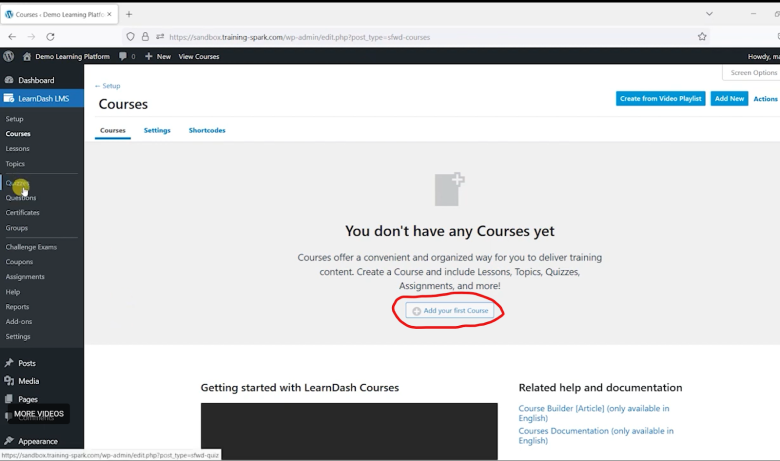
Another feature that should be noted is the visual Course Builder. To access it, go to the course using LearnDash LMS, then select Courses. Select one course and click the Builder Tab. You can position your curriculum for the entire course on one screen. In comparison with other LMS platforms this is a game changer.
Plan the perfect stream of lessons. Add topics and quizzes for your students by simply dragging and dropping. This makes your students Progress Tracking simple, and your online learning spot seems professional and up to date.
Here you can see the course add option and in the left side bar you can add quizzes too.
Drip-Feed Settings
To set up drip-feeding, go to Edit Lesson, click on the Settings Tab, and under Lesson Access settings. Here, you decide what time your students see their content. You can configure it to become available either X number of days after they enroll or on a specific calendar date. Besides, this simple setup prevents your students from being overwhelmed and ensures that they follow your course with the perfect pacing.
Setting up your payment
First things first, though to start selling your courses, you need a way to get paid. These options are under LearnDash LMS > Settings > Payments. To make this very easy, LearnDash has built-in support for popular gateways such as PayPal and Stripe.
Just hit the “Connect” button to join your account. Once you do this, manage yourLearnDash pricingand start accepting enrollments within minutes. This final step serves as the backbone of your sales strategy, allowing you to monetize the content you’ve developed into a polished and eventually lucrative business.

Tracking report panel
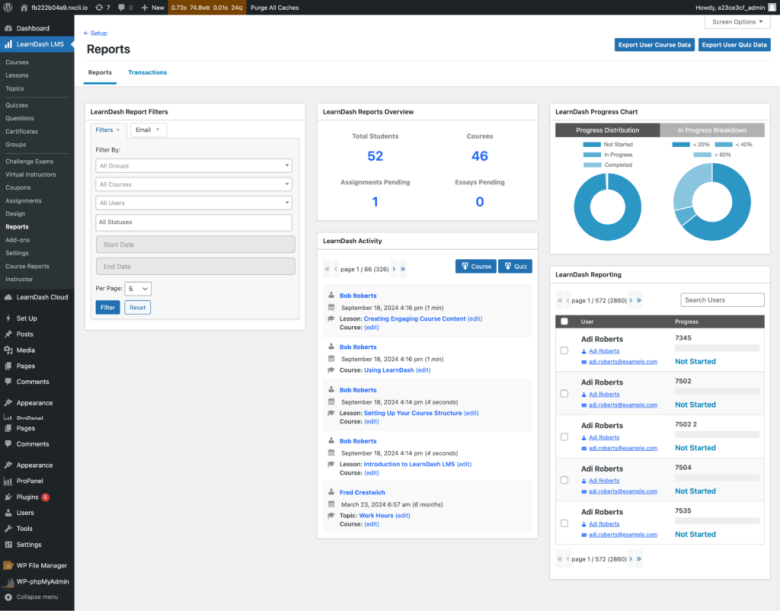
Since data is always at your fingertips to build a high-quality E-learning Ecosystem. You can find these insights under LearnDash LMS > Reports, as the ProPanel gives you an overview of your academy’s performance.
This area is ideal for User Progress Tracking, since it contains real-time graphs and charts that show exactly how many students are active or stuck at what part of the specific lesson. Looking at these visual reports, you’ll easily know what subjects are doing well and where the learner needs assistance with so that your content is effective and your learners/students remain happy.
LearnDash prices and Bundles.
Instead of using other LMS LearnDash plugin stands out among all in this. LMS platforms usually charge a high on a monthly basis. LearnDash offers one time licnese model that can be upgraded as per your needs. You can easily create tiered pricing on “Basic” and “Pro” packages or increase your revenue by bundling courses, such as a “Buy 1 Get 1”. The value of this method is rightly a professional’sLearnDash review. LearnDash offers transparent pricing with no hidden charges. You can check at here:
https://www.LearnDash.com/blog/online-course-pricing-subscription-vs-one-time
Prices may vary as per add on integration.
Automate students’ progress.
If you want to scale your online learning platform than ever before, stopping manual management and implement automation. Enter strategically integated Add-ons that can revolutionize your E-learning platform. Seamless, personalised journeys for every student with no effort. Using powerful tools like Uncanny Automator or a CRM like Mailchimp directly in LearnDash.
Think about sending a “Welcome” email right after a student enrolls, an offer specifically aimed to follow once they finish a specific lesson, or instantly revoking access if a subscription payment fails. The best part is that automation helps save your hours on admin tasks and leads to a much better student retention rate.

Conclusion:
Let’s recall what we have learnt:
- How to turn your conventional WordPress site into a high-revenue E-learning Ecosystem with LearnDash in this definitive guide.
- Guided by a comprehensive LearnDash tutorial where we covered everything from installing and activating the license to setting up automated workflows. I have attached real-time images from the easy to use drag and drop Course Builder, tailored Drip-Feed Settings, and tight payment gateway configurations to provide a functional hands-on example.
- I show you the data, like the ProPanel for User Progress Tracking & looking at LearnDash pricing strategies.
- You are now ready to implement this technical strategy alongside a marketing plan that can grow your online academy.
You can check more at the official LearnDash website:


 Noor Mustafa Raza
 Muhammad Saqib