

Increasing interactivity on your blog leads to more subscribers and increased traffic plus help your visitors get to know you more to build up a relationship of trust. Trust means a lot in blogging and can help determine if you will earn good money on your blog or not. This can be done with a […]
How To Change Email Address in WordPress Database
So you have neglected your old self-hosted WordPress blog and now you want to dust it off and start blogging once again. But you have forgotten the username and password and the email address associated with the blog is no longer active. So when you try the ‘Lost Your Password’ link on the WordPress login […]
How To Change The Date Of A WordPress Post
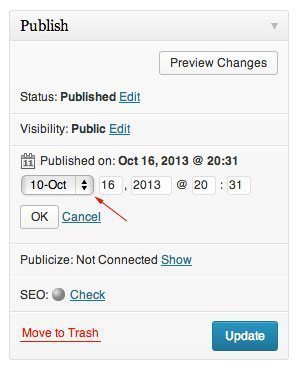
If there is ever an occasion that you want to change the date of a WordPress post there is an easy way to change the timestamp of a WordPress post. From within the WordPress dashboard, click All Posts to open the posts and then the title of the post to edit. After you open the […]
Installing WordPress Multiple Times On The Same Site

Installing WordPress multiple times on the same site is real easy. There may be times you want to have two different installs of WordPress on one domain. You can install WordPress on the root of your domain, on a subdomain or in a subdirectory or on all of the above. These, however, will function as […]
Blogging To The Lowest Common Denominator

The saying goes “there are no stupid questions” OK if there are no stupid questions then what about the questions asked by stupid people? What are those supposed to be? And how do these people actually grow into adulthood without sticking themselves in the eye with a knife because nobody told them otherwise? If you […]
How To Add Stationary Content To WordPress Front Page

Adding static or stationary content to the front page of your blog can be done two different ways. One is to use the static front page option. Another is to just add your text or HTML code to the index file. This WordPress guide will address the latter. First, your themes files permissions will need […]