Make your best pages easier to find, easier to understand, and worth visiting. Start with the problem in front of you, then use the checks below to turn a setting change into a verified improvement.
For a new site, establish one public domain, readable URLs, crawlable navigation, and one SEO configuration. For an existing site, diagnose before changing URLs. Preserve pages that already serve a distinct need; consolidate only where the replacement genuinely covers the old topic.
What WordPress SEO actually involves
WordPress gives you a publishing system. SEO is the work of making that system deliver useful pages that search engines can discover and understand. A plugin can print a title tag; it cannot decide whether your article deserves a reader’s time. A faster server can help a page respond; it cannot make a vague answer specific.
Work in four layers: the reader’s question, the page that answers it, the technical delivery of that page, and the evidence that it is working. Keep those layers connected. An impressive keyword report is little use when a staging noindex flag survives launch or when the public frontend never receives the description saved in WordPress.
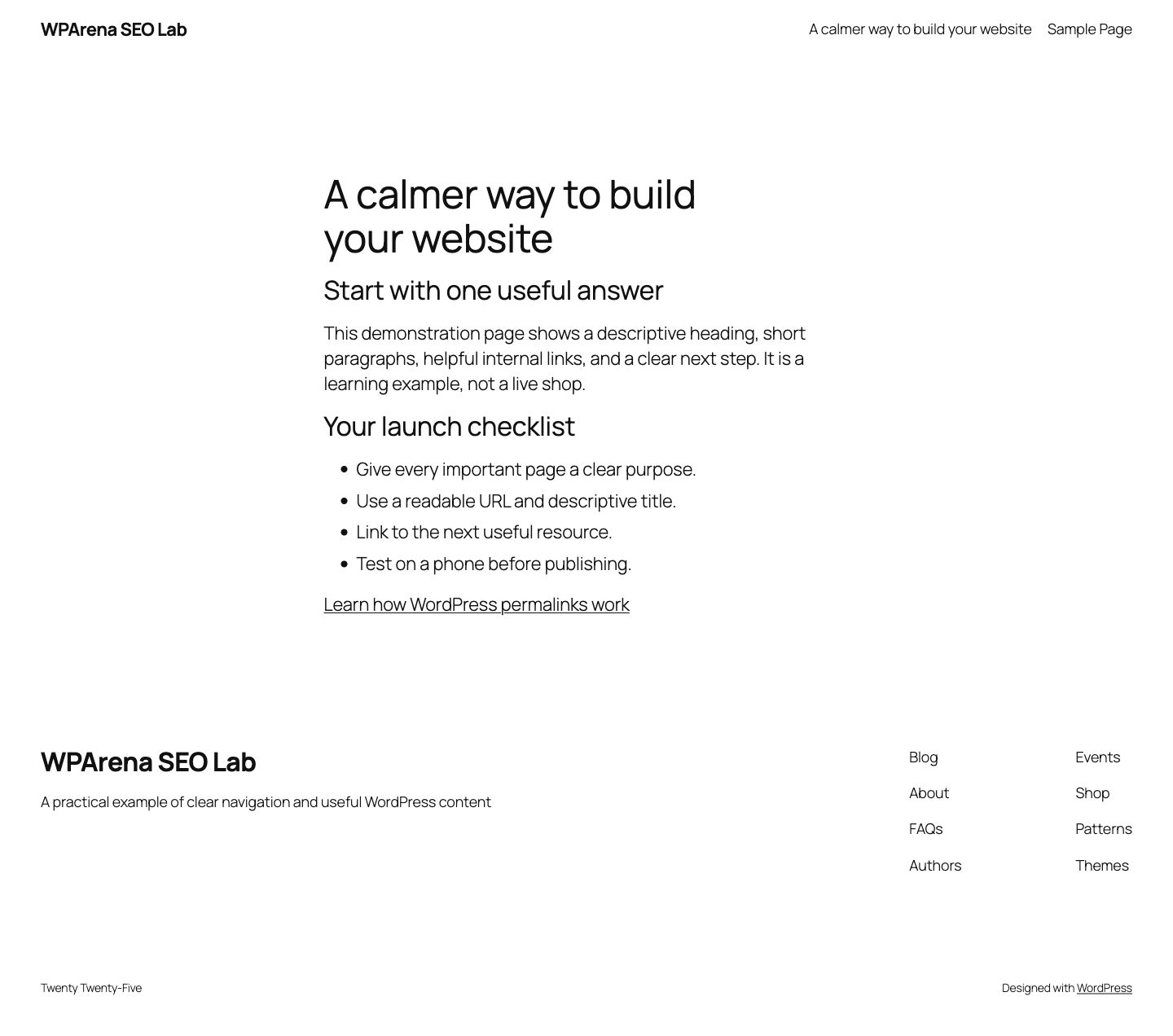
This guide uses practical WordPress examples and WPArena’s own publishing experience. Jazib Zaman uses WordPress products in his work; product-specific observations are distinguished from vendor documentation. The demonstration screenshots were captured on a temporary WordPress multisite subsite on September 19, 2026. They illustrate page structure, not ranking results.
Read Google’s SEO Starter Guide alongside this workflow. Eligibility, indexing, and ranking are separate outcomes. None is guaranteed by completing a checklist.
Start with a baseline, not a plugin shopping list
Before changing the site, record which URLs matter. Include revenue pages, lead forms, popular tutorials, pages with external links, and content whose traffic recently changed. Export the URL list, titles, canonical URLs, status codes, and index directives. Keep a dated copy of Search Console performance data and your conversion definitions.
Then sample each template: homepage, article, category, product, author archive, pagination, and a page that does not exist. Open them signed out. A template problem often affects hundreds of URLs; repairing those templates should come before rewriting hundreds of descriptions.
| Question | Evidence to collect | First action |
|---|---|---|
| Can the page be reached? | HTTP status and redirect destination | Fix broken routes, loops, or accidental access blocks. |
| Can it be indexed? | Robots directives, canonical, Search Console inspection | Remove unintended exclusions on the intended public page. |
| Does it answer the query? | Actual search results and the page’s main content | Improve the answer, examples, and scope. |
| Does it help the business? | Qualified leads, orders, subscriptions, or another defined action | Improve the next step and measurement. |
Make a recoverable backup before bulk changes. Record the owner, expected result, and rollback for each technical change. Update a representative sample first, inspect it, and only then roll the change out to every template.
Choose topics by intent and assign one clear purpose
Build your topic list from customer questions, support tickets, site search, sales conversations, and Search Console queries. Keyword tools help estimate demand and discover vocabulary, but their numbers are estimates. A small, highly relevant query can be more valuable than a large unrelated one.
For each topic, write a one-sentence promise. “Help a beginner restore a broken WordPress site from yesterday’s backup” is more useful than “target backup keywords.” Check the search results to understand whether people expect a tutorial, comparison, product page, local service, or quick definition. Do not force all those intents into an identical article template.
| Example query | Likely need | Useful page format |
|---|---|---|
| WordPress backup plugins | Choose a tool | Comparison with constraints and restore guidance |
| Restore WordPress database | Perform a task | Step-by-step procedure with safeguards |
| WordPress hosting renewal price | Evaluate total cost | Current terms and a cost worksheet |
| WordPress noindex error | Diagnose a failure | Decision tree with observable checks |
Map closely related questions to one maintained page when a reader would reasonably expect them together. Keep distinct tasks separate when combining them would bury the answer. Give every planned page a primary reader, supporting questions, examples to produce, and a meaningful next link. Avoid creating near-identical pages by swapping a city, year, or adjective.
When two existing articles compete for the same task, compare their useful material, links, and traffic before selecting the surviving URL. Length is not the deciding factor. A compact page with a precise answer can be the better destination.
Build navigation that explains the site
Your navigation should make important resources findable without a search box. Organize a small set of topics around actual reader needs: start a site, choose hosting, improve search visibility, protect the site, or build a store. Each hub should explain its subject and link to useful supporting guides.
Categories group content; tags describe recurring details. Neither should become a dumping ground for keyword variations. Before indexing an archive, ask whether it offers a useful browsing experience, a clear heading, and enough relevant articles. Thin archives with one duplicate entry rarely deserve prominent navigation.
- Use stable category names that readers understand.
- Link important guides from relevant hubs and related articles.
- Keep paginated archive pages reachable through ordinary links.
- Review orphaned pages when publishing or consolidating content.
- Use breadcrumbs that match the visible hierarchy.
A human-readable sitemap page can help visitors browse a large site. It serves a different purpose from an XML sitemap for crawlers. Neither replaces useful navigation. If your only link to an important tutorial is buried in XML, improve the reader-facing path to it.
Set the WordPress foundations carefully
On a conventional WordPress site, inspect Settings → Reading and confirm the search-engine visibility choice fits the site’s purpose. A live editorial site generally should not discourage indexing. A temporary demo or staging site should remain excluded and, when private data is present, protected by authentication as well.
Choose a preferred HTTPS domain and check that its other forms resolve consistently. Confirm the WordPress address and site address only after understanding the hosting setup. In a headless installation, the CMS address and public site address can intentionally differ; blindly making them identical can break authentication or previews.
For a new site, a readable post-name URL is a sensible starting point. For an established site, do not change the permalink structure simply to make it look newer. Export existing URLs and build tested redirects before any structural change. Our WordPress permalink guide covers the detailed choices.
Check the timezone used for publishing and scheduling. Keep author profiles useful, remove unused demonstration pages, and make sure your title and tagline describe the actual site. These housekeeping tasks prevent confusing output; they are not secret ranking switches.
Choose one SEO plugin and verify what it outputs
Choose a plugin around the work you need: titles and descriptions, canonical URLs, index controls, XML sitemaps, structured data, redirects, and editor support. Compare the exact edition rather than assuming the free and paid versions have the same features. Avoid running competing plugins that print duplicate metadata.
| Option | Where to evaluate it | Questions before adopting |
|---|---|---|
| Yoast SEO | Official directory | Does its editor workflow fit your team? Which schema and redirect features require another tier? |
| Rank Math | Official directory | Which modules do you need? Can the public frontend consume their output? |
| The SEO Framework | Official directory | Does the available configuration cover your content types and extensions? |
| SEOPress | Official directory | Which integration, schema, and migration features are in your chosen edition? |
| WP Meta SEO (withdrawn) | No longer listed — removed from the plugin directory in June 2026 | Not a current option; if you still run it, plan a migration to one of the maintained plugins above. |
Before switching plugins, export settings and metadata. Test title templates, noindex controls, canonical URLs, redirects, and sitemap addresses on staging. After switching, inspect the public HTML on several content types. A green editor score is not proof that those values reached the live page.
Use the plugin’s recommendations as editing prompts. Do not add awkward keywords, repeat phrases, or lengthen a useful answer just to satisfy a score. The same caution applies to automated internal-link suggestions: read the destination and the surrounding sentence before accepting a link.
Write titles, descriptions, and headings for the actual page
A title should identify the subject and the reason to choose the result. Lead with the distinguishing task, not a list of variants. “Restore a WordPress Backup Without Losing New Orders” is clearer than “Best Ultimate WordPress Backup Restore SEO Guide.” Avoid years in titles unless the content truly depends on the current year and you can maintain it.
Google may generate a different title link from page content and other signals. Keep the title tag, prominent heading, and article scope aligned. Review Google’s title-link guidance; there is no fixed character count that guarantees how a title will appear on every device.
Write a description that explains the answer, audience, and useful detail. Google may use a relevant passage instead of your supplied description. Treat it as a concise page summary rather than a direct ranking lever. See the snippet documentation.
A useful title-and-description pair
Title: WordPress Backup Plugins: Choose, Schedule & Test a Restore
Description: Compare backup approaches, set a schedule around acceptable data loss, keep an off-site copy, and verify recovery before an incident.
Use headings to outline the answer. Give the page a clear main heading, then descriptive sections and subsections. Do not choose a heading level just to obtain a font size. A visitor scanning the headings should understand both the problem and the route to solving it.
Publish evidence, examples, and useful decisions
The strongest tutorial answers the questions that appear during the task. Where is the setting? What should the reader see afterward? What can go wrong? How can they reverse the change? These details often matter more than adding another broad definition.
For reviews, state what was used, which edition and environment were involved, and what was actually observed. Separate a personal impression from a repeatable result. A product’s marketing claim belongs in an attributed description, not in a fabricated test table. If a screenshot illustrates a demonstration, label it as a demonstration.
- Give the reader a useful answer near the top.
- Use original examples with realistic constraints.
- Explain who should choose a different approach.
- Link primary documentation for settings that change.
- Keep published and updated dates visible and truthful.
- Credit the responsible author or editorial team.
Content tools can help with planning and editing. They do not replace subject knowledge, verification, or editorial responsibility. Do not spin another article or publish hundreds of near-identical answers. For financial, health, or other consequential subjects, qualified review and precise sourcing are especially important.
Build an editorial workflow that prevents duplicate articles
Before adding a post to the calendar, record the reader’s question, the existing page that should answer it, the evidence needed, an owner, and a review date. If an existing page serves the same purpose, improve it instead of assigning a competing article. Use WordPress drafts, revisions, and scheduled publishing for the basic workflow; add a calendar plugin only when your team needs shared planning or approval steps.
| Job | Useful tool or feature | Acceptance check |
|---|---|---|
| Plan and review | Editorial calendar, drafts and revisions | One owner and one intended URL per reader task |
| Control search metadata | One maintained SEO plugin | Public title, canonical and robots match the plan |
| Deliver pages efficiently | Host or frontend cache, with a plugin where appropriate | Updated public content appears; private sessions remain private |
| Illustrate the explanation | Original screenshots or properly licensed media | Readable image, recorded source and permitted use |
A plugin score is an editing prompt, not a Google score. Caching does not repair an inaccessible mobile layout, and AMP is not a prerequisite for WordPress SEO. On a headless site, a WordPress cache plugin may not control the visitor-facing HTML cache at all. Confirm which layer owns each job before installing another tool.
Build internal links with a reason to click
Link where a reader needs more detail or the next task. In a backup article, a link to migration instructions belongs beside the discussion of moving a restore to another host. It does not need to appear in every paragraph. Use descriptive anchor text that accurately names the destination.
Ordinary HTML links with an href are the safest baseline for discovery. Buttons that depend on JavaScript alone can be harder to crawl. Google’s link guidance explains the supported pattern.
When publishing a new guide, search your own relevant articles for natural places to link to it. When merging articles, update those links to the final destination. A working redirect is valuable for older external links, but your own navigation should not keep sending readers through avoidable hops.
A simple link ledger can hold the source URL, destination, anchor, reason, and last check. Review broken links in context. A temporary timeout is not proof that a resource has disappeared. If a source is gone, replace it with a source that supports the same claim or remove the unsupported claim.
Make images helpful, accessible, and efficient
Use a meaningful featured image for every article. It should communicate the subject at a glance and remain legible when cropped for a card. A tutorial also benefits from screenshots at decision points, diagrams for relationships, and tables for comparisons. Avoid decorative screenshots that add weight without explaining anything.
Write alt text for the image’s purpose. Describe the relevant setting or result instead of repeating the target keyword. Use empty alt text for purely decorative images. Keep important instructions in selectable text beside the image so readers do not have to decode a tiny screenshot.
Export at a size appropriate for the layout, compress carefully, and supply dimensions to reserve space. Use responsive variants where your image pipeline supports them. Lazy-load below-the-fold illustrations, but let the main visible image load promptly. Follow Google’s image guidance for crawlability and supporting context.
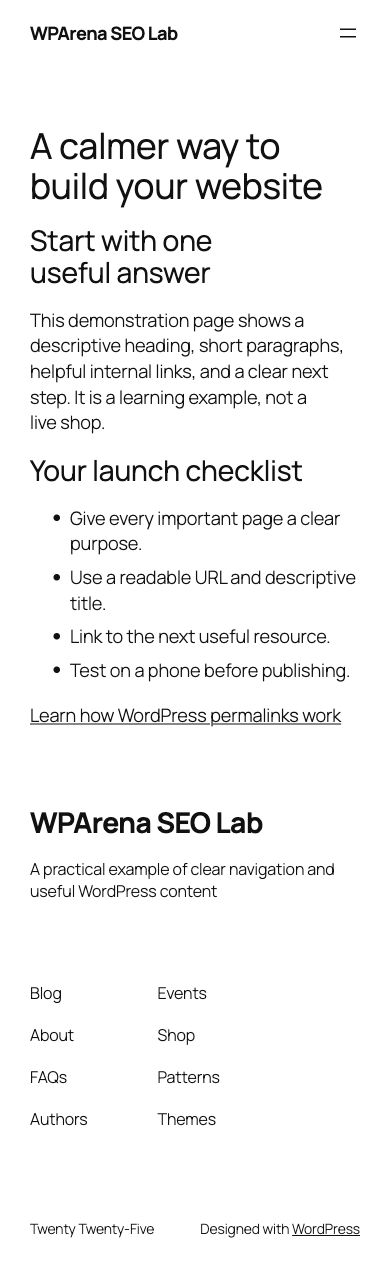
Before publishing a screenshot, inspect it at the width at which it will actually appear. Check that labels are complete, dialogs do not obscure the task, and account details are absent. Prefer a complete narrow view over a desktop image squeezed until the words become unreadable.
Keep a media rights record alongside your editorial notes: creator, original source, license, permitted uses, and any attribution requirement. A free download is not automatically public domain. Check the license attached to the specific asset and whether recognizable people, trademarks, or property create additional usage restrictions. Prefer your own demonstration screenshots when the reader needs to see an actual WordPress setting.
Separate crawling, indexing, and canonical selection
These are different decisions. A crawler needs access to fetch a URL. An index directive can tell a search engine not to index the fetched page. A canonical indicates the preferred representative of substantially duplicate content. Confusing the three is a common cause of contradictory configuration.
| Control | What it does | Common mistake |
|---|---|---|
| robots.txt | Controls crawler access to matching paths | Blocking a URL and expecting Google to read its noindex tag |
| noindex | Requests exclusion from indexing when the directive can be read | Leaving a staging directive on a public guide |
| rel=canonical | Signals a preferred duplicate URL | Pointing a useful unique article to an unrelated hub |
| 301 redirect | Permanently moves visitors and crawlers | Sending every missing page to the homepage |
| Authentication | Restricts access to private material | Treating robots.txt as a privacy barrier |
Use robots.txt for crawl controls and noindex for index exclusions. Protect private content separately. Inspect both the HTTP headers and HTML; an X-Robots-Tag header can override what you expected from a plugin screen.
Choose a canonical URL that resolves successfully, is indexable, and matches your internal links and sitemap. Google can select a different canonical; compare its selection in Search Console when duplicates behave unexpectedly. The canonicalization documentation explains the signals.
Keep one maintained sitemap system
Modern WordPress can produce a core XML sitemap, and SEO plugins often provide their own. Use the system that represents your actual public site. On a headless installation, a backend sitemap may list the wrong host or omit frontend-only routes. Open the XML itself and sample the URLs.
Include canonical, indexable URLs that you want discovered. Exclude redirected, trashed, private, and noindex content. Update last-modified values when the page meaningfully changes, not every time a build runs. Submit the correct sitemap in Search Console and inspect processing errors.
A sitemap is a discovery aid, not a promise that each URL will be indexed. See Google’s sitemap documentation. WPArena’s public sitemap is sitemap_index.xml. Its contents must agree with the public frontend after a merge or deployment.
Do not confuse an XML sitemap with a visual page listing. A reader-facing contents page can still be worthwhile, but it should organize the site around useful categories instead of exposing every attachment and utility URL.
Use structured data that matches visible content
Structured data describes the page; it does not make weak content authoritative. Use an appropriate type, consistent identifiers, truthful dates, visible authorship, and an accessible image. For an editorial article, Article and BreadcrumbList can describe the article and its place in the site. Product markup belongs on a genuine product offer, with accurate price and availability.
Check which layer generates schema. A theme, SEO plugin, review plugin, and headless frontend can all add overlapping entities. Inspect the final HTML for duplicate or contradictory authors, dates, ratings, and canonical identifiers.
Test eligible markup in Google’s Rich Results Test and review the structured-data introduction. Valid markup does not guarantee a rich result. Do not add ratings that readers cannot see or claim review scores without a real methodology.
FAQs can be useful even when they do not receive a special search appearance. Write questions readers actually ask. Do not duplicate the entire article into an accordion or add FAQ markup solely to occupy more space in results.
Improve the experience on real devices
Start with the slow or awkward template, not a target score. Test a representative article, archive, and product page on a phone and on a realistic connection. Inspect the main image, web fonts, third-party scripts, long JavaScript tasks, and layout shifts as the page loads.
Core Web Vitals currently assess loading, responsiveness, and visual stability through LCP, INP, and CLS. Good thresholds are LCP at or below 2.5 seconds, INP at or below 200 milliseconds, and CLS at or below 0.1, assessed at the 75th percentile. Field data describes real visits; a lab run is a diagnostic snapshot. See Google’s Core Web Vitals guidance.
- Resize the largest visible image and reserve its space.
- Remove scripts that do not support a reader task.
- Test navigation and forms while the page is still loading.
- Keep font loading predictable and avoid moving text blocks.
- Use caching appropriate to the route; exclude private sessions and checkout.
Good performance does not guarantee a particular ranking. It does reduce friction for the people already visiting. Keep the full content and functions available on mobile, including menus, tables, and forms. Our performance guide goes deeper into diagnosis.
Verify headless WordPress and multisite at the public URL
In headless WordPress, saving an SEO value in the CMS is only the first step. The API must expose it, the frontend must render it, and every cache must serve the updated response. Test the URL a visitor uses, not only the backend preview.
A headless setup splits the frontend and the WordPress backend across separate hosts, each with its own cache, which is exactly why redirect and cache verification has to happen on the public URL. A content consolidation shows the problem plainly: fresh requests already return the new guide while the CDN still holds older HTML at the canonical URL. The check that settles it is an ordinary request made after cache invalidation, confirming the expected redirect and the page schema.
- Read the saved title, status, dates, image, canonical, and robots values.
- Check API output and the public HTML.
- Revalidate the frontend page or rebuild when required.
- Clear affected CDN caches.
- Open the canonical URL signed out and test sequential navigation.
For multisite, document each subsite’s domain, index policy, sitemap, and plugin configuration. Network activation does not mean every subsite shares the right SEO settings. Domain mapping, shared media, and cross-site links require deliberate decisions. Keep temporary test sites non-indexable and remove them when their work is finished.
The multisite demo used for the screenshot in this guide was deliberately excluded from indexing. It was created for this article and removed after capture. No production content or user data was used in the demonstration.
Handle ecommerce categories, filters and product pages
Stores need a clear path from category to product, accurate stock and price information, useful product descriptions, and crawlable links. Decide which filtered pages serve a real search need before allowing every sort and filter combination into the index. Keep out-of-stock and discontinued-product decisions tied to availability and replacement relevance.
Do not replace useful product detail with manufacturer copy alone. Add measurements, compatibility, delivery constraints, returns information, and original photos where available. For a broader store workflow, use our WordPress ecommerce guide.
Decide which URLs deserve discovery
A useful category can answer a buying need that individual products cannot: explain compatibility, selection criteria, and meaningful differences. A sort order or a temporary filter combination usually needs a different crawl and indexing policy. Test the policy against real URLs before applying it to an entire store. Do not block a URL in robots.txt if your immediate goal requires Google to read a new noindex directive on that page.
For an unavailable product, distinguish a temporary stock gap from permanent removal. Retain useful information when stock will return. A genuinely equivalent replacement can justify a permanent redirect; an unrelated category is not automatically an appropriate destination. Remove discontinued URLs from the sitemap once they no longer represent indexable pages.
Help the right local customers find your business
Start with the service and the customer’s need. A repair shop needs to explain which devices it repairs, where it operates, how appointments work, and how customers can contact it. A generic article about the importance of marketing will not answer those questions. Build useful service pages around actual work, supported by accurate contact details and examples you have permission to share.
Where the business is eligible, maintain a verified Google Business Profile with accurate category, hours, location or service area, and contact information. Google describes local results in terms of relevance, distance, and prominence; there is no setting that makes a business the nearest result everywhere. See Google’s local ranking guidance and business representation rules.
- Use the business’s real identity. Do not add keywords to its name solely for rankings.
- Keep website and profile details accurate when opening hours or locations change.
- Explain genuine differences between locations rather than copying a page and swapping a city name.
- Make the phone number, appointment link and directions easy to use on a small screen.
- Request honest customer feedback without promising a reward for a positive rating.
Inconsistent information can confuse customers; it does not justify a blanket claim that every mismatch causes a Google penalty. Likewise, paid search is a separate acquisition channel. An advertising campaign does not purchase better organic positions.
Measure qualified visits, not just visits
Agree on an outcome before selecting keywords: a completed booking, a relevant enquiry, or an order. Review which search queries bring people to each service page, then test the contact journey yourself. Analytics can show an event firing; the business still needs to confirm that the enquiry or transaction was received. A short optional “How did you hear about us?” question can add context that attribution reports miss.
Use customer questions and service requirements to understand the audience. You do not need to guess personal characteristics to write a useful answer. Share that answer in relevant communities where it is welcome, without treating social posting or profile links as a guaranteed ranking tactic.
Set up multilingual and international WordPress SEO
Choose the markets and languages you can actually support before multiplying pages. Translation is part of localization: product availability, currencies, delivery times, returns, units, terminology and support hours also need to make sense for the reader. A language selector cannot repair an unclear international purchase process.
Choose stable URLs before translating
| Structure | Example | Operational trade-off |
|---|---|---|
| Language or regional directories | example.com/fr/ | One main domain; routing and translation mapping need maintenance |
| Subdomains | fr.example.com | Can separate delivery systems; monitor configuration on each host |
| Country domains | example.fr | Country focus with separate domain administration and possible registration requirements |
No structure guarantees higher rankings. A multilingual WordPress plugin can create language directories and translate metadata; plugins and subdirectories are not competing alternatives. Select the implementation by its actual output, supported content types, editorial workflow and compatibility with your public frontend.
Google recommends separate URLs for language versions and a way for users to switch between them. Avoid automatically sending everyone to an inferred country or language, which can frustrate visitors and prevent discovery of alternatives. See Google’s international site guidance.
Verify language pairs, not just one page
- Publish a complete, reviewed translation at a stable URL. Translate navigation and essential transaction information as well as the article body.
- Use hreflang annotations for equivalent versions, with supported language codes and optional region codes. Each set should include the page itself and reciprocal references to its alternatives.
- Keep canonical signals consistent with the intended indexable language versions. Do not point every translated page to English merely because they discuss the same subject.
- Use x-default where a fallback or language-selection page is appropriate. It is not a substitute for the actual language annotations.
- Check that linked alternatives return successful responses and remain accessible to crawlers. Repeat the check after a slug change or translation deletion.
The hreflang documentation provides supported formats and examples. On headless WordPress, verify the public HTML or sitemap that carries these annotations; backend settings alone are not proof.
Have someone competent in the language review meaning, technical terms and purchase conditions. In-house reviewers can be appropriate when qualified; there is no universal requirement to outsource every translation. Keep a review schedule so a product update does not leave contradictory information in another language. Use our ecommerce guide for the broader store setup.
Earn trust without buying a backlink pattern
Build something worth referring to: a clear recovery checklist, original measurements with a reproducible method, a helpful tool, a specialist explanation, or a documented case study. Share it where it is relevant. The reason to cite it should be the value it offers, not a domain-extension trick.
A .edu or .gov suffix does not make an irrelevant link useful. Avoid automated link building, paid links intended to pass ranking credit, fake scholarship campaigns, and excessive exchanges. Google’s spam policies cover link and scaled-content abuse.
Commercial relationships should be visible to readers. Use appropriate link attributes for paid placements and affiliate links. An editorial mention should not quietly turn into a ranking guarantee for a sponsor. Likewise, social distribution can bring readers and citations, but a share count is not a simple ranking formula.
If hiring an agency, ask for a prioritized implementation plan, examples of technical work, transparent link methods, and reports tied to business outcomes. Keep ownership of Search Console, analytics, domains, content, and credentials. Reject proposals built around guaranteed positions or an unexplained monthly backlink quota.
Treat AI search as another reason to be precise
Google’s AI features do not require a separate magic optimization file or special schema to become eligible. Its AI-features guidance points site owners back to established search fundamentals, accessible content, and helpful information.
Make explanations self-contained enough to understand: name the product and version where relevant, put caveats beside the claim, and distinguish an example from a measured result. Clear tables and concise answers help readers regardless of how they arrive.
Do not hide instructions in a page intended to manipulate automated answers. Do not claim that adding a file or repeating a phrase guarantees citations. Review actual referral and conversion evidence, recognizing that search interfaces and reporting capabilities change.
When refreshing older voice-search or “200 ranking factors” articles, keep the useful work—answering questions clearly, improving navigation, checking access—and remove speculative formulas presented as established facts. A readable answer should remain useful even when the search interface changes again.
Merge pages and redesign without losing the route to the answer
Build an old-to-new URL map before removing anything. The new page should cover the original reader’s need. Preserve a valuable established URL when it still fits. If content genuinely moves, use a permanent server-side redirect and update links, canonical references, and sitemaps to the final URL.
Follow older inbound redirect chains too. If A redirected to B and B is now merged into C, update A to point to C. Keep a backup of the original content and rules. Verify the public response after deployment; a WordPress redirect plugin may not control a separate frontend.
Google documents 301 and 308 as permanent redirects. Its site-move guidance also covers mapping, testing, and monitoring. Keep redirects long term rather than removing them immediately after a recrawl.
A genuinely missing page with no useful replacement can return 404 or 410. Do not send every error to the homepage. Give the 404 page a useful search or navigation path while retaining the correct status. A pretty page returning 200 for missing content can create a soft-404 problem.
Separate a visual redesign from unnecessary URL changes. Test metadata, mobile content, images, navigation, forms, and structured data as well as appearance. Keep a rollback point until the replacement is working and the initial monitoring period is complete.
Measure the result and diagnose changes in order
Use Search Console to understand impressions, clicks, queries, pages, and indexing. Use analytics and business systems to understand what visitors do afterward. Record form submissions, qualified leads, orders, or subscriptions consistently. A rise in low-value visits is not necessarily progress.
Compare like periods and segment by page group, device, country, and branded versus non-branded queries when the data supports it. Note releases, campaigns, seasonality, outages, and tracking changes. Average position and click-through rate need context; a change in query mix can move both without a technical failure.
| Symptom | Check first | Avoid |
|---|---|---|
| Page absent from results | Index directives, canonical selection, discovery, content quality | Repeatedly submitting the same unchanged URL |
| Clicks down, impressions stable | Query mix, title presentation, competing result features | Assuming every decline is a penalty |
| Many URLs drop together | Template changes, outages, robots, redirects, analytics | Rewriting all articles before checking infrastructure |
| Traffic stable, leads down | Forms, checkout, intent, measurement | Treating rankings as the only success measure |
Keep an annotated change log. For each improvement, record affected URLs, the reason, the deployment date, and what you will examine later. Allow time for recrawling and enough data to interpret the result. If a change fails, use the evidence to revise the hypothesis.
Our analytics setup guide covers installation. Consent and privacy choices depend on your audience and implementation; do not assume a measurement script makes every visit visible.
A repeatable monthly review
- Choose a comparable date range and note seasonality, releases and tracking changes.
- Separate branded searches from non-branded discovery and compare similar page groups.
- For a page with fewer clicks, check impressions, position, query mix and search appearance before rewriting its title.
- For a page with visits but few enquiries, inspect intent, mobile usability and the conversion path.
- Record one prioritized change, its owner, and the date to review it. Keep a rollback copy.
Do not call a change successful because the day after publication looks better. Search visibility, demand and reporting vary. Use enough observations to distinguish a plausible improvement from a short-lived fluctuation.
Diagnose common WordPress SEO problems
Start with the URL and the evidence. A sitewide plugin score cannot explain why one important page disappeared or why Google selected another canonical. Save the response headers, rendered HTML, Search Console status, and recent change history before changing settings.
| Symptom | First checks | Practical response |
|---|---|---|
| Published page is not indexed | Status code, noindex, canonical, internal links, sitemap, and URL Inspection | Remove unintended barriers and improve the page’s distinct value. Request indexing after the fix; inclusion is not guaranteed. |
| Google selected another canonical | Duplicate content, conflicting canonicals, redirect targets, and sitemap URLs | Align signals around the intended URL. Keep genuinely distinct pages useful and self-canonical. |
| Old title still appears | Public HTML title, visible heading, cached response, and last crawl | Correct conflicting titles, refresh caches, and allow recrawling. Google may generate a different title link. |
| Traffic fell after a redesign | Old URL list, redirect map, missing content, navigation, robots, and rendering | Restore missing routes or use relevant permanent redirects, then compare affected landing pages. |
| Images do not appear | Image response, robots restrictions, lazy loading, rendered src, dimensions, and surrounding content | Serve accessible images in meaningful context and verify on mobile. |
| Many tag pages compete with articles | Archive usefulness, duplicate intent, indexation, and internal links | Keep useful collections; consolidate redundant tags and decide deliberately which archives belong in search. |
| New content appears only after JavaScript runs | Initial HTML and rendered page, API errors, authentication, and cache behavior | Ensure important content and crawlable links are available reliably to users and search engines. |
Separate a measurement change from a search change
A broken analytics tag can make traffic appear to collapse while Search Console clicks remain steady. A consent change can alter recorded sessions. Compare the same dates, pages, countries, devices, and search types before deciding that rankings caused the difference. Search Console and analytics measure different things, so their totals are not expected to match.
Handle a real 404 honestly
If a page has a useful replacement, redirect it to that replacement. If it has no replacement, a helpful 404 page can offer navigation while still returning the correct 404 response. Sending every missing URL to the homepage hides the problem from visitors and can be treated as a soft 404. Fix broken internal links at their source.
Do not revive obsolete shortcuts
Old tutorials about meta keywords, blanket directory submissions, keyword density targets, or Google authorship photos should not dictate a current setup. Tags organize content; they are not a secret keyword field. AMP is an architectural decision to evaluate against the site’s needs, not a requirement to make ordinary WordPress content eligible for search.
Choose SEO tools and professional help carefully
Use a small toolkit that answers your actual questions. Search Console shows search visibility and indexing evidence. A crawler helps inspect status codes, links, titles, and directives across the site. PageSpeed Insights and browser tools help investigate performance. Your analytics and order or lead records show whether visitors complete useful actions.
Keyword and backlink tools provide estimates and discovery ideas. Their authority scores are vendor metrics, not Google’s own ranking scores. Validate a suggested opportunity by reading the search results, understanding the audience, and checking whether your site can provide something more useful than the existing answers.
Brief an SEO agency around a concrete problem
A WordPress agency should be able to explain how it will handle templates, archives, plugins, redirects, staging, access, and rollback. For headless sites, ask which team owns public metadata, route responses, caching, and deployment. A recommendation that changes WordPress without checking the public frontend is incomplete.
- Ask for an audit with reproducible examples, priorities, and proposed fixes.
- Agree on deliverables, access ownership, approval boundaries, and reporting.
- Keep control of your domain, Search Console property, analytics, and content.
- Request evidence for claimed experience, including what the agency actually changed.
- Reject guaranteed positions, hidden link networks, and reports built only around vanity scores.
A sensible first project might repair conflicting canonicals, consolidate two genuinely overlapping articles, or improve a key category’s navigation. Define the starting evidence and acceptance checks before implementation. Track useful outcomes over time, accounting for seasonality, site changes, and the delay between a fix and recrawling.
If you build SEO skills in-house, learn to inspect public output and explain the reason for a change. Tool familiarity helps, but the durable skill is connecting a reader’s question to useful content on a technically dependable page.
A practical 30-day implementation plan
Week 1: establish the facts. Inventory URLs and templates, verify analytics and Search Console access, record top pages, check robots and canonical signals, and make backups. Fix outages and accidental index exclusions before editing prose.
Week 2: repair the structure. Choose the important hubs, remove avoidable redirect chains, repair broken internal links, and make navigation coherent. Review category and tag archives. Test sitemap contents against the live site.
Week 3: improve priority content. Work on a manageable set of pages with a clear audience and business purpose. Add missing explanations, original visuals, stronger examples, and useful comparisons. Merge overlapping content only when the destination covers the old need.
Week 4: verify and measure. Check public HTML, screenshots, mobile behavior, image loading, schema, and redirects. Record the changes. Review early indexing signals and functional results, then schedule the next evaluation around the amount of data the site receives.
Repeat the cycle. A maintained small set of strong resources is easier to trust than a large library of forgotten checklists. Keep a backlog ordered by impact, confidence, and effort, and reserve time for verification after each release.
Practical checklist
- Important URLs and baseline performance recorded
- Backup and rollback instructions verified
- Public pages return the intended status
- Canonical and index directives agree
- One SEO metadata system controls each template
- Sitemap contains only intended public URLs
- Titles and headings describe the actual answer
- Images have useful context and appropriate alt text
- Internal links reach the final destination
- Mobile menus, tables, and forms work
- Structured data matches visible content
- Changes and follow-up measurement dates recorded
- Local service details and business profile accurately describe the real business.
- Language alternatives have working reciprocal annotations and appropriate canonicals.
- Each planned article has a distinct reader task, owner and evidence plan.
Common questions
Is WordPress good for SEO?
It provides a flexible publishing foundation. Results depend on useful content, accessible templates, sensible settings, and ongoing maintenance.
Which SEO plugin guarantees the best rankings?
None. Choose a maintained plugin that fits your workflow, then inspect its public output. Scores and feature counts are not ranking guarantees.
Should I merge every article about the same topic?
No. Merge overlapping answers when one destination can satisfy their readers. Keep distinct tutorials, comparisons, and specialist tasks separate when that makes navigation clearer.
Does changing the year make an article fresh?
No. Update dates when the content materially changes. Preserve the original publication date and explain meaningful changes where useful.
Do I need AMP or a special AI SEO file?
Neither is a general requirement for search eligibility. Prioritize accessible content, reliable delivery, and the relevant current search documentation.
How long does SEO take?
Technical fixes can change the page immediately, but crawling and search effects vary. Review sufficient data over time instead of promising a fixed ranking deadline.
Should every 404 redirect to the homepage?
No. Redirect to a genuinely relevant replacement when one exists. Otherwise return the appropriate missing-page status and provide helpful navigation.
Can I use the same SEO setup across a multisite network?
Use shared defaults carefully, then verify each subsite’s public domain, content types, sitemap, and index policy. Test sites and production sites often need different settings.
Can a multilingual plugin create SEO-friendly language URLs?
Yes, depending on the plugin and configuration. Check separate public language URLs, translated metadata, appropriate canonicals and hreflang output. On a headless site the frontend must render the intended configuration.
Should every article mentioning SEO be redirected into one guide?
No. Merge pages that serve substantially the same purpose and preserve their useful information. Keep specialist tutorials when they answer a distinct task, and link them from the guide. An unrelated redirect can frustrate readers and may be treated as a soft 404.
Use breadcrumbs as navigation first
Breadcrumbs should describe the visible hierarchy and help readers move to a useful parent page. Generate one consistent trail through the theme, an SEO plugin, or a maintained breadcrumb plugin such as Breadcrumb NavXT. Avoid rendering two trails from overlapping systems.
The visible labels, linked destinations, canonical hierarchy, and any BreadcrumbList structured data should agree. Test posts with several categories, pagination, custom post types, and mobile layouts. Structured data does not replace visible navigation and does not guarantee a special search result.