

Hands-on installation · Free, Pro and specialist add-ons
WPLocation is a WordPress geolocation plugin for changing content and store experiences by a visitor’s country. Its strongest feature is the shared country engine: ordinary pages, WooCommerce product audiences, regional redirects and campaign experiences can use the same location source.
For this WPLocation review, we installed Free 1.1.9, Pro 1.4.4 and all three released specialist add-ons on a dedicated WPArena demo site. We created sample rules, activated an existing eligible Pro license, compared logged-out responses for several country inputs, and captured the actual interfaces shown below. This guide explains the product, its installation, each module, pricing, licensing and the limitations that matter before you use it on a live site.
Relationship disclosure: WPLocation and WPArena are associated TechAbout projects. This is a related-product review using an owner-provided license. The screenshots and observations come from our review installation; capabilities outside those checks are identified as documentation-based. The cover is an original conceptual illustration, while the product screenshots show the installed software.
Our verdict
WPLocation is worth considering for country-level content personalization and WooCommerce audience rules. Free covers a useful first rollout; Pro adds commerce, regional routing, campaigns and aggregate reporting without requiring a separate plugin for every module. The main work is configuring a reliable location source and testing caching. The reviewed CloudFront adapter combination also needs a compatibility correction, explained below. It is a less suitable choice when you need precise location, an automatic currency system, a complete multilingual platform or confidential-content access control.
What is WPLocation?
WPLocation lets a WordPress administrator choose which countries should see particular content or experiences. A publisher might show a UK delivery message, display a different enquiry form to US visitors, or send visitors to a regional version of a guide. A store can use Pro to limit the countries that can discover and purchase a product.
The standard setup uses a local GeoLite2 Country database. WordPress looks up an IP address on the server and obtains a country code; the saved rule then decides what to display. It does not need browser GPS permission. Local lookups do not consume WPLocation lookup credits, but you remain responsible for the database provider’s license, freshness and any applicable charges.
Country targeting is approximate. A VPN exit, mobile network or proxy can change the detected country. WPLocation does not establish a customer’s identity, address, legal residence or eligibility for regulated goods. Treat it as a personalization and store-rule tool, and keep real authentication and other required checks separate.
WPLocation Free vs Pro: why are there two plugins?
Keep Free active when you install Pro. Free supplies the country resolver, data configuration and general content audiences. Pro is a second plugin that adds the paid modules. An Agency subscription uses the same current Pro plugin, with a different site allowance and additional download entitlement.
The word “add-on” needs a little care. Geo Redirects, WooCommerce Markets, Forms & Campaigns and Geo Analytics appear in the product’s feature catalog, but their released implementations are included inside Pro. Affiliate Link Localization, Agency Toolkit and CloudFront Country Source are separate ZIP installations.
| Component | What it adds | How it is installed |
|---|---|---|
| WPLocation Free | Post, page and post-category audiences; country content block; shortcodes; local data setup; diagnostics and activity log. | Base Free plugin. |
| WPLocation Pro | WooCommerce product/category rules, Markets, Geo Redirects, Forms & Campaigns and Geo Analytics. | Separate Pro plugin, alongside Free. |
| Affiliate Link Localization | Country alternatives for publisher-supplied Amazon Associates and Impact links. | Separate ZIP included with current paid plans; requires Free and Pro. |
| Agency Toolkit | Reviewed export, comparison and import of supported country rules. | Separate ZIP included with Agency subscriptions and both lifetime plans. |
| CloudFront Country Source | An optional trusted source for sites already using their own AWS CloudFront distribution. | Separate free ZIP; requires the website Free build’s source hooks. |
At the review date, country groups, schedules, bulk tools and managed lookup credits were future work. Do not buy on the assumption that a roadmap feature already ships. The feature comparison, add-on catalog and changelog are the places to recheck before purchasing.
How we tested this WPLocation review
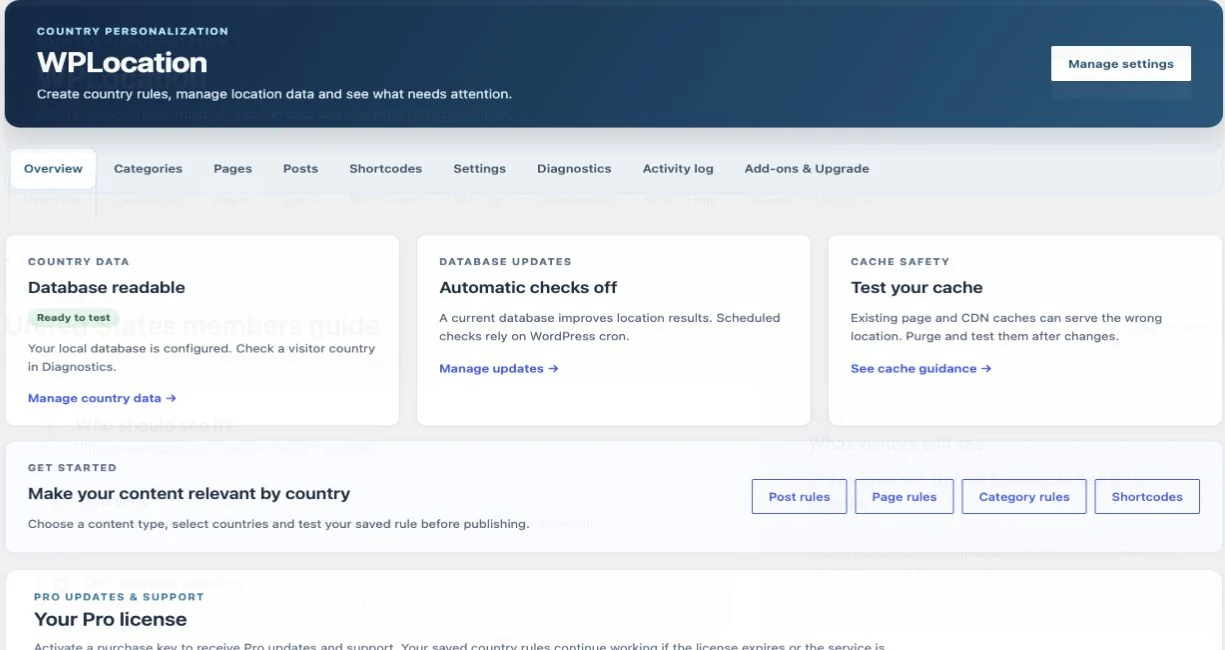
Our dedicated review installation runs on WordPress 7.1.4 in a PHP 8.3 environment, with WooCommerce 11.2.1 and Formidable Forms 7.0. We installed Free 1.1.9, Pro 1.4.4, Affiliate Links 1.0.0, Agency Toolkit 1.0.1 and CloudFront Country Source 1.0.1. A private GeoLite2 Country file provided local lookups, and an existing eligible five-site license returned a valid Pro activation.
The demo belongs to WPArena’s multisite network. We activated the plugins on this subsite only. The publisher documents single-site testing; our subsite results are not a general multisite compatibility certification. We did not network-activate the product or alter the other theme demos.
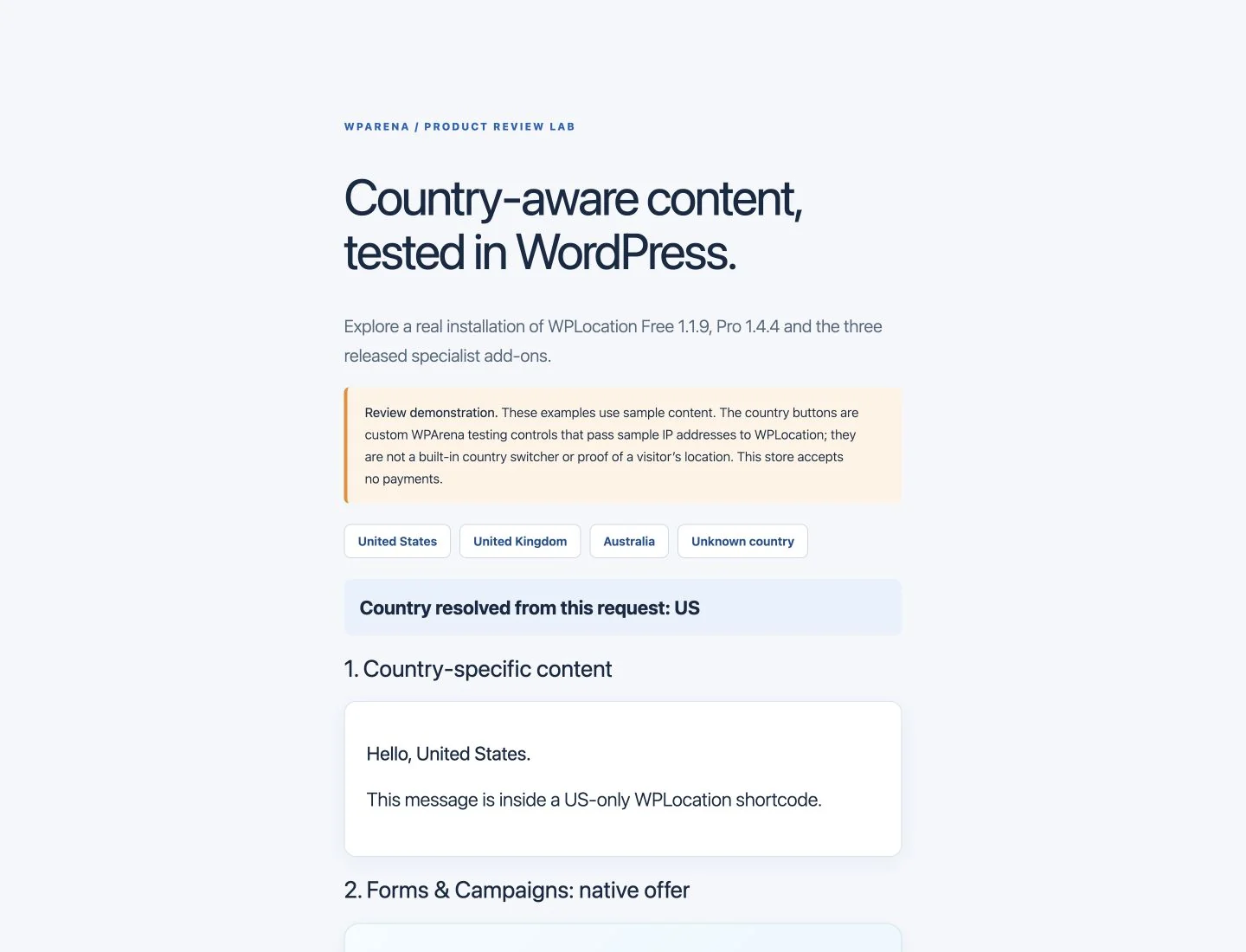
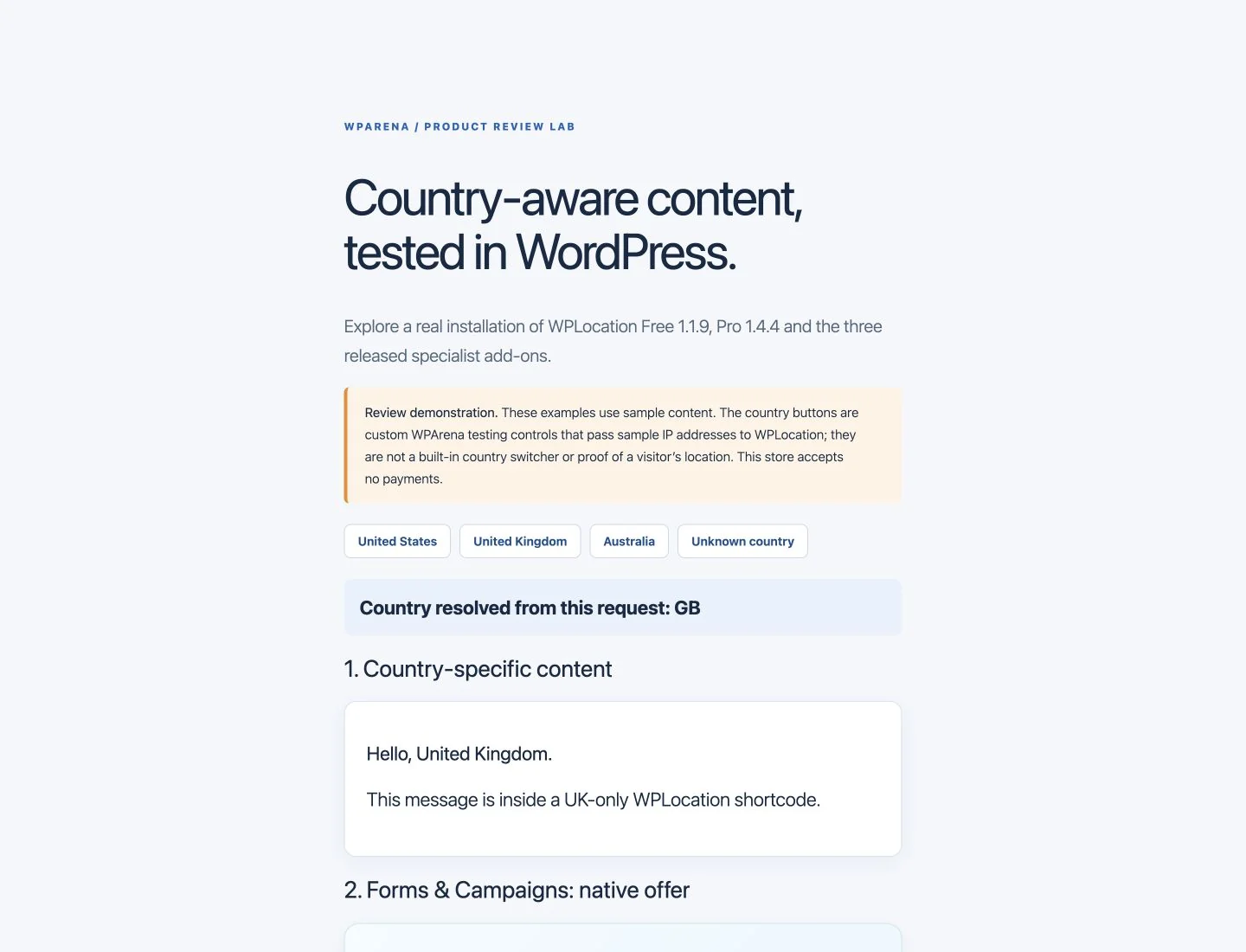
For repeatable checks, our custom demo selector supplies representative US, UK and Australian IP addresses, plus an address that resolves to unknown. These are controlled inputs, not four geographically distributed visitors. The buttons belong to our review scaffolding, not to WPLocation. The resulting messages, campaign cards, product decisions and redirects are produced by the installed plugin.
| Check | Observed result |
|---|---|
| US and UK content | The matching country message appeared; the other country’s message did not. |
| Australian and unknown campaign inputs | The saved global offer appeared as the campaign fallback. Unknown location hid the country-targeted shortcode sections. |
| US-only page | The US request returned 200. UK and unknown requests returned 404. |
| Regional page rule | The UK request received a temporary 302 redirect. The US request stayed on the original page. |
| WooCommerce audiences | Matching product pages loaded, a nonmatching product page returned 404, and the US/UK catalogs showed the appropriate sample products. |
| UK Market | The UK shop displayed the saved regional message. |
| Formidable experience | The US campaign rendered the published enquiry form. An unknown-country decision selected its offer fallback. |
| Geo Analytics | After enabling collection, real anonymous test requests appeared as aggregate country/event totals. |
| Agency Toolkit | Export and same-site comparison produced four portable rule rows. We did not perform a cross-site import or restoration. |
The main HTTP matrix contained 15 checks. This was a functional review, not a speed benchmark, geolocation-accuracy study or full checkout certification. We did not place a paid order, test a subscription renewal, submit a form entry, validate affiliate commissions or run a live AWS distribution. Those boundaries matter when assessing the screenshots.
How to install WPLocation Free and Pro
1. Check requirements and take a backup
The current website packages require WordPress 6.8+ and PHP 8.3+. WooCommerce is needed for the store modules; Formidable is needed when a campaign selects a form. Native offer cards do not need Formidable. Check these against the current installation and licensing guide, since compatibility can change.
Back up the database and plugin files before installing. Use staging first when a store already has product restrictions, custom checkout code or substantial caching. Write down the result you expect for a matching country, another country and an unknown location.
2. Download and activate Free
Get the current website release from the official WPLocation Free download page. In WordPress, open Plugins → Add New → Upload Plugin, select the ZIP and activate it. Avoid unofficial download sites, modified archives and files described as development candidates.
There are different Free release histories. The website build we reviewed is 1.1.9. The separate WordPress.org Free 1.0.0 submission was still awaiting approval at the review date. That is also distinct from the much older standalone 1.0.0 plugin. Matching version numbers do not mean those packages can be swapped without preparation.
3. Configure the country database
Open WPLocation → Settings. For a normal local setup, use your own MaxMind account and license key to download a current GeoLite2 Country database, or select a current licensed MMDB file you maintain yourself. Keep that file outside the public web root, readable by the PHP process, and outside a plugin directory that an update might replace.
Our initial command-line check could read a database stored under another site’s private directory, but the web process could not. Moving the review copy to this demo site’s own private directory resolved the issue. This is a useful setup lesson: test through the actual web request, not only through an SSH or command-line session.
Automatic database updates are opt-in. If you enable them, verify that WordPress cron or the host’s scheduled cron runs, and inspect the reported result. A readable old database is not the same as a maintained database. Follow the MaxMind setup guide, database-update guide and the provider’s GeoLite2 documentation.
4. Add Pro and activate the license
Download Pro from the purchase receipt or customer account, upload its ZIP, and keep both Free and Pro active. Enter the purchase key in the inline license panel on WPLocation → Overview. The key should be kept private; it should never appear in an article screenshot or public support message.
Our existing license activated successfully on the demo. That establishes activation for this installation; it does not test a new customer’s payment, receipt or renewal. Pro’s installed rules are designed to keep working after license expiry, while updates and support depend on an active paid entitlement. If Free is missing or incompatible, Pro pauses its enforcement. Disabling the plugins removes their active targeting behavior.
5. Install the separate add-on ZIPs you need
Upload Affiliate Link Localization and, when entitled, Agency Toolkit as separate plugins. Install CloudFront Country Source only for its specialist infrastructure use case. The Free add-on screen can switch separately installed add-ons on or off, but it is not an automatic ZIP installer. Leave an infrastructure source disabled until the upstream configuration is ready.
The legacy Upgrade Assistant is a migration utility, not an additional everyday targeting module. Existing standalone 1.0.0 users should prepare a current private database, preserve rules and follow the migration instructions before replacing the old plugin. Our review subsite was a new installation, so no legacy migration was performed.
Free content rules, blocks and shortcodes
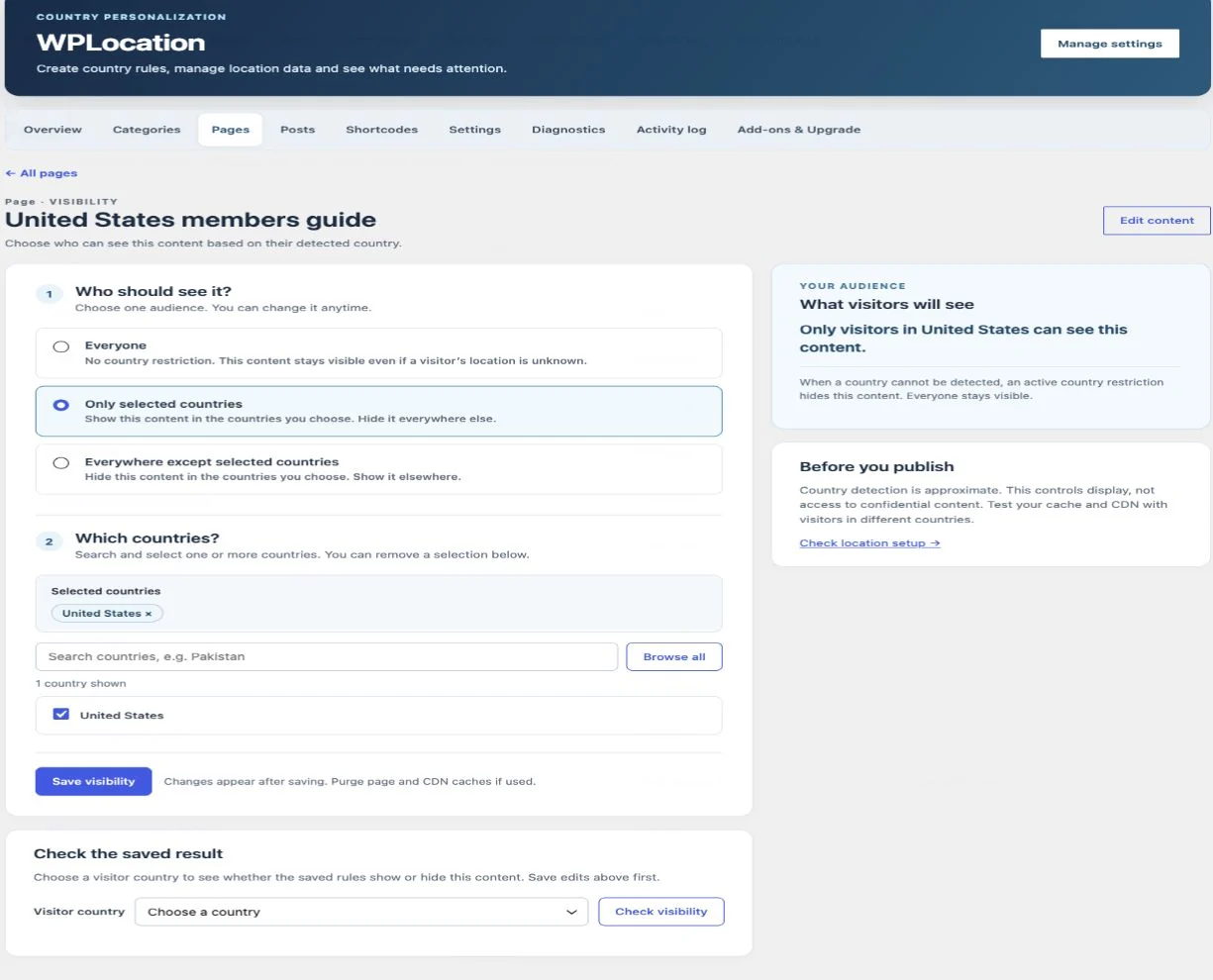
Free is enough when the task is “show this content in these countries.” Its admin screens separate posts, pages and post categories. Choose an item, select an audience, save it, then check the saved result for a visitor country.
- Everyone: no country restriction on that item.
- Only selected countries: show the item to the chosen countries.
- Everywhere except selected countries: hide it in the chosen countries.
Unknown location needs deliberate handling. A restricted rule does not guess a country: the targeted content is hidden. An unrestricted item remains available. For a post assigned to restricted categories, check the combined outcome rather than assuming the post’s own rule overrides the category.
Show a country-specific section
Use the country content block in the block editor, or put the current prefixed shortcode in a Shortcode block:
[wplocation_target country="US,GB"]
This message is for visitors in the United States or United Kingdom.
[/wplocation_target]

[wplocation_target exclude_country="US,GB"]
This message is for other detected countries.
[/wplocation_target]
Both examples are targeted sections. Neither supplies a universal unknown-country message. Keep essential information outside the targeted blocks, or use a Pro campaign with an explicit default experience when you need a structured fallback.
To display the detected country, use:
[wplocation_country format="code" fallback="Unknown"]The website Free package still recognizes the older [locationtarget] tag for existing content, but use [wplocation_target] for new work. Consult the shortcode guide and country block guide, especially when migrating between editions.
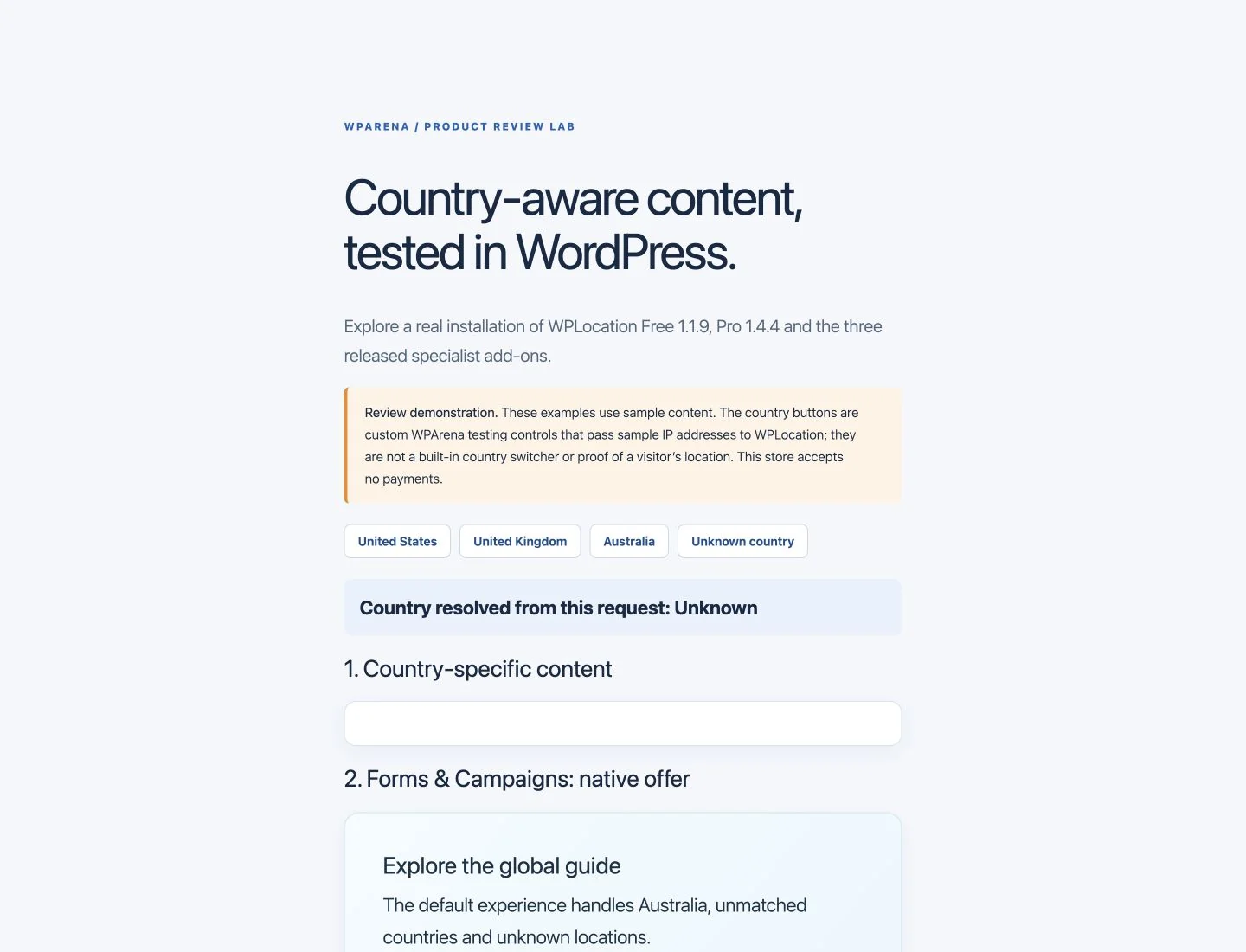
Free is a useful starting point for regional notices, selected editorial sections and simple country-specific landing pages. It is not a membership system: hiding rendered content is not a guarantee that every API, feed, cached copy or other access path is confidential.
WPLocation Pro for WooCommerce product restrictions
Open WPLocation → Product rules to set product and product-category audiences. The product must pass its own rule and every applicable category/ancestor rule. A product-level allow rule cannot override a category denial, and variations inherit the parent product’s audience.
Our sample catalog contained a global product, a US-only product and a UK-only product. With a US sample input, the US and global products appeared in the shop while the UK product was filtered out. With a UK input, the matching pair appeared. A direct request to the US-only product from the UK input returned 404, so this was more than hiding a card with CSS.
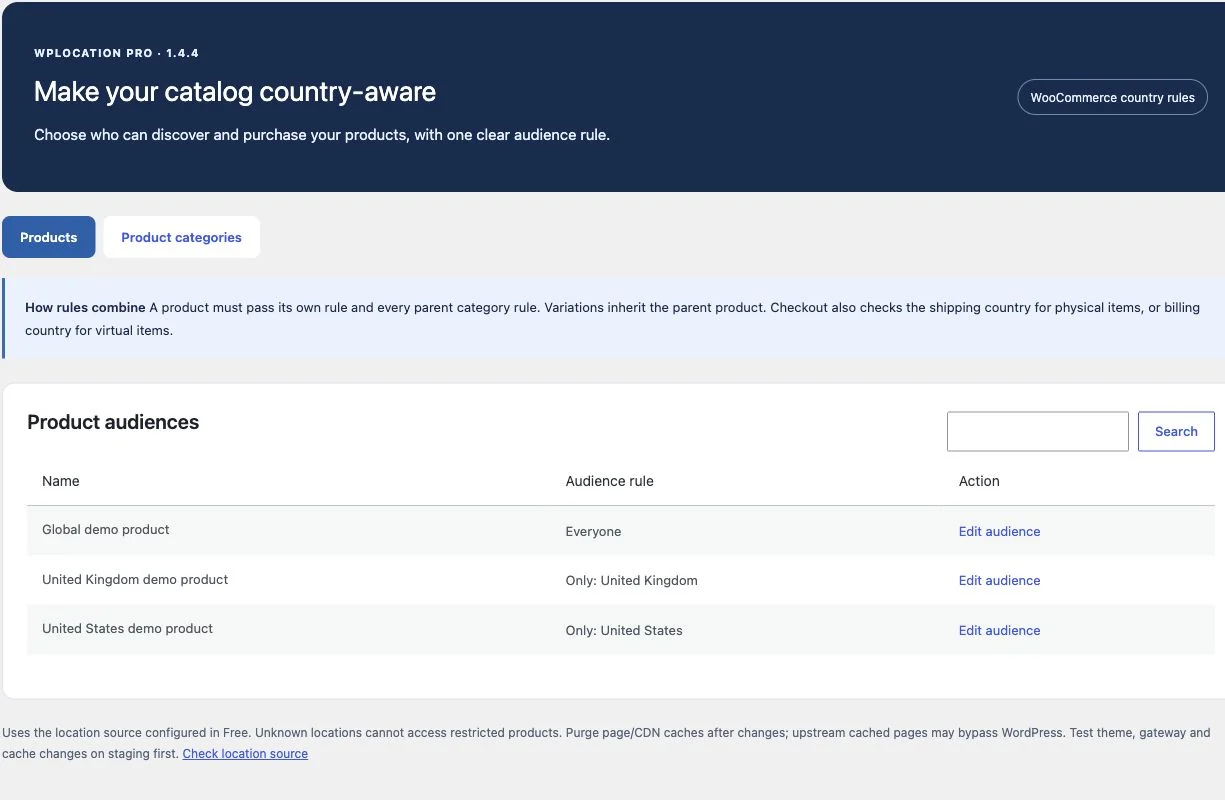
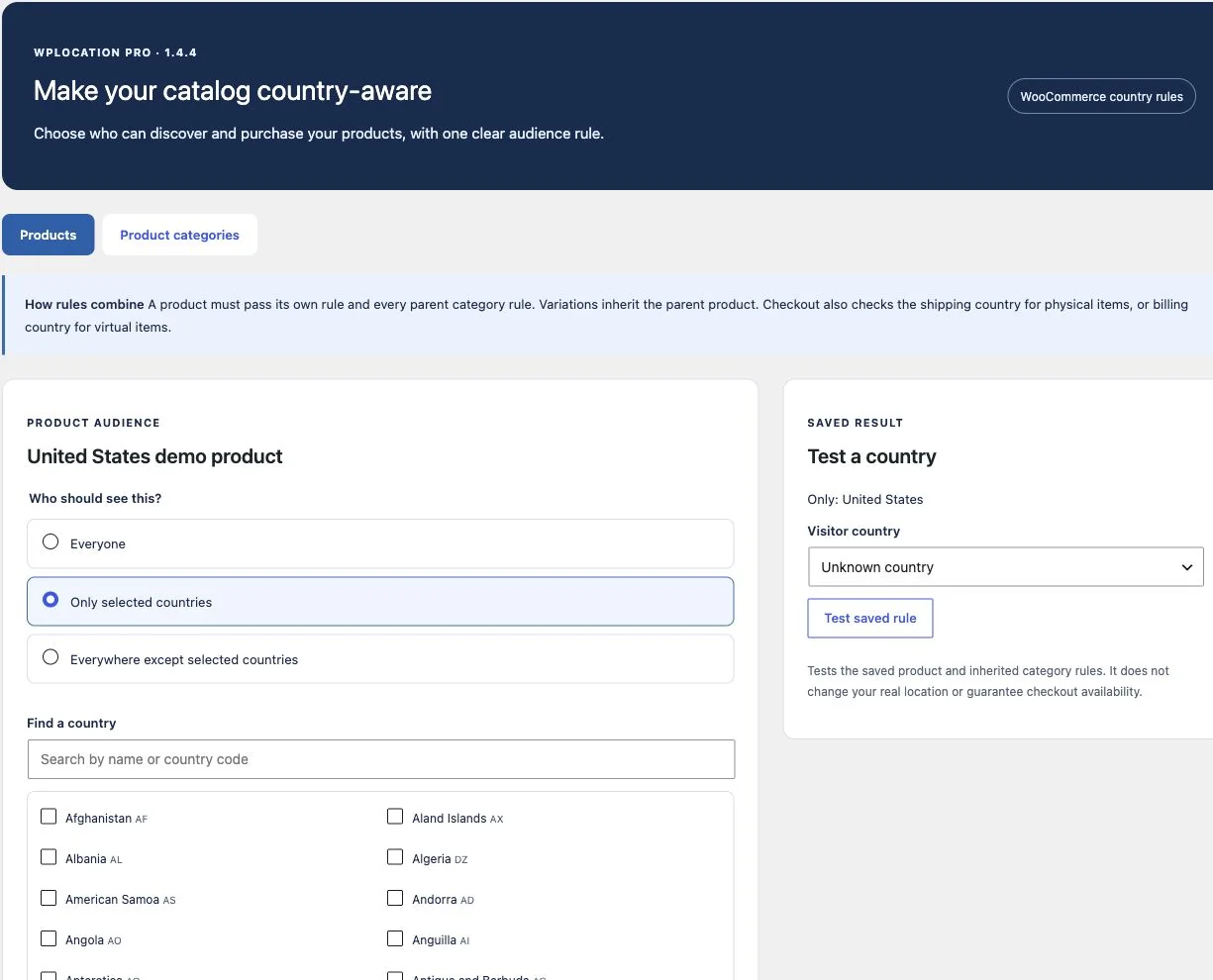
According to the released documentation, Pro also checks standard add-to-cart, existing carts, classic checkout, Store API checkout and the classic order-payment action. Browsing uses the IP country; checkout also considers the applicable billing or shipping country. Unknown locations cannot access restricted products, while unrestricted products remain available.
Our review verified catalog and product-page behavior, not every checkout integration. Before relying on a rule commercially, test your actual payment gateways, express checkout, checkout blocks, bundles, subscriptions, feeds and any custom API. Enter a nonmatching address after adding an item to the cart and confirm that the store rejects the unsuitable purchase path. See product-rule setup and WooCommerce troubleshooting.
WooCommerce Markets: regional messages and method availability
Markets is included in Pro. It groups countries into a regional shop experience with a plain-text message, up to four featured product links, and optional narrowing of payment and shipping methods already configured in WooCommerce.
The distinction between the three country contexts is important: the shop message uses the detected visitor country; payment availability uses the buyer’s billing country; shipping availability uses the package destination. A store owner should test all three rather than infer checkout behavior from a regional banner.
- Open WPLocation → WooCommerce Markets.
- Create a market with a clear name and country selection.
- Add the regional shop message and relevant featured products.
- If needed, allow only selected existing payment or shipping methods.
- Preview, activate, and test the storefront and checkout.
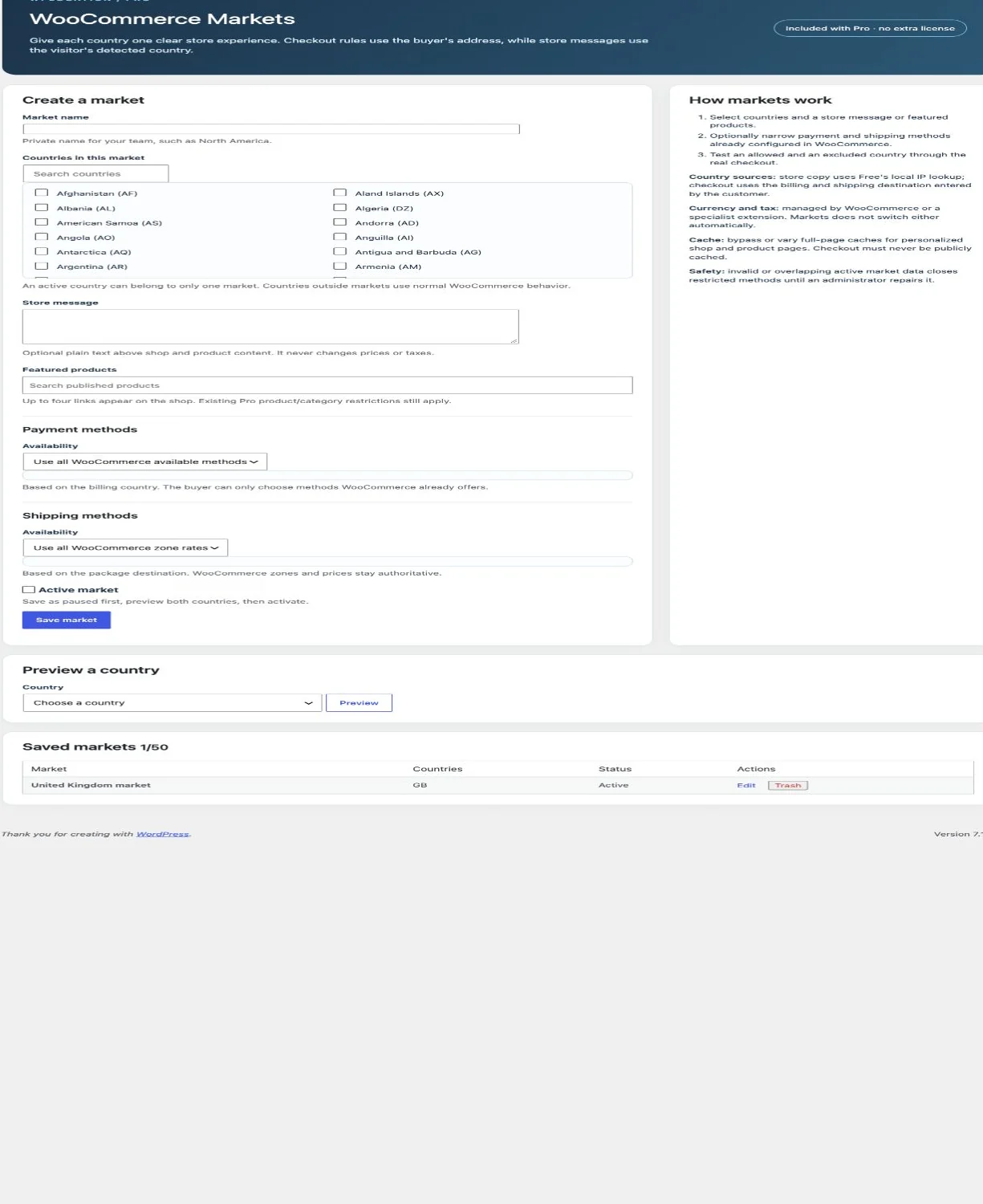
Markets does not convert currencies or set exchange rates, taxes, shipping prices or shipping zones. It narrows the methods your store already has. If you need a multi-currency checkout, translation or different regional pricing, evaluate that separately and test the combined stack. The Markets guide explains these boundaries.
Geo Redirects: send visitors to a regional page
Geo Redirects connects an original published page to a regional published page on the same site. You choose included or excluded countries, set priority, preview the decision and activate the rule. Matching frontend requests receive a temporary HTTP 302 redirect.
In our example, a UK input visiting “Regional guide” was redirected to “United Kingdom guide,” while a US input stayed on the original. The released module rejects loops and resolves supported chains to their final page. It excludes sensitive endpoints such as checkout, cart, account and login pages from redirect endpoints.
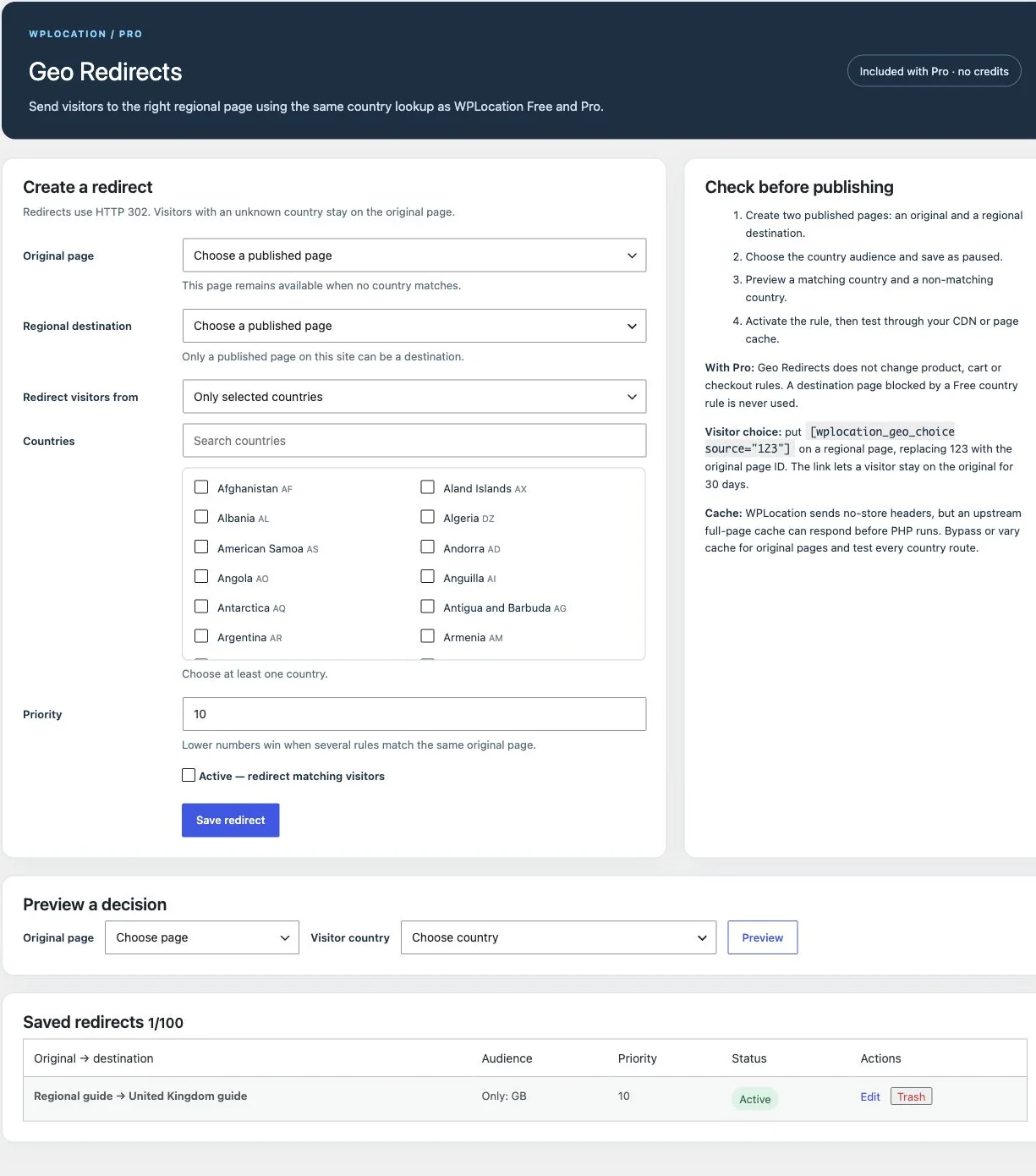
A regional destination can include a visitor-choice link:
[wplocation_geo_choice source="123"]Replace 123 with the original page’s ID. On the original page, the source can be omitted. The documented choice mechanism lets a visitor stay on the original for 30 days using a first-party HTTP-only cookie. WPLocation does not automatically inject a country switcher into every theme.
Keep regional versions reachable through ordinary links. Someone researching another country should be able to read its page, and search crawlers need a discoverable route. Original URL query strings are not forwarded automatically. Check whether that behavior affects your campaign tracking. See the Geo Redirects guide.
Forms & Campaigns: regional forms or native offer cards
Campaigns is one of Pro’s more useful features for publishers. Instead of scattering country conditions across a page, you create a campaign with a required default experience and country variants. Each experience can be an existing published Formidable form or a native offer card.
Our offer campaign had a US card, a UK card and a global fallback. The corresponding country inputs selected the intended cards; Australian and unknown inputs selected the default. A separate campaign rendered a published Formidable enquiry form for the US input.
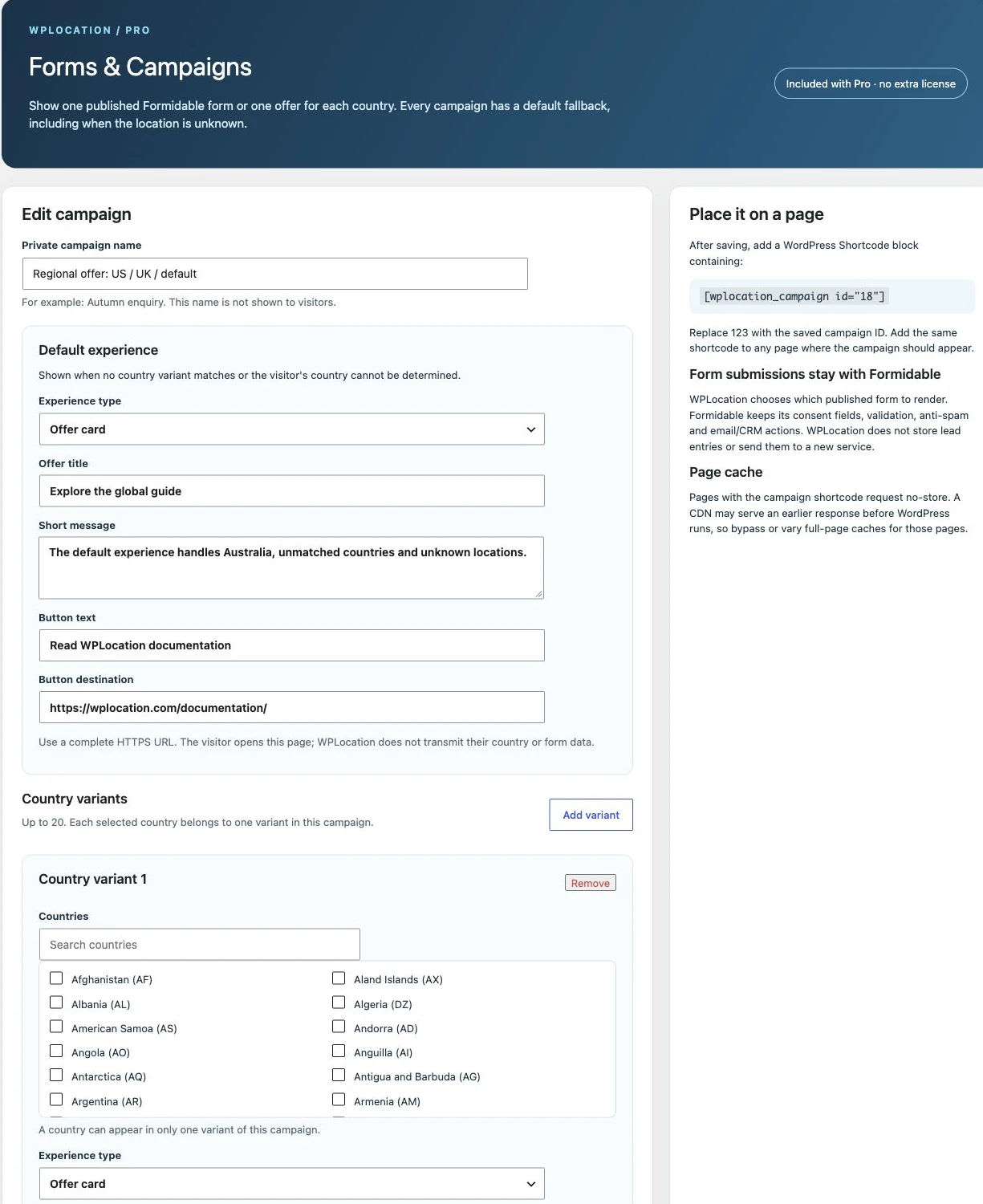
- Open WPLocation → Forms & Campaigns.
- Name the campaign and choose a useful default.
- Add country variants, using each country in only one variant.
- Select a published Formidable form or enter an offer headline, copy, button and URL.
- Save paused, preview the country decisions, then activate it.
- Place its generated shortcode on the intended page.
[wplocation_campaign id="123"]Use the actual saved campaign ID. A campaign supports up to 20 country variants. Unmatched or unknown countries use the default. If a variant form becomes unavailable, the documented fallback behavior uses the default; an unavailable default form leaves nothing to display until repaired. A paused campaign displays nothing.
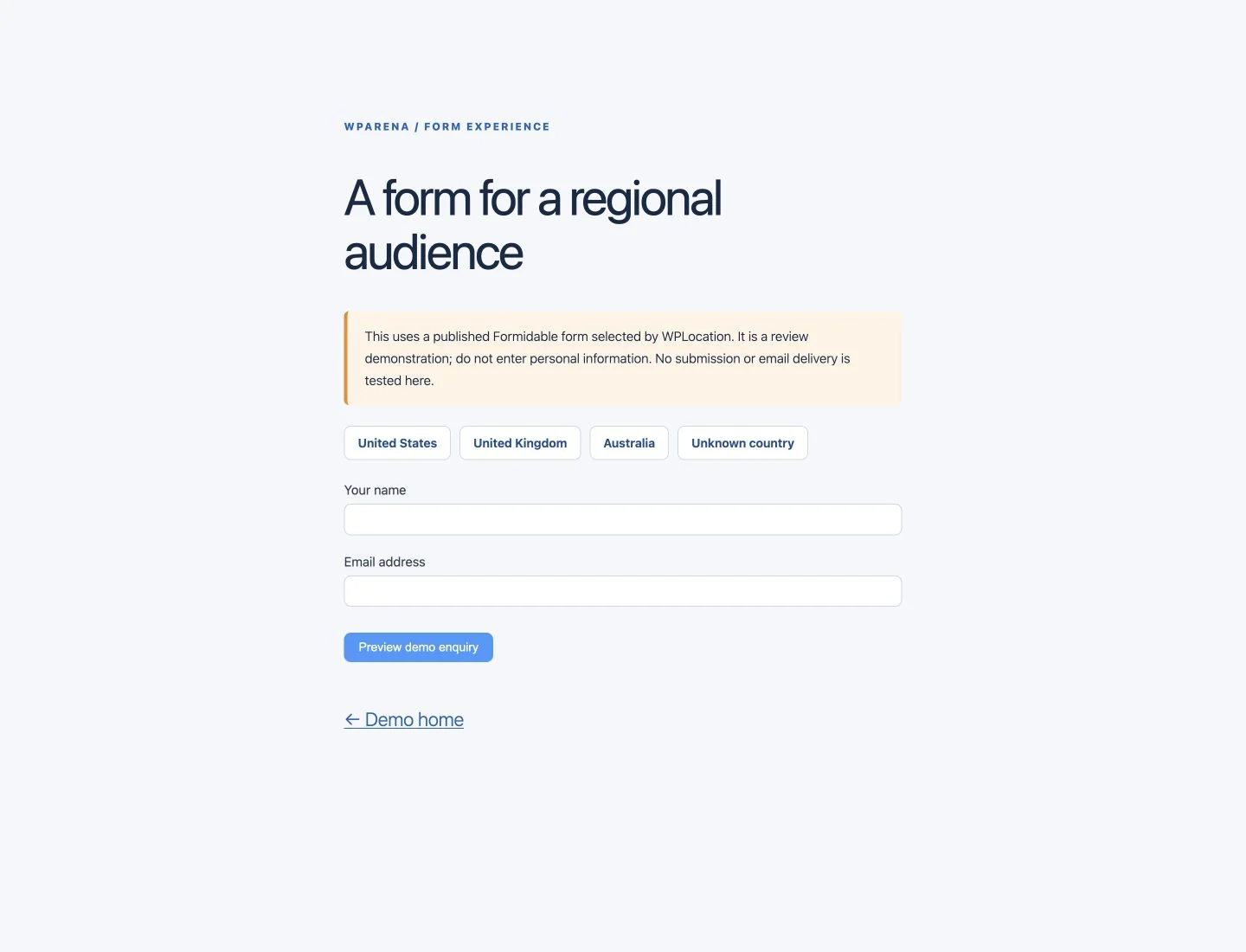
Formidable owns the fields, consent controls, spam protection, entries and submission actions. WPLocation chooses which existing form to show. Native offers work without Formidable, making them suitable for regional calls to action when a full form is unnecessary. Read the Forms & Campaigns guide before placing campaign shortcodes inside cached builders, widgets or patterns.
Geo Analytics: aggregate decisions, not conversion attribution
Geo Analytics is included in Pro and is off by default. An administrator can enable collection and select 7, 30 or 90 UTC days of retention. It counts supported content decisions, redirects, campaign form/offer displays and fallback use.
We enabled seven-day retention on the demo, made anonymous test requests and read back the resulting country/event totals. The chart and table below contain those controlled requests. They are not an audience estimate, a customer case study or evidence of revenue uplift.
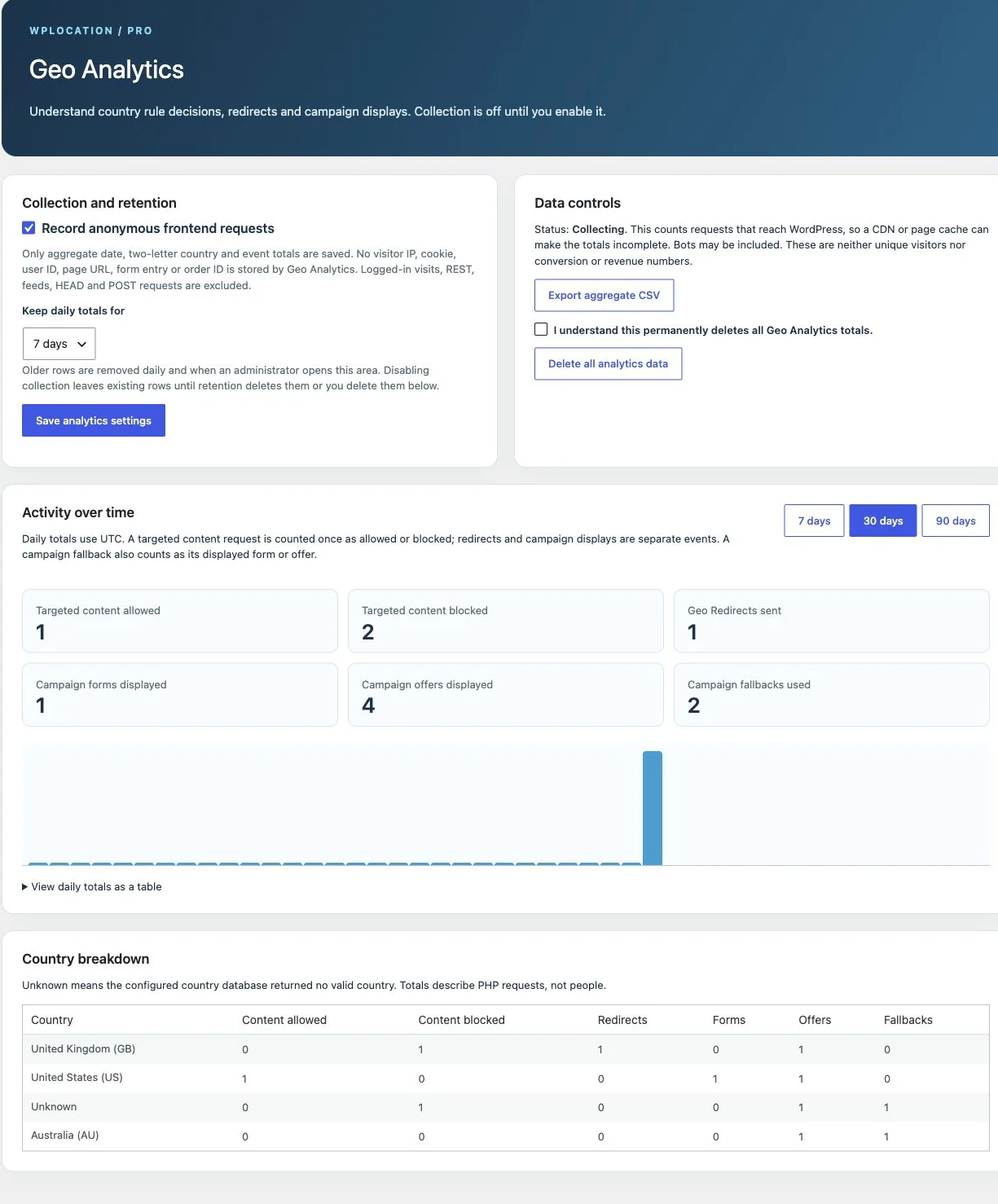
The module stores aggregate day, country, event and count values. Its documentation says it does not store raw visitor IPs, cookies, user IDs, page URLs, form entries or order IDs in this analytics table. Logged-in requests, REST, feeds, HEAD and POST are excluded. Administrators can export an aggregate CSV or delete totals.
This is useful for checking whether regional experiences are being selected. It is not a replacement for commerce reporting or a complete analytics platform. A page cache can stop the request reaching WordPress; bots and repeated requests can increase counts. Disabling collection stops new counts but retains existing rows until retention or deletion removes them. See Geo Analytics documentation.
The three separate WPLocation add-ons
Affiliate Link Localization
This separate plugin supplies country alternatives for approved Amazon Associates and Impact links. You save a direct default URL and, in manual mode, up to 30 country alternatives. The shortcode starts with the usable default link in the HTML; an uncached AJAX request can replace its destination for a matching country.
[wplocation_affiliate id="123"]View the offer[/wplocation_affiliate]Amazon OneLink mode leaves the approved Amazon link unchanged and relies on your configured OneLink service. Manual mode uses the country links you supply. The plugin does not connect your partner accounts, create tracking tags, establish program membership, check commission rates or select equivalent products for you.
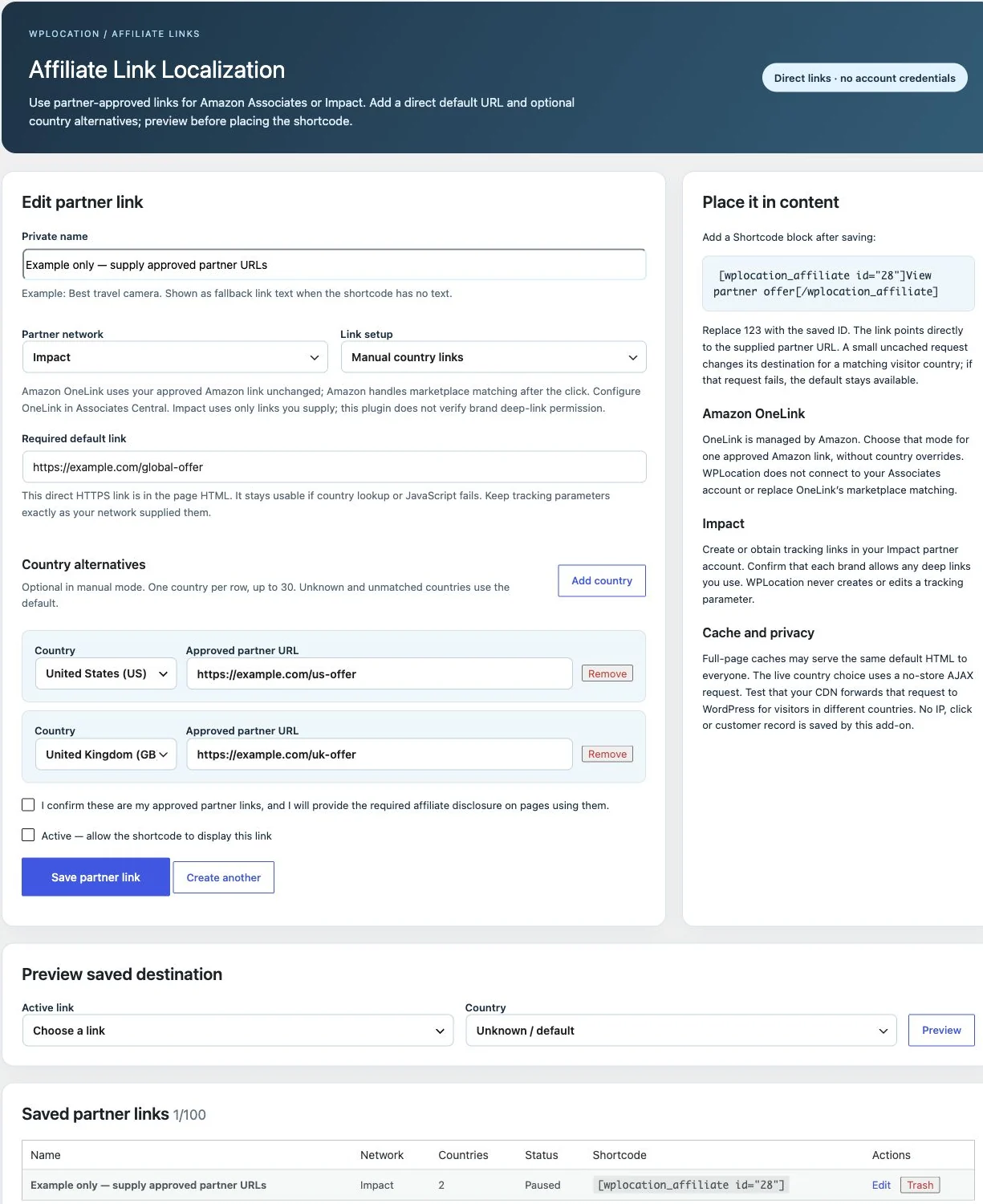
We installed the add-on and inspected its saved configuration and preview interface. We did not verify a live Amazon or Impact account, regional purchase or commission. The add-on’s generated commercial links use sponsored/nofollow attributes by design. That product behavior is separate from the ordinary editorial links in this article.
All current paid plans include its separate ZIP. Updates are currently downloaded manually through the eligible account; the separate add-on does not yet have its own signed automatic update stream or separate key. Consult the product page and setup guide.
Agency Toolkit
Agency Toolkit transfers supported country rules through a reviewed JSON file. It can include rules for published posts, pages, post categories, products and product categories. The destination matches objects by path or slug rather than trusting numeric IDs, then compares current and imported audiences before an administrator applies the change.
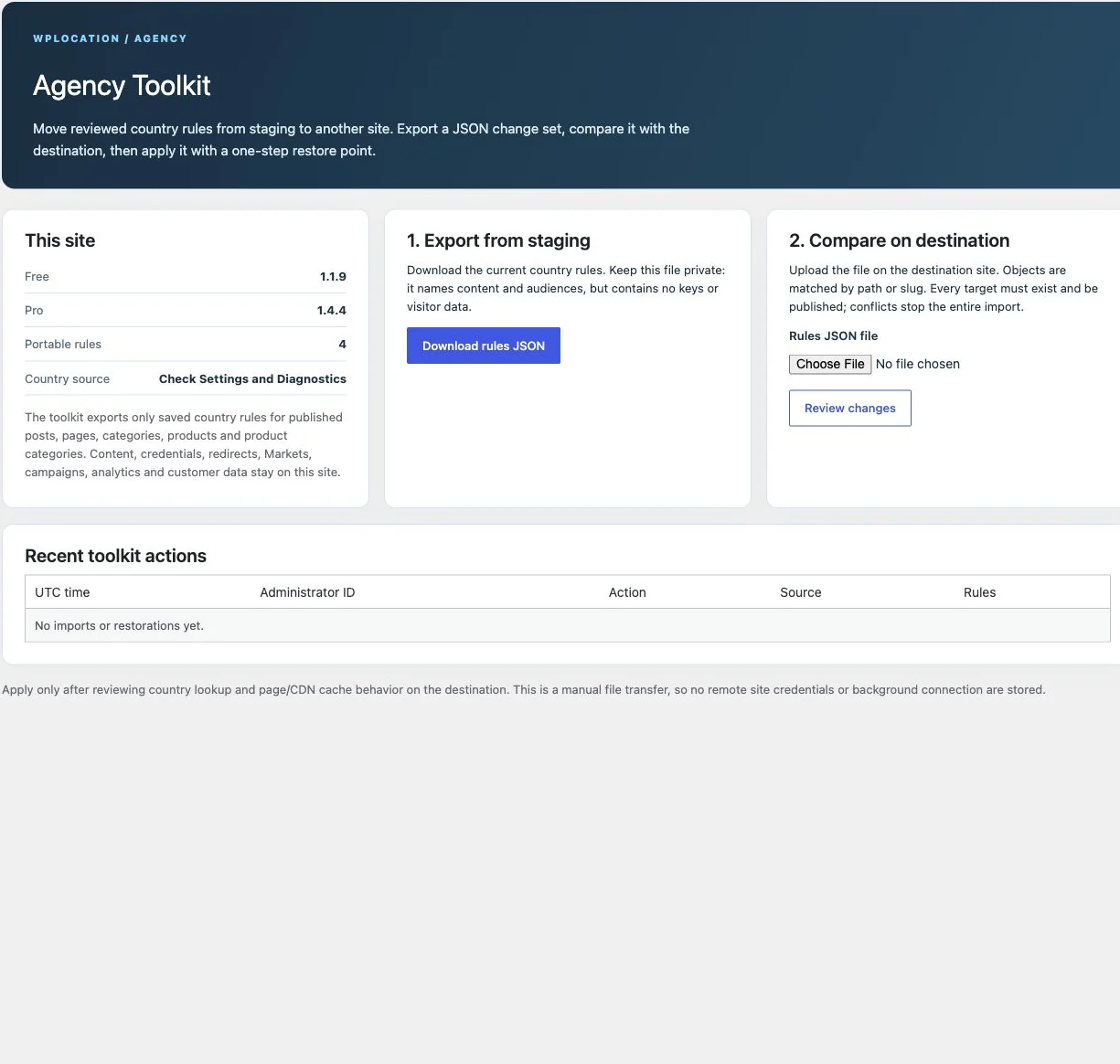
The useful workflow is staging → export → destination upload → comparison → backup → confirmed apply. The documented one-step restore protects only the last import and refuses when a rule has changed afterwards. It is a supervised rule-transfer utility, not an automatic remote deployment service.
It does not migrate content, credentials, redirects, Markets, campaigns, analytics or customer data. Prepare those separately. The exported paths and audiences are operational information even though the package excludes keys and visitor data, so keep the JSON private.
Agency subscriptions and both lifetime plans include Agency Toolkit for their covered sites. A one-site Pro subscription does not. The separate ZIP currently uses manual account downloads for updates. See the Agency Toolkit page and transfer guide.
CloudFront Country Source
This free specialist add-on is intended for sites already served through their own Amazon CloudFront distribution. The documented setup verifies a private origin token and the forwarded viewer-country and viewer-address headers before using that source. It is not an AWS subscription, an AWS partnership or a general-purpose alternative for every CDN.
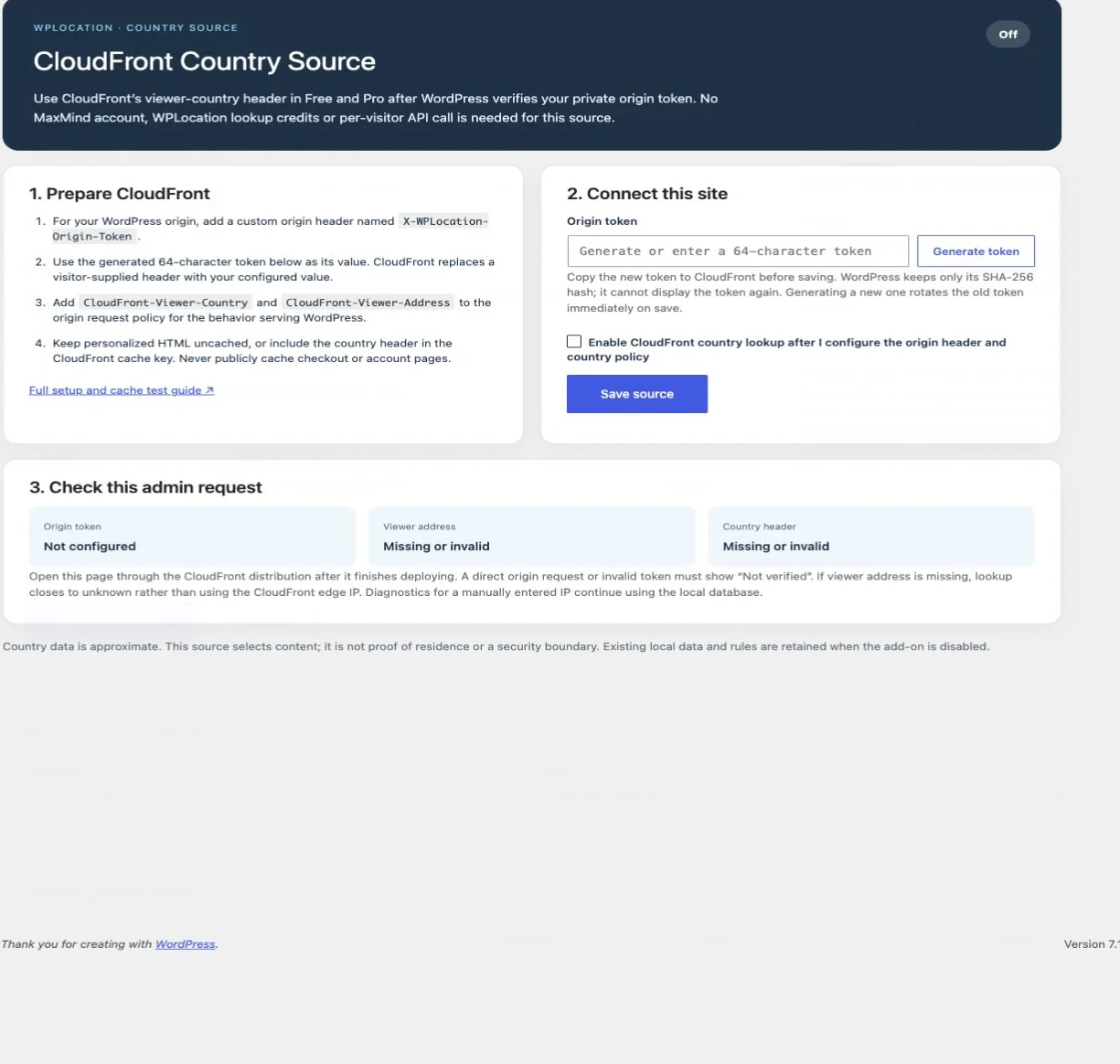
Its setup guide requires a custom X-WPLocation-Origin-Token origin header and the CloudFront-Viewer-Country and CloudFront-Viewer-Address headers. The token is secret; the plugin stores its hash. Forwarding a country header alone is not a complete trusted-source configuration.
Compatibility finding in the reviewed package: a controlled check on Free 1.1.9 did not invoke the country-source filter used by the CloudFront adapter. We therefore cannot recommend the CloudFront path on this exact combination until that integration is corrected and retested. The local MMDB path is the source verified in this review.
We installed the add-on and inspected its status screen, but left it off because this demo has no CloudFront distribution. Compatibility also depends on the website Free build’s country-source hooks. Obtain the current compatible combination and prove trusted, spoofed and missing-header behavior on staging before choosing this source. The pending directory Free edition is a separate compatibility boundary. Follow the CloudFront setup and verification guide.
WPLocation pricing, licenses and updates
The public pricing page showed the following USD prices on 31 October 2026. Recheck checkout for the final total and terms before purchasing.
| Plan | Price | Sites | Current distinction |
|---|---|---|---|
| Free | $0 | No paid WPLocation license needed | Base content rules and country engine; bring a supported data source. |
| Pro Monthly / Yearly | $9/month or $69/year | 1 | Current Pro modules plus the Affiliate Link Localization ZIP. |
| Agency Monthly / Yearly | $25/month or $199/year | 5 | Same Pro features, Affiliate Link Localization and Agency Toolkit. |
| Pro Lifetime | $599 once | 1 | Current Pro and current/future add-on software when released, within the site limit. |
| WPLocation Lifetime | $999 once | 5 | Lifetime software entitlement for the covered sites. |
At those listed prices, Pro yearly is $39 less than twelve $9 monthly payments; Agency yearly is $101 less than twelve $25 monthly payments. Monthly billing can make sense for a short trial period, while yearly billing costs less over a full year. Lifetime is a larger upfront commitment whose value depends on how long you use the product and what actually ships.
Subscriptions renew at the selected interval until cancelled. Cancellation stops future renewals; the remaining paid term continues to its end. “Lifetime” is defined in the seller’s terms as a non-expiring software license with updates and support for the product lifetime, within the stated site limit. It does not include third-party provider charges, metered services or managed lookup credits.
Pro licensing and separate add-on updates are different. Pro has licensed update delivery. The separate Affiliate and Agency ZIPs currently require manual updates through the eligible customer account and do not have independent add-on keys. Download access follows the plan. Do not assume every future paid add-on will be included in a subscription.
The published refund policy allows requests within seven calendar days when the purchase is unused or there is a specific issue with the purchased product. Read the purchase terms and the refund wording linked from checkout rather than treating this as an unconditional money-back promise. We did not exercise a refund or renewal.
Caching, SEO and privacy: the practical trade-offs
Country output and page caching must agree
If a CDN serves cached HTML before WordPress runs, the plugin cannot change that already-generated response. A US visitor can otherwise warm a page that is later served to a UK visitor. Free requests no-store for frontend and REST output because targeted content can occur beyond the main page body, and our tested responses carried no-store directives. That does not prove every upstream cache obeys them.
Bypass shared HTML caching where required, or implement and test a correct variation strategy. Account for visitor-choice cookies on redirect routes. Purge old cache entries after changing rules, plugin versions or country data. Warm the exact public URL in country A, then test country B and unknown location through the real CDN. Repeating a preview in wp-admin is not the same test.
The Affiliate add-on has a different design: its default HTML link is country-independent, and localization uses an uncached request. That can fit cached pages, provided the AJAX endpoint reaches WordPress. Start with the caching/CDN guide and trusted-proxy guide.
Make regional pages crawlable
Give substantive regional versions stable URLs and ordinary links. A crawler may not arrive from every country, so country-only content and forced routing can limit discovery. Google’s locale-adaptive page guidance explains this limitation; its multi-regional guidance covers regional URL choices.
Use hreflang when appropriate for genuine language/regional alternatives and verify the implementation. WPLocation’s reviewed modules do not make a complete translation or international SEO system. Do not promise rankings, automatic translations or a WPML replacement based on the presence of country rules.
Understand the different data flows
Local country lookups keep the lookup on your server. Database downloads contact the selected provider, while license activation sends the purchase key, site URL and software information to WPLocation. Saved keys can be present in database backups. Optional Geo Analytics stores its own aggregate totals, but the web server, CDN, form plugin and commerce stack have separate data handling.
Collect only the information you need, protect backups and keep any provider credentials out of public screenshots. We are describing observed settings and documented data flows, not certifying privacy-law compliance. The country detection guide is useful for understanding the limits of IP-based location.
Plan explicitly for headless WordPress
WPArena’s main frontend is headless, while the review demo uses normal WordPress rendering. Those are different delivery paths. A Next.js frontend can receive content from a backend or cache without the original visitor context, and backend installation does not automatically execute plugin scripts in the frontend.
For a headless site, design the visitor-aware rendering, endpoint and cache behavior deliberately. Never evaluate one visitor’s country during a static build and treat it as a dynamic rule for everyone. Our conventional WordPress demo does not certify a headless integration. Our broader WordPress geolocation guide covers the planning questions.
What we liked, and what needs care
| Strength | Practical limitation |
|---|---|
| Free provides usable country content rules. | You still need a current supported source and correct cache behavior. |
| Pro bundles the main operational modules. | Keep Free and Pro active; specialist ZIPs and entitlements remain separate. |
| Product audiences combine product and category decisions. | Your real checkout, gateways, feeds and custom integrations need their own tests. |
| Campaigns require a useful default. | Formidable still owns form creation and delivery; campaigns do not create a CRM workflow. |
| Analytics can show aggregate country-rule activity. | Request counts are incomplete behind caches and do not establish unique visitors or conversions. |
| Agency transfers include a comparison step. | It transfers supported rules, not an entire site or every Pro configuration. |
| The admin interfaces make audiences and previews explicit. | Preview, save, activation and real visitor output are distinct steps. |
For an ordinary WordPress publisher, start with Free and one regional notice. For a WooCommerce store that needs country-based product audiences, Pro is the relevant step. Agencies should evaluate the five-site allowance and supervised transfer tool. If your primary need is precise delivery-area validation, a location directory, multi-currency checkout, translation or GPS maps, define that requirement first and evaluate the appropriate specialist system.
A practical launch and troubleshooting guide
- Start small. Use one targeted page or content section and a useful default.
- Verify the web process can read the data. Check Diagnostics and run a representative IP lookup.
- Keep content rules understandable. Record the intended audience and any inherited category restrictions.
- Save, preview, activate. Do not mistake unsaved form changes for the current rule.
- Test anonymously. Administrator sessions may be excluded from redirects or analytics.
- Test unknown location. Confirm the fallback, not just the matching country.
- Test the real cache. Warm it in one country, then request the same URL from another.
- Check the direct route. A hidden product card is not sufficient evidence of checkout enforcement.
- Test purchases on staging. Include a changed billing/shipping address, cart persistence and your actual gateways.
- Maintain data and software. Monitor database updates, active licenses and manual add-on downloads.
Everyone sees the same country
Check cached HTML and proxy handling first. Confirm that WordPress receives a verified visitor address rather than a CDN or origin address. Do not trust arbitrary forwarded headers. If your host uses a proxy, configure it through the documented trusted mechanism and test both normal and spoofed requests.
Targeted content disappears
Check whether the source is missing, unreadable or returning unknown. Inspect the selected audience and applicable categories. Keep a neutral explanation outside restricted blocks. A 404 for a country-targeted page may be the intended outcome, so compare it with the expected rule before treating it as a routing failure.
A shortcode appears as text
Check that the correct plugin is active, the shortcode name matches the installed edition, and the editor uses a suitable block. On a headless frontend, confirm that shortcode processing and the required visitor context are actually supported.
A product is missing unexpectedly
Check its own audience, every assigned product category and any ancestor category. Test unknown location, then billing/shipping country behavior. Also rule out ordinary WooCommerce visibility, stock and publication settings before blaming geolocation.
The testing guide and full documentation hub are useful next steps when your result differs from the intended rule.
WPLocation review: frequently asked questions
Is WPLocation a free WordPress geolocation plugin?
Yes. Free provides country-level content audiences, a country content block, shortcodes and diagnostics. The website package requires a current supported data source. Pro adds the paid commerce and operational modules.
Does Pro replace WPLocation Free?
No. Pro runs alongside a compatible Free installation and reuses its country engine. Keep both active. An absent or incompatible Free base pauses Pro enforcement.
Are Geo Redirects, Markets, Campaigns and Analytics separate purchases?
The released versions are included inside Pro. Affiliate Link Localization, Agency Toolkit and CloudFront Country Source are separate ZIPs with their own dependency and entitlement rules.
Do local lookups use paid credits?
Local lookups do not require WPLocation lookup credits. You supply and maintain the supported database and follow the provider’s terms. CloudFront is an optional infrastructure-specific source, and managed credits were future work at this review date.
Does WPLocation automatically change currency?
No. The reviewed WooCommerce Markets module changes regional messages, featured links and allowed existing methods. It does not set exchange rates, currency, taxes, shipping prices or zones.
Does the plugin need GPS permission?
The local IP-country lookup does not need browser GPS permission. It estimates a country from an IP address and is not precise device geolocation.
Will it work with every cache or CDN?
That is not established. The plugin can request no-store, but a cache that serves a response before WordPress runs can still bypass country rules. Test the actual delivery path and use suitable bypass or variation.
Can I use it to protect private content?
Do not use country personalization as the confidentiality boundary. Use authentication and access controls appropriate to the private material, and check all relevant APIs and delivery paths.
Can I see a working WPLocation demo?
Yes. Our review demo lets you compare controlled country inputs. WPLocation also has its own official demo. Read the labels: a simulator demonstrates rule selection, not your real location.
Is WPLocation proven compatible with multisite or headless WordPress?
We observed the listed checks on one demo subsite. The publisher’s documented tested scope is single-site, and our main headless frontend is a separate architecture. These observations do not establish universal multisite or headless support.
Should you use WPLocation?
WPLocation makes the most sense when you want country-aware experiences in a conventional WordPress site and can take responsibility for the country source and cache setup. Free is a sensible place to prove a small content use case. Pro becomes useful when you need product audiences, regional pages, forms/offers or aggregate decision reporting in the same stack.
Our demo confirmed the listed content, campaign, catalog and redirect results, with a valid Pro activation and real screenshots. The next decision should be based on your own staging results, particularly if checkout restrictions or a specialist infrastructure source are central to the project. Use the current released features and terms to choose a plan; treat roadmap items as future possibilities.
Review date: 31 October 2026. Product versions, prices and download terms can change. Screenshots were captured from the WPArena review installation during this review. Country-data attribution: This product can use GeoLite Data created by MaxMind, available from MaxMind.



Responses (0 )