

WordPress geolocation · A practical setup guide
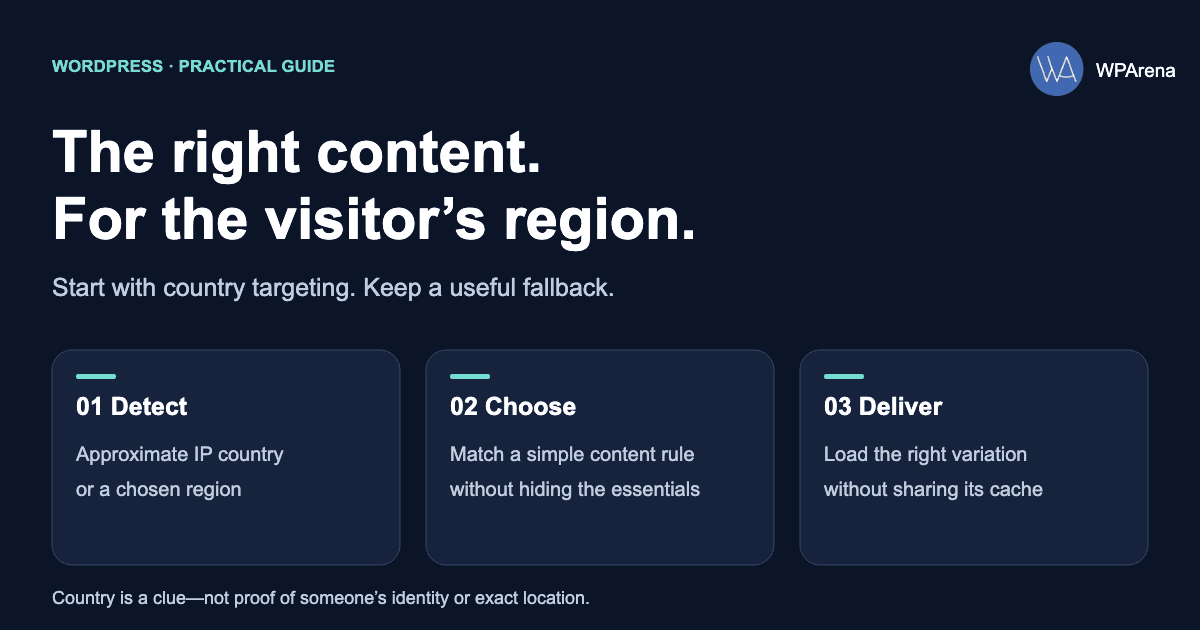
You can customize WordPress content by country using a geolocation plugin, a visitor’s chosen region, or WooCommerce’s built-in location settings. The right approach depends on what changes: a delivery message, a promotional block, a regional landing page, or a store’s initial tax and shipping estimate.
Start with one small variation and a useful default. A visitor in Canada might see a Canadian delivery link while everyone can still read the product description. You do not need to redirect the whole website or ask for precise coordinates to do that.
Use country rules for local offers, contact details, and delivery messages.
Use separate, linked URLs when whole pages differ by market or language.
Use WooCommerce location detection, then let the customer confirm their address.
Choose a tool for the job
These options solve different problems. A plugin that adds a map to your post does not automatically change what visitors see based on their location.
| Tool | Useful for | What to consider |
|---|---|---|
| Geolocation IP Detection | Free IP-country data and shortcode-based messages. | Choose a data source and check its limits. Configure AJAX when the page is cached. |
| GeotargetingWP / Geotargeting Pro | Commercial country rules and targeted content blocks. | Check current plans, lookup usage, and compatibility with your cache. |
| WooCommerce + MaxMind | Initial customer location for tax and shipping calculations. | It does not provide a complete currency switcher or regional product policy. |
| Geolocation | Adding locations and maps to travel posts. | This is post geotagging, rather than visitor-based personalization. |
For a simple country notice, try the free route first. For several editorial rules managed by non-developers, evaluate GeotargetingWP on a staging site. For a shop, begin with the store’s native settings before adding another extension. Do not buy a product restriction plugin just to display a local delivery message.
Understand what “location” means
- IP geolocation: estimates location from the visitor’s network address. It can be useful for country-level suggestions, but a VPN, mobile carrier, or shared network can make the estimate wrong. Treat it as a hint rather than a verified home address. MaxMind explains GeoLite data and its limitations.
- Browser geolocation: requests device location through the browser. It requires a secure context and the visitor’s permission; it is a different mechanism from a silent IP lookup. Use it only when the experience needs it, such as finding nearby branches. See the browser Geolocation API.
- A region selector: asks the visitor which market they want. This is often the most useful override for travelers, gifts, cross-border customers, and incorrect detection.
Country is not language. A person in Switzerland may prefer French, German, Italian, or English. Keep the language choice separate from the delivery country, and make both choices easy to change.
Set up a free country message
Geolocation IP Detection provides country data and conditional shortcodes. Its available data sources have different requirements: a local MaxMind database needs registration and updates, while an external lookup service can have usage limits.
- Install the current plugin on a staging copy of your site.
- Choose a supported data source in the plugin settings. If a CDN or proxy sits in front of WordPress, verify that the plugin detects the visitor rather than the server.
- For a cached page, enable the plugin’s AJAX option and follow its AJAX documentation.
- Add a Shortcode block with a small message. Publish it on staging and check the logged-out page.
This example displays a country name, with a readable fallback when detection fails:
[geoip_detect2 property="country.name" default="your region" lang="en"]This example limits a message to France and Germany:
[geoip_detect2_show_if country="FR,DE"]
See our delivery options for France and Germany.
[/geoip_detect2_show_if]
Use the current geoip_detect2 family, rather than copying legacy geoip_detect examples. Keep a normal delivery-information link outside the conditional block so unknown locations and failed scripts still have somewhere useful to go.
Use GeotargetingWP for more content rules
Geotargeting Pro supports geographic rules for content. Before choosing a plan, estimate the pages that actually need a lookup and check current allowances. A large traffic total is not, by itself, a reliable estimate of billable requests.
- Install the plugin on staging and connect the account using the setup wizard.
- Enter the account credentials privately, authorize the relevant domain, and choose the fallback behavior.
- Check the detected visitor IP in the settings, particularly when using a reverse proxy.
- Enable the appropriate cache-compatible mode before adding public rules. The publisher documents these settings in its configuration guide.
The following is an illustrative country rule, using the publisher’s documented shortcode syntax. Replace the message with a real offer available in those markets:
[geot_filter country="US,CA"]
Explore our North American delivery options.
[/geot_filter]
Keep essential information outside the filtered block. Add a country switcher when visitors need to correct the estimate. Do not publish debug output, API keys, or a visitor’s raw IP address on a public page.
The common failure: caching the wrong country
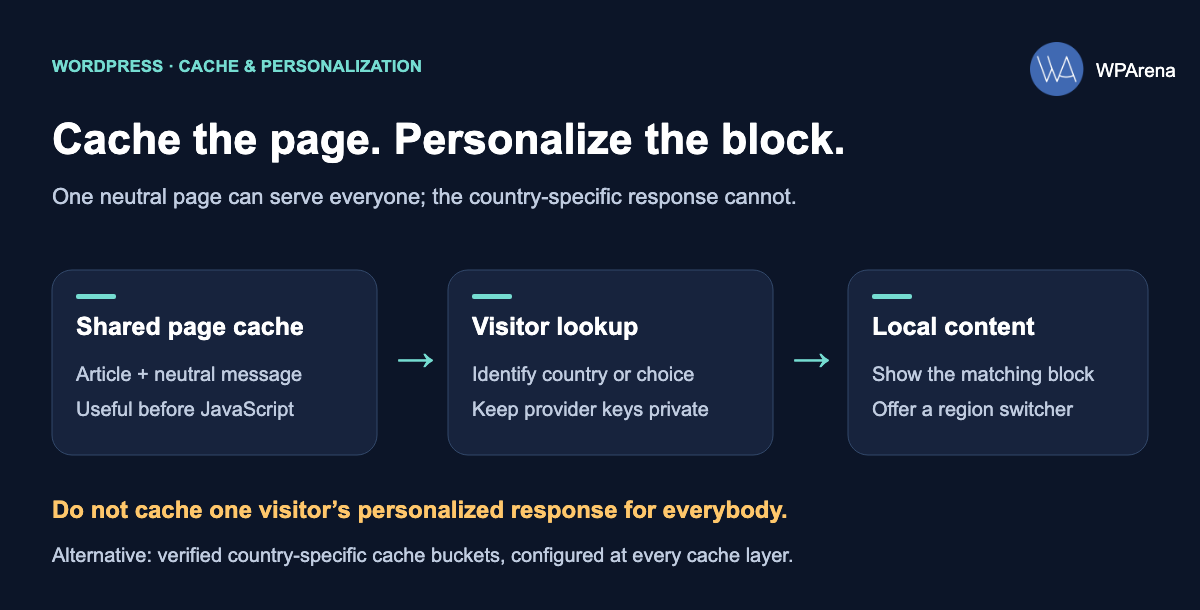
A rule can work while you are logged in and fail for everyone else. Imagine that the first visitor is in Canada. WordPress renders a Canadian offer, and the page cache saves that HTML. A later visitor in Germany receives the saved Canadian page without the targeting rule running again.
GeotargetingWP’s cache guide describes this conflict. The important question is where personalization happens in relation to every cache—not whether the plugin has a checkbox labeled “cache.”
Choose one of two delivery patterns
- A neutral page with AJAX personalization. Cache the common page, then fetch the appropriate variation after loading. Ensure the lookup response is not shared across visitors. Reserve space for the block, provide a useful default, and handle slow or failed requests.
- Separate cache variants by country. This needs deliberate configuration at the CDN, host, and WordPress cache. Use a trusted country signal and a defined fallback. Do not assume a cookie or a request header automatically becomes part of the cache key.
GeotargetingWP’s AJAX mode replaces supported placeholders after page load. It has limitations; not every server-side PHP rule or archive behavior becomes compatible just by enabling it. Check the specific feature you intend to use.
Hidden content is not protected content. Changing visibility in a browser is suitable for a message or promotion. Enforce paid access, purchase eligibility, and restricted data on the server. A visitor can inspect HTML or call an endpoint directly.
If WordPress is headless
A frontend receiving cached content through GraphQL or REST may not receive WordPress plugin scripts or the visitor’s IP context. Installing a targeting plugin in the backend alone is not enough.
Plan a frontend integration: render neutral content first, request the visitor-specific variation through an appropriate endpoint, and keep credentials on the server. Verify the actual response and cache behavior. Avoid evaluating a country rule once during a static build and assuming it will change for each reader.
Configure WooCommerce geolocation
WooCommerce uses MaxMind GeoLite2 to estimate the customer’s location for initial tax and shipping calculations. Follow the current MaxMind integration guide:
- Create the required MaxMind account and license key.
- In WooCommerce → Settings → General, set Default customer location to Geolocate, or Geolocate (with page caching support) when appropriate.
- In Settings → Integration → MaxMind Geolocation, enter the license key and save.
- Check that scheduled database updates run, then test the storefront as a logged-out customer.
The caching-support mode can add a ?v= hash to URLs. Do not strip it blindly while trying to “clean” links. Let customers enter their actual address; an IP estimate should not override it.
Currency switching is a separate capability. For example, WooCommerce documents a dedicated Currency Switcher extension. Regional product restrictions also need their own verified checkout rules. Test your specific cart and payment flow after adding either behavior.
Keep regional pages accessible and discoverable
If Canada and Germany need substantially different pages, give each version a stable URL and link between them. A region suggestion can help visitors choose, without forcing them away from the page they requested.
Google warns that locale-adaptive pages may not expose every version to its crawlers. Follow its multi-regional site guidance: use crawlable locale URLs and appropriate hreflang when you have genuine language or regional alternatives.
- Keep the main description and navigation available when location is unknown.
- Provide visible region and language links; do not require a particular IP address to discover a page.
- Avoid automatic IP-based redirects that prevent a visitor from choosing another market.
- Keep shared article information consistent. Change the local offer, rather than hiding the entire explanation.
This is also better for readers: someone researching an overseas move should be able to inspect that market before traveling there.
Test the experience before switching it on
Write down the message each visitor should see. Then test the same public URL with a fresh browser session, not only an administrator account. Warm the cache in one country before checking a second one.
| Test | Expected behavior |
|---|---|
| Country A, then country B | Each visitor gets the intended variation, even after the page cache is warm. |
| Unknown location or lookup timeout | A useful default remains, with a link or region selector. |
| Manual region change | The chosen region wins and can be changed again. |
| Mobile and slow connection | No broken layout, large content jump, or unusable controls. |
| JavaScript unavailable | The essential page and fallback links remain readable. |
| Customer enters an address | Store calculations follow the intended address and checkout rules. |
A VPN is useful for comparing country-level behavior, but it tests the exit network, not a verified customer address. Use your plugin’s supported test mechanism on staging for repeatable rule checks.
Why the same country appears for everyone
Check shared cached HTML first. Then inspect whether a proxy is replacing the visitor IP with the origin IP. If a session stores the detected country, a network change may not update it immediately; follow the plugin’s location-cache settings when retesting.
Why a shortcode appears as plain text
Confirm that the corresponding plugin is active, the shortcode name is current, and the editor block supports it. In a headless frontend, also check that the response processes the shortcode and the necessary integration is present.
Why a page becomes slower
Measure the lookup and the page separately. Limit targeting to the blocks that need it, avoid duplicate lookups, and give the request a failure path. Watch request volume before broadening the rollout. Collect only the diagnostic detail you need, and avoid retaining raw IP addresses unnecessarily.
Common questions
Can I target content by country for free?
Yes. Geolocation IP Detection offers a free plugin with country data and shortcodes. The selected database or external service can have separate requirements or limits. Verify the data source and caching setup before relying on it.
Does IP geolocation ask for browser permission?
A server-side IP lookup does not use the browser’s location permission prompt. Browser geolocation does. These are different data flows; explain the one your site uses and request precise location only when it serves a clear purpose.
Is a city-level IP location precise enough for delivery?
Do not treat it as a delivery address. Ask the customer for an address or postcode and validate the service area through your ordering rules. A country estimate can suggest a market, but cannot confirm an individual’s eligibility.
Will installing a plugin improve search rankings?
A plugin does not guarantee better rankings. Keep useful content accessible, make regional pages discoverable, and verify that personalization does not break the page. Choose targeting because it helps visitors complete a task.
Is the Geolocation plugin the same as Geolocation IP Detection?
No. The Geolocation plugin adds location information to posts, including maps and travel features. Geolocation IP Detection provides visitor IP-location data. Choose according to whose location you need: the post’s subject or its reader.
A sensible first rollout: one country-specific delivery message, one neutral fallback, and one way to change the region. Once that works for logged-out visitors with caching enabled, add more rules gradually.
Affiliate disclosure: WPArena may earn a commission if you purchase through the Geotargeting Pro link, at no extra cost to you. The recommendations here are based on the linked publisher documentation; they do not imply a performance test of the plugins.








Responses (4 )