


WPArena reader offer: WPArena is a Relevanssi partner. Our readers can claim an exclusive 20% discount. Use code WPARENA20 at checkout on any annual or lifetime license.
Affiliate disclosure: WPArena is a Relevanssi partner and received a review license. We may earn a commission from purchases through partner links. The public search check in this review is separate from our documentation-based feature assessment.
Quick verdict: Relevanssi Premium is a strong choice for WordPress sites that need searchable documents, more control over relevance, or search across a multisite network. Its unlimited-site license is especially useful for agencies. Start with the free version if your main goal is better matching for ordinary posts and pages; upgrade when you need a specific Premium capability.
Relevanssi Premium review at a glance
WordPress search can leave useful content undiscovered when visitors search by a product SKU, a custom field, or a phrase inside a PDF. Relevanssi addresses those gaps with a configurable index. The important question is not whether it has more settings, but whether those settings help visitors find the right material on your particular site.
Relevanssi offers free and Premium editions. This review explains where the paid edition adds value, what still needs configuration, and how to check the result before enabling it on a busy WordPress website.
Review scope: We checked the vendor’s public search hands-on and reviewed its current pricing and documentation for this publication. The search screenshot below comes from that public check. It is not a benchmark of a large production database, a test of every integration, or proof that the same layout appears automatically on another theme.
| Review summary | Our take |
|---|---|
| Best for | Documentation sites, knowledge bases, WooCommerce stores, news/magazine sites, membership sites, any content-heavy WordPress site |
| Price | €120/year (unlimited sites) or €402 one-time (permanent, unlimited sites) |
| Standout features | Relevance ranking, full-text PDF/Office document search, granular weighting, user profiles and cross-site multisite search |
| Watch-outs | Live search needs a companion plugin; database resources and theme/API integration need checking |
Pros
- Configurable relevance, partial matching, synonyms and field weighting help tune results to your content.
- Full-text search inside PDFs, DOC, ODT, RTF and ePub files — a useful feature for documentation and download-heavy sites.
- Granular weighting: boost by post type, taxonomy, and even post date so fresh or important content ranks higher.
- Separate indexing, search and display controls make it possible to tune the engine in stages.
- Documented integrations with WPML, Polylang, WooCommerce and bbPress; Premium adds cross-site multisite search.
- Unlimited-site licensing — superb value for agencies and freelancers.
Cons
- Live “as you type” Ajax search isn’t built in — you add the free Relevanssi Live Ajax Search companion.
- No advanced faceted Boolean queries (e.g. nested AND/OR/NOT groups).
- The index needs database space, and larger sites need performance testing and tuning.
- There is no free trial, but Relevanssi Premium purchases are protected by a 30-day money-back guarantee.
Why default WordPress search isn’t good enough
WordPress already supports basic relevance ordering: its WP_Query documentation describes how title and phrase matches influence results. The limitation is the coverage and control available without additional code. Default search does not provide a full-text index of PDF contents or an editor-friendly way to weight all your custom fields and taxonomies. Relevanssi is useful when you need those capabilities, rather than merely a different date order.
Relevanssi replaces that engine wholesale. It builds its own search index in your database and scores results by actual relevance, the same core idea search engines use.
Free vs Premium: what you actually pay for
Relevanssi’s free version is already a huge upgrade — it adds relevance ranking, custom-field and taxonomy search, “Did you mean?” suggestions, match highlighting, synonyms, stop words and AND/OR operators. Premium is about control and reach. The features that matter most in the paid tier:
- Full-text PDF & document indexing (PDF, DOC, ODT, RTF, ePub) — free only reads file names/metadata.
- Advanced weighting — adjust relevance by post type, by taxonomy, and by post date.
- Operator control — switch AND/OR on the fly and use the NOT operator to exclude terms.
- User profiles & taxonomy terms in results, and the ability to index additional columns in the WordPress posts table.
- Search redirects, Related Posts, WP-CLI, Multisite, export/import of settings, and priority support.
How to set up Relevanssi without guesswork
Use a WordPress staging site first. Keep a database backup before building or changing the index, particularly on a store or membership site. The official installation guide explains the available controls.
- Choose what visitors should find. Include the relevant public post types. Do not index every field just because it is available: internal notes and unrelated metadata add noise.
- Configure useful fields. For example, a store may need SKU metadata, while a directory may need location and service fields. Check field names rather than assuming the visible label is the stored key.
- Build the index. Confirm completion and investigate skipped content. Changes to indexed fields may require rebuilding before they affect existing documents.
- Start with representative searches. Try an exact article title, a short topic, a SKU, a partial word, and a phrase that appears only in a document. Record the expected result for each.
- Tune weights cautiously. Increase title or selected field weights when good results are buried. Retest the whole query set after each change; improving one query can harm another.
- Check the actual frontend. Confirm excerpts, pagination, keyboard access and mobile display. Test while logged out as well as logged in so protected content stays protected.
Hands-on check: searching Relevanssi’s own website
We entered PDF into the search form on Relevanssi.com. The results page identified Relevanssi as its search engine and showed 37 results during our check. The first row included the homepage, a guide to embedded PDFs, the PDF indexing guide and the installation guide. The search box retained our query, making it easy to refine.
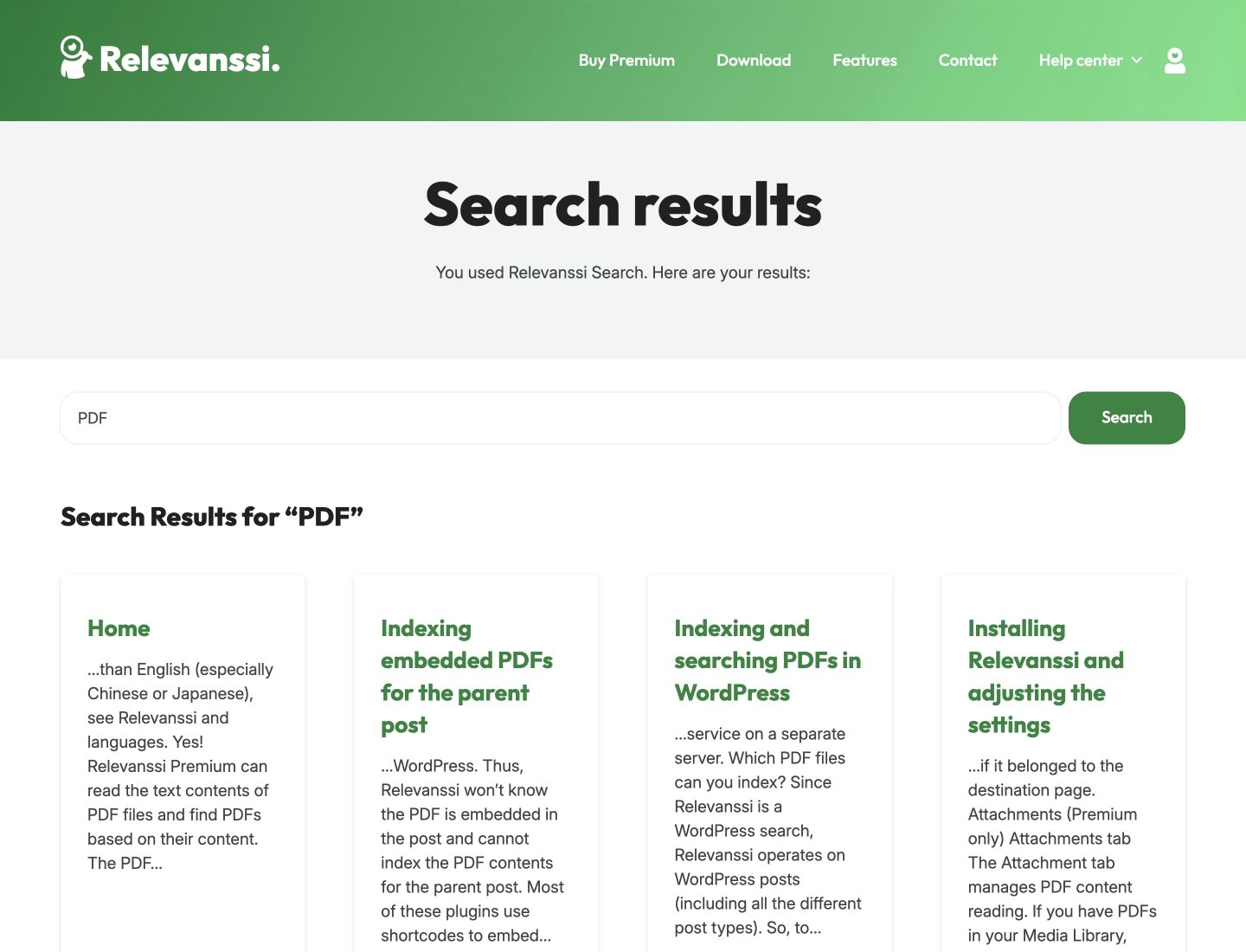
This illustrates why relevance tuning matters: the broad query returned the homepage before the dedicated PDF guide. A more specific query may serve a visitor better. We would use real customer queries to decide whether that ranking is right for a particular site, rather than treating any returned result as evidence of perfect relevance.
On a conventional WordPress site, the theme controls the search layout while Relevanssi supplies the results. Page builders and custom search widgets can use their own queries, so test compatibility. On a headless site such as WPArena, installing the plugin in WordPress does not automatically change a separate JavaScript search interface: its API and frontend must explicitly use the intended search engine.
Want instant, “as-you-type” live results?
Relevanssi’s core engine powers the results page, but if you want live, instant search — results appearing in a dropdown the moment a visitor starts typing — you add the free companion plugin, Relevanssi Live Ajax Search. It layers an Ajax auto-suggest experience on top of the same relevance engine, so you get the modern “live results” UX you see on big e-commerce and documentation sites, while keeping Relevanssi’s ranking quality underneath. It’s a two-plugin combo, but both come from the same team and are built to work together — and both are covered by the same relevance settings you tuned above.
Features to evaluate before buying
1. Relevance scoring done properly
Relevanssi gives you controls for the relative importance of indexed fields. Premium adds post-type and taxonomy weights and options to favor newer posts. A documentation site may prioritize a maintained reference page, while a publication may need a balance between detailed older coverage and fresh reporting.
2. Full-text PDF & document search
Premium indexes and searches the text inside PDFs, Word docs, ODT, RTF and ePub files. For a documentation site, university, law firm or any business with a library of downloadable files, this single feature can justify the license.
PDF requirements: Files must contain extractable text; image-only scans need OCR first. The standard document-reading service processes attachments on a separate server, so review that data flow before using it for private documents. See the PDF indexing documentation. Test a phrase found only inside a file to confirm its contents, not just its title, were indexed.
3. Search analytics
Query logging is available in the free edition too, so it is not by itself a reason to upgrade. Review searches with no results to identify missing content, unfamiliar terminology or indexing problems. A failed search does not always mean you need a new article; sometimes a synonym or a clearer title solves the problem. Set appropriate retention and avoid collecting unnecessary personal information.
4. WooCommerce, multilingual & Multisite
WooCommerce search can include product data such as SKUs and selected attributes when the relevant fields and taxonomies are configured. Test variable products and your specific search widget. WPML and Polylang integrations help with multilingual sites; Premium can search across sites in one multisite network. Neither feature removes the need to check language boundaries, permissions and result URLs.
5. Search redirects and related posts
Premium can send a specific search to a chosen destination, such as your pricing page, and offer related content. Test these rules carefully: a query that should show several useful results should not be redirected to a single unrelated page.
Performance and scalability
Relevanssi stores an index in your WordPress database. That uses storage and processing resources: the plugin directory suggests budgeting roughly three times the size of the posts table for the index, although actual requirements vary. We have not independently benchmarked a million-post installation and would not promise a universal capacity or response time. Measure indexing time, database growth and representative search latency on your own hosting. Limit unnecessary indexed fields, test throttling, and consider Relevanssi Light or an external search service if the full engine does not suit your resource limits. Check current plugin requirements before installing rather than relying on an old PHP compatibility range.
Honest limitations
Relevanssi is primarily a search engine, not a complete faceted browsing interface. Live suggestions use the separate free Relevanssi Live Ajax Search plugin. Nested Boolean expressions are a different requirement from basic AND/OR and exclusion operators. Arbitrary custom database tables are not automatically searchable; a developer may need to expose data through supported content and hooks. Document extraction also deserves a privacy review before processing confidential files. Check access restrictions in both result titles and excerpts.
Relevanssi Premium pricing
Pricing at the time of writing: Annual: €120. Permanent: €402. These are the listed prices before the WPArena discount; confirm the final total and any applicable tax at checkout.
| Plan | Price | What you get |
|---|---|---|
| Annual | €120 | Unlimited sites, one year of updates & priority support |
| Permanent | €402 | Unlimited sites, lifetime updates & support for the current major version |
Unlimited-site licensing is particularly useful if you maintain several client websites. At the current undiscounted prices, €402 is less than four annual purchases (€480). The annual license is not an automatically renewing subscription: it buys one year of updates and support. If you do not renew, the installed version continues to work, but you lose access to updates and support. The vendor’s FAQ describes permanent support and updates as covering the current major version.
WPArena reader offer: use code WPARENA20 at checkout for 20% off an annual or lifetime license. Get Relevanssi Premium →
Who should buy Relevanssi Premium?
- Buy it if you run a documentation site, knowledge base, WooCommerce store, news/magazine, membership or any content-heavy site — especially with PDFs, custom fields, or multiple languages, or if you manage several sites.
- The free version may be enough if you run a small blog and just want relevance ranking and highlighting without document-content indexing, weighting by post type or cross-site multisite search.
- Look elsewhere if your core requirement is faceted filtering or a hosted external search index — that’s a different product category.
Verdict: a strong search upgrade when you need Premium features
Relevanssi Premium is worth considering when document content, user profiles, taxonomy pages or cross-site search are central to your website. The unlimited-site license also makes its cost easier to justify across client projects. For an ordinary blog, try the free version first and identify a concrete limitation before paying. Our recommendation depends on that fit: the right index, sensible weights and a working frontend matter more than a long feature list.
Relevanssi Premium FAQ
Is Relevanssi Premium worth it?
For content-heavy sites, yes. If you rely on custom fields, PDFs, WooCommerce data or multiple languages — or you need the additional weighting controls — Premium may justify its price. Small blogs may be fine on the free version.
Does Relevanssi search PDF files?
Relevanssi Premium indexes and searches the full text inside PDF, DOC, ODT, RTF and ePub files. The free version only reads file names and metadata.
Is Relevanssi good for WooCommerce?
It can improve product discovery when SKUs, descriptions, attributes and custom fields are configured correctly. Test variable products and your theme’s search widget before going live.
How much does Relevanssi Premium cost?
€120 per year or €402 one-time (permanent), both for unlimited sites. WPArena readers get 20% off with code WPARENA20.
Is there a free trial?
There is no free trial, but Relevanssi Premium purchases are protected by a 30-day money-back guarantee.
Does Relevanssi slow down my site?
It can add database and processing load, especially while indexing or serving expensive searches. A dedicated index is not a guarantee of faster results on every site. Test with realistic content and traffic, measure response times, and tune the index before going live.
Sources and further reading
- Official Premium pricing and licensing and refund FAQ
- Free and Premium feature comparison on WordPress.org
- Relevanssi user manual
- WordPress SEO guide: site search helps visitors navigate; it does not guarantee a Google ranking improvement.




Responses (0 )