

If you want control over the WordPress Visual Editor tools to format web content, In either case, it is possible to extend or replace the WP WYSIWYG with third-party plugins to achieve your goals. The Visual Editor can be replaced or extended via plugins to give you more control.
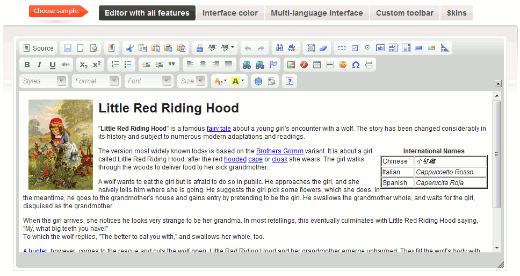 Dean's FCKEditor is based on the FCKEditor, a fast and lightweight open-source application for creating XHTML 1.0. Dean's FCKEditor is multi-browser compatible, including: IE 5.5+, Safari 3.0, and Firefox 1.0+.
This plugin Replaces the default WordPress editor with CKeditor.
Some of the most useful tools available include:
Special Characters, Horizontal Lines, Anchors, Forms, Templates, and Replace.
Another reason to use the FKCEditor is that it allows you to paste from Word—with auto-detection cleanup.
To switch between HTML view or the FCKEditor Visual Editor, click the Source button.
To upload Flash using the FCKEditor, simply click the Flash logo. If this is difficult to identify, hover over the buttons for tooltips—look for Insert/Edit Flash.
A handy chart explaining all the buttons on the toolbar can be found here Dean's FCKEditor For WordPress
Download Dean's FCKEditor Plugin
Dean's FCKEditor is based on the FCKEditor, a fast and lightweight open-source application for creating XHTML 1.0. Dean's FCKEditor is multi-browser compatible, including: IE 5.5+, Safari 3.0, and Firefox 1.0+.
This plugin Replaces the default WordPress editor with CKeditor.
Some of the most useful tools available include:
Special Characters, Horizontal Lines, Anchors, Forms, Templates, and Replace.
Another reason to use the FKCEditor is that it allows you to paste from Word—with auto-detection cleanup.
To switch between HTML view or the FCKEditor Visual Editor, click the Source button.
To upload Flash using the FCKEditor, simply click the Flash logo. If this is difficult to identify, hover over the buttons for tooltips—look for Insert/Edit Flash.
A handy chart explaining all the buttons on the toolbar can be found here Dean's FCKEditor For WordPress
Download Dean's FCKEditor Plugin
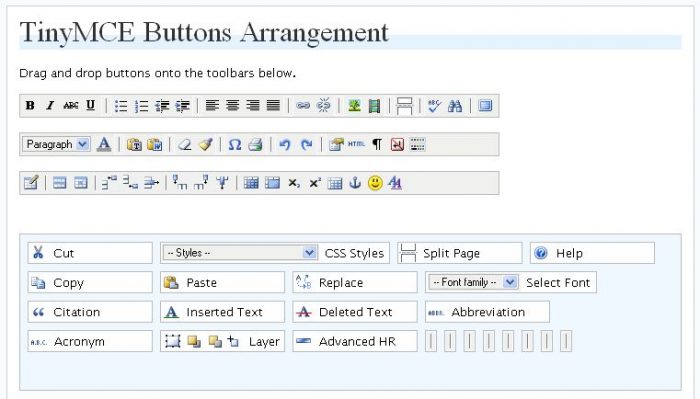 TincyMCE adds fifteen plugins to the WP Visual Editor. The most useful of these include:
Advanced Image, Advanced Link, Context Menu, Layers, and Paste from Word. The TinyMCE Advanced homepage is TinyMCE Advanced
Download TinyMCE Advanced
TincyMCE adds fifteen plugins to the WP Visual Editor. The most useful of these include:
Advanced Image, Advanced Link, Context Menu, Layers, and Paste from Word. The TinyMCE Advanced homepage is TinyMCE Advanced
Download TinyMCE Advanced
1. Dean's FCKEditor For WordPress
Dean's FCKEditor is based on the FCKEditor, a fast and lightweight open-source application for creating XHTML 1.0. Dean's FCKEditor is multi-browser compatible, including: IE 5.5+, Safari 3.0, and Firefox 1.0+.
This plugin Replaces the default WordPress editor with CKeditor.
Some of the most useful tools available include:
Special Characters, Horizontal Lines, Anchors, Forms, Templates, and Replace.
Another reason to use the FKCEditor is that it allows you to paste from Word—with auto-detection cleanup.
To switch between HTML view or the FCKEditor Visual Editor, click the Source button.
To upload Flash using the FCKEditor, simply click the Flash logo. If this is difficult to identify, hover over the buttons for tooltips—look for Insert/Edit Flash.
A handy chart explaining all the buttons on the toolbar can be found here Dean's FCKEditor For WordPress
Download Dean's FCKEditor Plugin
2. TinyMCE Advanced
TincyMCE adds fifteen plugins to the WP Visual Editor. The most useful of these include:
Advanced Image, Advanced Link, Context Menu, Layers, and Paste from Word. The TinyMCE Advanced homepage is TinyMCE Advanced
Download TinyMCE Advanced









Responses (1 )