

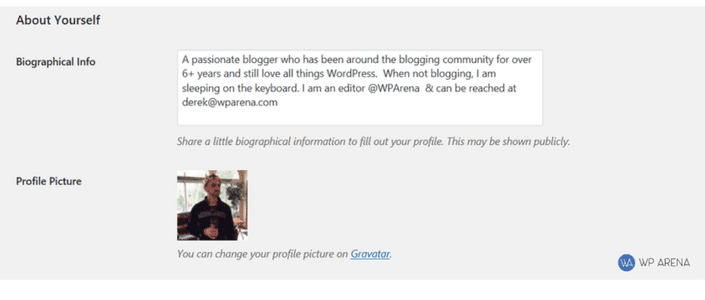
An author box helps readers understand who wrote a WordPress article, why they should trust it, and where they can find more work from the same author. It is useful for single-author blogs, multi-author magazines, review sites, and editorial teams that care about transparency.
The simplest author box uses WordPress profile fields, a Gravatar image, and theme support. A plugin can help when your theme does not include an author box or when you need social links, guest authors, multiple authors, or stronger design controls.
Start with the WordPress user profile
In the WordPress dashboard, go to Users > Profile or Users > All Users and edit the author. Fill in the display name, website, biography, and any social profile fields your theme or SEO plugin supports.
Use a real display name for accountable editorial content. Avoid exposing usernames as public bylines. For team content, use a clear team author such as Editorial Staff and link it to a maintained author archive.
Add the author photo
WordPress commonly uses Gravatar for author images. The email address on the user profile controls the Gravatar image. If your theme or plugin lets you upload a local avatar, use a square image that is clear at small sizes.
For WPArena-style editorial pages, the author photo should not be decorative. It should support trust, make the byline easier to scan, and avoid broken or stretched images.
Use a theme author box when it is good enough
Many modern WordPress themes include an author box setting under the customizer, theme options, or block theme templates. Turn it on first before installing another plugin. Then check the single post on desktop and mobile.
- The author name should be readable and link to the author archive.
- The biography should be short and specific.
- The image should be round or square without extra white padding.
- The box should not overpower the article conclusion or comments.
- The layout should work after long names and multiple lines of bio text.
When to use an author box plugin
Use a plugin only when the theme author box is missing or too limited. Good reasons include guest authors, co-authors, social profile links, schema support, custom avatars, or per-post author overrides.
Before choosing a plugin, check recent updates, active support, block editor compatibility, and whether it adds unnecessary frontend assets. An author box should be lightweight because it appears on many posts.
Author box checklist
- Use one public author URL for each writer or team author.
- Keep the bio current and avoid generic marketing language.
- Link Editorial Staff and team authors to a maintained author page.
- Use consistent avatar sizing across single posts and author pages.
- Review mobile spacing, contrast, and image cropping.
- Add author information to Article schema through your theme, SEO plugin, or frontend template.
Common mistakes
Do not add several competing author boxes from the theme, SEO plugin, and another plugin. Do not show a username instead of a display name. Do not use a broken Gravatar placeholder. Do not link author names to empty archives.
If a post is written by an editorial team, say that clearly. For example, WPArena uses Editorial Staff for team-maintained guides and links it to the author archive so readers can see related work.



Responses (1 )