


A DMARC analyzer turns raw DMARC data into operational clarity. Every mail receiver (including Gmail and Yahoo) emits a DMARC aggregate report as an XML report that lists sending sources, alignment results, and message actions. The right DMARC analyzer will parse DMARC report feeds reliably, correlate message volumes by domain and IP address, and produce a human readable report that supports day‑to‑day email authentication decisions. That visibility is essential to guide staged policies—monitor, quarantine, then reject—without harming legitimate email delivery.
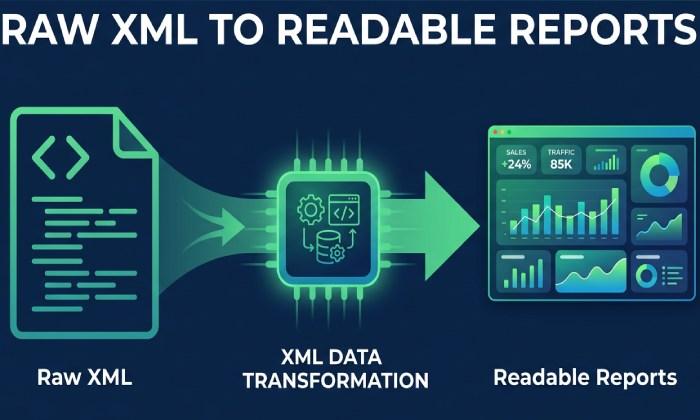
Turning XML report data into a human readable report
Convert every DMARC report (RUA) XML report into searchable, filterable aggregate reports, plus per‑source diagnostics.
Summarize SPF authentication and DKIM authentication outcomes and alignment in a human readable report for non‑specialists.
Tracking message volumes and message actions
Trend message volumes across domains, subdomains, and streams to spot anomalies.
Explain message actions (none, quarantine, reject) so teams understand why a receiver treated a message as it did.
Risks without visibility
Without aggregate reports, organizations fly blind. Attackers exploit weak or misconfigured email authentication to launch phishing and business email compromise campaigns. Lack of oversight also undermines compliance, data governance, and broader cybersecurity programs, while increasing insider threat exposure when internal tools spoof corporate domains.
Phishing, business email compromise, insider threat
Detect unauthorized sources before they harm brand protection and data protection.
Use aggregate reports to pinpoint shadow senders and third‑party tools impersonating your domain.
Deliverability and reputation management
Monitor reputation management indicators across Gmail, Yahoo, and other providers to avoid blacklists.
Use the DMARC analyzer to correlate alignment with email delivery outcomes and reduce false positives at quarantine/reject.
Outcomes for brand protection and compliance
A mature DMARC management program improves email security, threat protection, and risk management—backed by auditable evidence. Expect fewer spoofing attempts, stronger reputation, and predictable enforcement that supports data compliance.
Email security and threat protection improvements
Enforce policies (quarantine, then reject) when aggregate reports confirm authentication and alignment are stable.
Feed insights to security solution owners, SOC analysts, and Security Behavior Management teams to elevate security awareness.
DMARC management maturity: monitor, quarantine, reject
Start at p=none to inventory message volumes and sources; progress to p=quarantine and p=reject as coverage improves.
Use the DMARC report timeline to justify change control and demonstrate customer success to stakeholders.
Prerequisites Check: SPF, DKIM, and Alignment (aspf/adkim) Readiness
Validate SPF authentication
SPF authentication begins with correct sender authorization and consistent envelope domains. Use DNS lookup and MX lookup to confirm includes and mechanisms, and ensure each sending IP address is present. Tools like MxToolbox SuperTool, Delivery Center, and Cloudflare DNS dashboards help verify records and spot syntax errors before you setup DMARC.
DNS lookup, MX lookup, IP address authorization
Keep SPF under lookup limits; flatten where needed and prune stale vendors.
Map each platform’s IP address ranges to the correct domain or subdomain for clean alignment.
Analyze headers to verify pass/fail and alignment
Analyze headers from sample messages to confirm SPF authentication results and domain alignment (RFC7208).
Track outcomes in the DMARC analyzer to reconcile header tests with aggregate reports.
Validate DKIM authentication
DKIM authentication requires stable selectors, strong keys, and consistent signing of your organizational domain. Rotate keys periodically, ensure vendors sign with your domain, and verify that Gmail and Yahoo show DKIM=pass at scale. Monitoring via diagnostics in your DMARC analyzer will surface gaps that could block a safe move to quarantine or reject.
Alignment policies and readiness
Set alignment to match your risk tolerance: aspf and adkim relaxed for initial rollout; tighten to strict when third‑party platforms sign with your domain reliably. Plan subdomain handling with sp= to avoid breaking niche streams while you mature email health.
Selecting a DMARC Analyzer: Must-Have Features, Privacy, and Integrations
Must‑have features
Choose a report analyzer that can parse DMARC report feeds from every receiver without delay, de‑duplicate XML report entries, and correlate SPF authentication and DKIM authentication outcomes per source. Look for dashboards that produce a human readable report, break down message volumes by domain and stream, and surface real‑time insights for delivery center triage. At minimum, require:
Reliable parsing for every DMARC aggregate report, with drill‑downs and exportable aggregate reports.
Enforcement planning that simulates quarantine and reject impacts before changes go live.
Blacklists checks, diagnostics, and monitoring to tie authentication to email delivery results.
Privacy, data governance, and integrations
Your DMARC record includes rua/ruf endpoints that may carry regulated data in reporting metadata. Ensure the provider’s data governance, data protection, and data compliance controls meet your requirements and your broader compliance posture. Leading options—DMARC Analyzer (by Mimecast), MxToolbox Delivery Center, PowerDMARC—offer API integration for automation and an API Reference or API Documentation on their API Platform. When evaluating the Mimecast platform, consider next‑generation protection tie‑ins (e.g., Mimecast Email Archive, Threat Intelligence Hub) and review partner programs like the Mimecast Partner Services Program for Managed Service Providers (MSP), Reseller Partners, and Technology Alliance Partners. Many vendors publish a resource library—Cyber Insights Blog, Mimecast Community, Mimecast Customer Stories, and even SpringLaunch announcements—that illustrate customer success and technology alliance roadmaps.
Also confirm single‑sign‑on, role‑based access, and privacy controls; assess whether ruf forensic flow is minimized and masked. If your policies require advanced governance, map outputs into Aware Governance & Compliance Suite or Incydr Data Protection workflows.
Build Your Sending Inventory: Domains, Subdomains, Streams, and Third‑Party Platforms
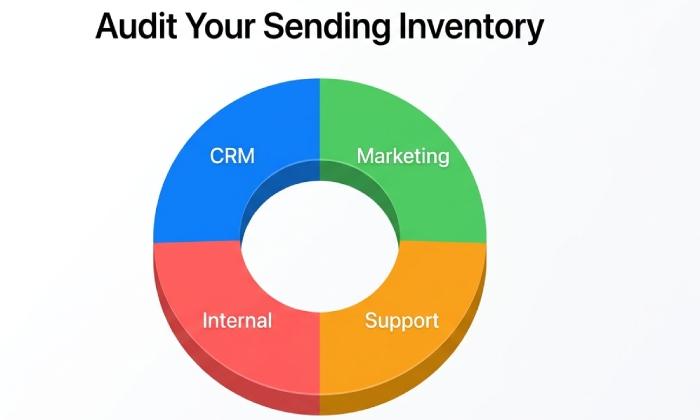
Inventory starts with message volumes by domain, then drills into subdomains and streams (transactional, marketing, support). Group senders by IP address or provider to understand which sources will pass SPF authentication and DKIM authentication today.
Message volumes by source, IP address mapping
Use aggregate reports to tie each XML report line item to a platform and contact owner.
Track growth in message volumes over time to inform when it’s safe to quarantine or reject.
Third‑party platforms: Cloudflare, marketing, CRM, and MSPs
Document DNS‑related services (e.g., Cloudflare) and outbound platforms (marketing automation, CRM, ticketing).
Engage your managed service provider early to align signing domains and selectors.
Identify providers and partners
Catalog all service providers and align them with contracts and internal owners. Include Reseller Partners, Managed Service Providers (MSP), and Technology Alliance Partners who may send on your behalf. Don’t forget internal systems tied to email collaboration, ticketing, or your email archive solutions such as the Mimecast Email Archive.
Monitoring and risk management
Establish ongoing monitoring so new tools don’t silently erode alignment. Use Delivery Center blacklists checks and diagnostics to catch reputation drift and drive risk management actions.
Blacklists and diagnostics in Delivery Center
Run routine blacklists queries and DMARC analyzer diagnostics; correlate with bounce codes and message actions.
Use real‑time insights to alert when new sources appear in a DMARC report or spike message volumes.
Security awareness and Security Behavior Management programs
Share human readable report summaries with executives to reinforce security awareness.
Feed findings into Security Behavior Management and training to reduce phishing susceptibility.
Publish and Validate Your Initial DMARC Record: rua/ruf, p, fo, pct, sp, aspf/adkim
From record construction to enforcement
Construct your initial DMARC record with p=none and precise reporting: rua= for aggregate reports and ruf= for limited forensic flow, plus fo=1 (or 0:1:s) to tune failure samples. Set pct=100 for full visibility, define sp= for subdomain policy, and choose aspf/adkim to match your readiness. Publish via DNS (Cloudflare or your registrar), then validate with tools like MxToolbox SuperTool and your chosen DMARC analyzer. As aggregate reports arrive, your platform should parse DMARC report data from each XML report automatically, normalize results, and present a human readable report showing SPF authentication, DKIM authentication, and alignment by source.
Use the DMARC report evidence to close gaps with vendors, update selectors, and adjust SPF includes. When aggregate reports show stable alignment and acceptable email delivery, move to p=quarantine. Continue to parse DMARC report streams daily and track message actions; as false positives drop and message volumes are fully authenticated, proceed to p=reject. Apply sp=quarantine or sp=reject for subdomains when inventory is complete.
Operationalize DMARC management by integrating the API Reference of your platform for ticketing and dashboards, and automate notifications via API integration. Maintain a resource library for playbooks (setup DMARC, analyze headers, DMARC record change control). For broader program value, connect insights to the Mimecast platform (Delivery Center, Threat Intelligence Hub) or similar security solution stacks, and engage communities such as Mimecast Engage and Mimecast Community. Leverage partner programs and Technology Alliance Partners to streamline onboarding, and encourage internal champions to share wins through Mimecast Customer Stories. Over time, consistent use of the DMARC analyzer, continuous monitoring of every DMARC aggregate report, and disciplined reviews of each XML report will sustain email security, brand protection, and reputation management—ensuring that quarantine and reject policies protect users while preserving business‑critical email delivery.





Responses (0 )