



The latest version is 6.9.4, which is a security and maintenance version. This is associated with improving the security of a platform, solving the vulnerabilities detected in the previous releases, and turning the WordPress websites into a more pleasant experience. It is strongly recommended that the owners of the websites must upgrade their installations to this new version in order to have their websites safe and efficient.
Key Highlights of WordPress 6.9.4
Important Security Fixes
The main feature of WordPress 6.9.4 is the attention to security issues that were not entirely fixed in the preceding versions including version 6.9.2 and 6.9.3. The WordPress security team published the update so that all patches had been installed correctly, and websites were safe.
The following are some of the major security fixes:
- Path traversal vulnerability of PclZip library.
- Notes feature Authorization bypass problem.
XML External Entity (XXE) vulnerability in getID3 library.
These patches assist in securing the WordPress sites against possible attacks and intrusion.
Improved Content Creation Process.
The 6.9 series of WordPress brought a series of enhancement to the content editing. The block editor has also been designed with a smoother and more intuitive interface that gives users the ability to create and manage the content more effectively.
Some improvements include:
- Enhanced drag and drop support of blocks.
- Improved layout controls to have a better page design.
- Faster editing performance
These have led to simplification of building professional looking pages without the use of codes.
Features with Notes: Collaboration.
There is a new Notes feature that allows the users and teams to comment directly on the editor. This facilitates easy collaborating in case more than one individual is doing content or web design.
With Notes, users can:
Insert comments right to the blocks.
- Suggestions and change of tracks.
- Enhance team work in content editing.
This aspect comes in handy especially when one is managing big websites in a group.
Faster Navigation Command Palette.
The other helpful addition made in the 6.9 version is the Command Palette which enables the user to access various sections of the WordPress dashboard very fast.
Using keyboard shortcuts, the user can:
- Quickly move between pages.
- Access settings faster
- Do not have to make more than single clicks.
This capability enhances the efficiency of workflow in the case of developers and content creators.
Performance Enhancements
The other important aspect of wordpress 6.9 updates is performance improvements. A number of back-end optimization enable web sites to load quicker and enhances the overall performance of the websites.
These include:
- Improved script loading
- Optimized stylesheet processing.
- Improved Largest Contentful Paint (LCP) performance.
Such enhancements can deliver enhancements in user experience and the SEO performance of websites.
How to Update to WordPress 6.9.4
WordPress is easy to update and can be updated directly at the dashboard.
Steps to update:
Access your WordPress account.
Go to Dashboard updates.
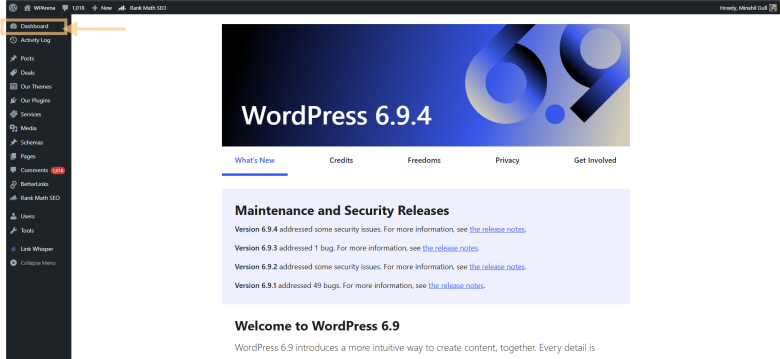
Click Update Now
Wait until the update process is done.
WordPress can automatically update itself assuming there is an auto-update feature.
see here how to make a website in 2026.
Bottom Line
WordPress 6.9.4 is a significant maintenance and security update that is created to secure the websites and enhance stability. Although no significant new features are added to the platform, it makes sure that the platform is safe and trustworthy to millions of websites across the globe. It is strongly advised that it be updated to the latest version to enjoy the latest security patches and enhancements in performance.
Frequently Asked Questions
WordPress 6.9.4 What is it and why was it released?
WordPress 6.9.4 is a maintenance and security release that is meant to address vulnerabilities and bugs in previous releases of WordPress. The release enhances overall stability, makes it secure and compatible with the modern themes and plugins.
Will I lose my theme or plugins with an update to WordPress?
Generally, the updates are not problematic, however, in certain instances, the themes or even the plugins do not always run on a new release. This may lead to layout or functionality problems and in particular when the plugins are not updated recently.
What will happen with me when I do not update the WordPress?
Failure to update your website may expose it to security attacks, malware, and performance problems. A large number of the hacked websites have either old versions of WordPress, themes, or even plugins, thus are easier to attackers.
Leave a Reply