
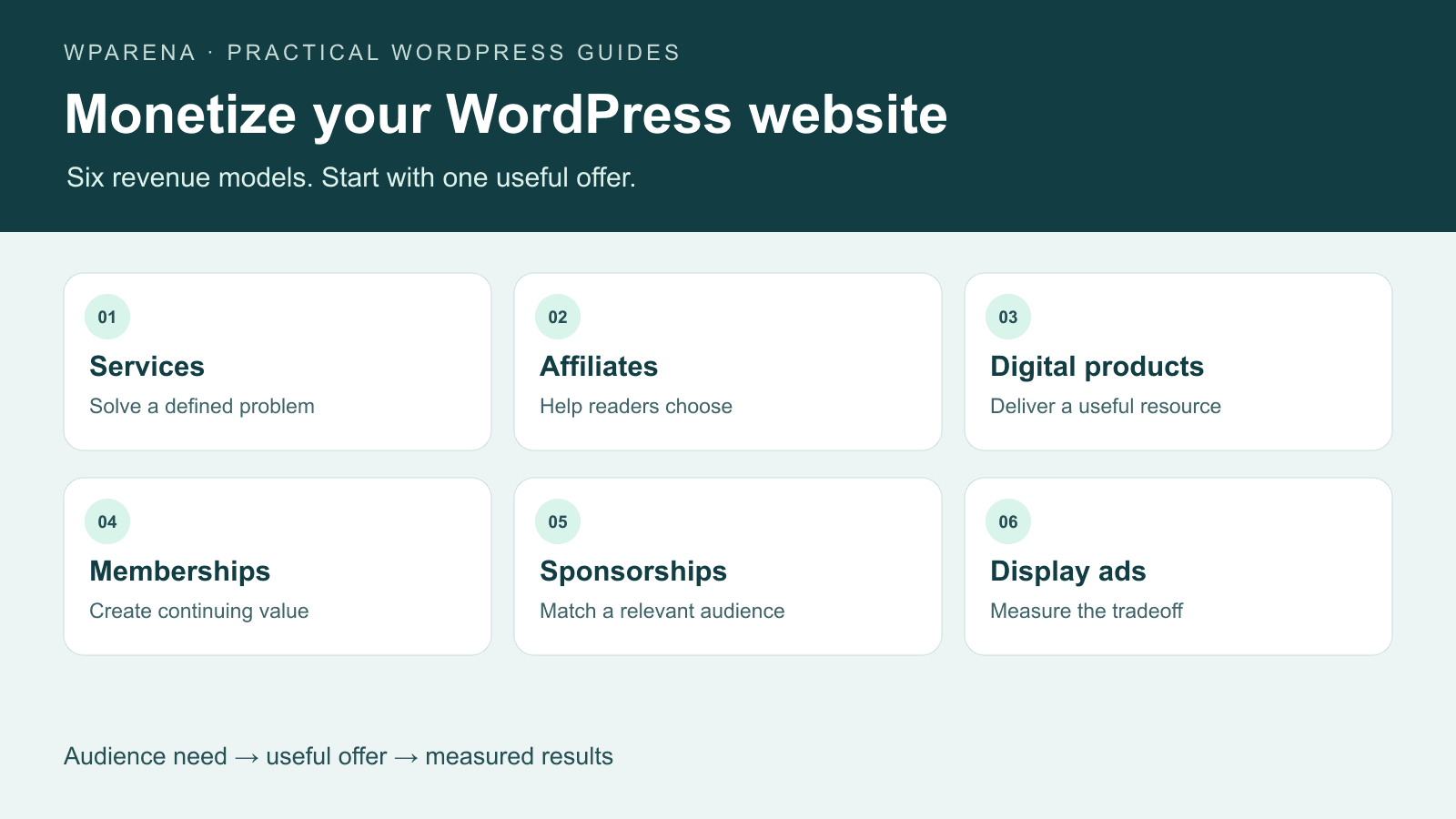
Build revenue around the reason people visit your website.
A reader comparing software may welcome a useful affiliate recommendation. Someone looking for a fix may prefer to hire you. A returning reader might pay for a resource they use every week. Choose the offer that fits that moment before adding another plugin or ad slot.
You can monetize a WordPress website through services, affiliate recommendations, digital products, memberships, courses, sponsorships and display advertising. For a small site, start with one useful offer and a working conversion path. Add a second revenue stream only after you understand what the first one earns and costs to maintain.
Affiliate disclosure: WPArena may earn a commission when you buy through the marked commercial links in this guide, at no additional cost to you. Free tools and direct documentation links are included where they fit. A commission does not determine which revenue model is right for your site.
Maintained by WPArena Editorial Team, led by Jazib Zaman. This guide draws on our work operating a WordPress publishing site and checking its affiliate routes. Product features are linked to official documentation; the tools below are options to evaluate, not a claim that each was newly installed or benchmarked for this update.
Which website monetization method should you start with?
Look at what readers already ask for. Search queries, support emails, contact enquiries and repeat visits often reveal a better first offer than a generic list of “passive income” ideas. A small audience with a specific problem can be more useful to a service business than a large audience with no interest in buying.
| Method | Good starting fit | What you need | Main ongoing cost |
|---|---|---|---|
| Services | Expertise and a clearly defined customer problem | Offer page, enquiry form, delivery process | Your time and client support |
| Affiliate marketing | Readers researching a purchase | Useful comparisons, approved programs, tracked links | Research and keeping recommendations current |
| Digital products | A repeatable problem you can solve with a resource | A product, checkout, secure delivery | Updates, refunds and support |
| Memberships / courses | A loyal audience seeking continued help | Access rules, payments, learning or member experience | Retention, content and moderation |
| Sponsorships | A defined audience relevant to advertisers | Media kit, terms, labeled placements | Sales, reporting and editorial review |
| Display ads | Content that attracts sustained readership | Network approval, placements and policy compliance | Performance impact and ad operations |
Our starting recommendation: if you already have a marketable skill, test a focused service. If your best pages help readers compare products, test a few contextual affiliate links. If readers repeatedly request the same resource, validate a small digital product. Treat ads as a measured addition, not the reason to make pages longer.
Use reader questions and existing demand.
Make the price, benefit and next step clear.
Review revenue, costs and reader experience.
1. Sell a defined service
Services can work before you have enough traffic to make advertising worthwhile. A WordPress tutorial can lead naturally to a migration, accessibility review, maintenance plan or troubleshooting session. The reader should understand what they receive without arranging a call just to decode the offer.
- Choose a bounded outcome. “Move one WordPress site and verify its key pages” is easier to assess than “complete digital transformation.” State what is included and what would require a separate quote.
- Create an offer page. Explain the deliverables, expected process, eligibility, pricing or quotation method, and how revisions or support work.
- Collect only useful enquiry details. Ask for the site URL and problem description. Do not ask people to send administrator passwords through a public contact form.
- Connect relevant articles to the offer. Put the invitation after the useful explanation, where a reader can decide whether to continue alone or hire help.
Track qualified enquiries and completed projects, not just form submissions. A campaign that generates many unsuitable leads may consume more time than it earns. Leave room in the price for scoping, communication and work that is not directly billable.
2. Add affiliate recommendations that help a buying decision
Affiliate marketing pays you for qualifying referrals under a merchant’s program terms. The practical work is choosing products worth recommending, explaining their tradeoffs and keeping the recommendation accurate. A large commission is not a substitute for audience fit.
- Join the relevant program. Approval, qualifying purchases, attribution windows, reversals and permitted promotion methods vary. Read the merchant’s terms before using a redirect or posting links in email.
- Document the recommendation. Explain who the product fits, what it costs to operate, what it cannot do and whether your evidence comes from use, a demo or documentation.
- Store the tracking destination centrally. BetterLinks or another link manager makes updates easier. A route such as
/go/product-name/should lead to the approved merchant or network URL, not another internal short link. - Add the disclosure and link attribute. Explain that purchases can earn you a commission near the recommendation. Mark the commercial anchor with
rel="sponsored"; Google also acceptsnofollowfor paid links. - Test the complete redirect. Check desktop and mobile, the intended product page and the affiliate parameters. A successful click count proves a click, not an approved commission.
Use deep links when a network such as Impact and the merchant allow them. Link to the actual plan or product being discussed rather than forcing readers to search a generic homepage. Keep campaign labels free of personal information and compare network-approved earnings with your click reports.
Our own BetterLinks routes illustrate the separation: the WordPress link manager stores the destination; the public WPArena route must actually redirect there. With a headless frontend, a WordPress-only setting does not prove that the public link works.
Google explains the markup in its outbound link guidance. For US-facing endorsements, the FTC’s affiliate disclosure guidance emphasizes a clear, conspicuous explanation close to the recommendation. A disclosure page alone may be missed; a plugin cannot guarantee that a particular presentation meets every applicable requirement.
3. Sell digital products and downloads
Start with a resource people already need: a spreadsheet, template, guide, preset, design asset or small software product. Define the customer and the finished result before building a large catalogue. A product that requires hours of individual setup for every buyer behaves more like a service and should be priced accordingly.
Easy Digital Downloads is a digital-commerce option. WooCommerce is useful when downloads share a store with other products. Compare the complete setup—payment fees, renewals, extensions, delivery limits and support—not just whether the base plugin is free.
A simple WooCommerce download workflow
- Create a product and explain exactly what the buyer receives, including file formats, requirements and license terms.
- For a file with no physical shipment, select both Virtual and Downloadable.
- Add the file, price and any download or expiry limits. Choose a delivery method appropriate for the file size and your hosting.
- Configure payments, confirmation emails and access after payment. Check the customer’s order and download screens.
- Use the payment provider’s test mode to verify success, failure and refund behavior before accepting live orders.
WooCommerce documents the virtual and downloadable settings and file delivery controls. Avoid putting a paid file at an unrestricted public URL and assuming that hiding its link protects it. Our WordPress ecommerce guide covers the wider store setup.
4. Build memberships, courses or paid access
A membership promises continuing value. A course promises a learning outcome. A one-time paid article or event promises access to a particular item. Choose the payment and access model first; then select software that supports it. These models are not interchangeable just because each has a checkout button.
- Membership: plan the publishing schedule, support boundaries, renewal reminders and cancellation experience. Watch voluntary cancellations and failed renewals separately.
- Course: define the outcome, lessons and support model. A course plugin helps organize learning, but it does not create demand for the material.
- Pay-per-view or one-time access: specify whether access expires, whether repeat viewing is allowed and what happens if an event is postponed.
- Paid community: budget for onboarding and moderation. An empty discussion area does not become valuable because access costs money.
Two options to evaluate
ARMember is a WordPress membership option for access plans and restrictions. Check gateway availability, recurring-payment behavior and the exact features in the version you intend to buy. BuddyBoss is relevant when community profiles, groups and member interaction are central; confirm how your chosen membership or course system handles billing and access.
We may earn a commission from purchases through these buttons. They use existing WPArena BetterLinks destinations; ARMember routes through Impact. These are different tools, not a requirement to buy both.
Test access as a logged-out visitor, an active customer, an expired member and a refunded customer. Check downloads as well as pages. For a headless site, enforce entitlement on the server or API: hiding content in the browser leaves it exposed if the response still contains the full material.
If you want eligible subscription content indexed, review Google’s paywalled-content documentation. Structured data describes the paywall; it does not secure the content or replace a working access-control system.
5. Sell sponsorships and advertising space directly
A sponsor buys access to a relevant audience or a clearly described placement. Build a short media kit with your topic, audience evidence, available formats, reporting method and commercial contact. Date your audience figures and distinguish estimates from measured results.
Agree on the placement, dates, creative dimensions, destination link, labeling, revision limits and payment terms before scheduling a campaign. Say what happens when a creative arrives late or an agreed placement cannot run. Avoid promising a specific number of sales when you only control delivery of the placement.
- Use an unmistakable advertising or sponsorship label.
- Keep sponsored links marked appropriately; do not sell ranking-passing links.
- Set start and expiry dates so old banners do not remain indefinitely.
- Report the metric you actually measured: impressions, clicks or agreed deliverables.
- Reserve the ability to reject misleading claims or offers unrelated to readers.
An ad manager can help with rotation and placement, but it does not replace these commercial checks. Ad Inserter’s official directory page describes code-placement and advertising support. Choose one insertion system and check its output before adding a second plugin that may duplicate the same ad code.
6. Add AdSense or another display ad network carefully
Display ads exchange a portion of the reading experience for advertising revenue. Revenue depends on the audience, advertiser demand, geography, season, consent choices, ad visibility and other factors. There is no universal earnings rate that applies to every thousand visitors.
How to add AdSense to a conventional WordPress site
- Review the current eligibility and content policies, then add your website through AdSense. Account and site approval are separate from installing a plugin.
- Follow Google’s WordPress and Site Kit instructions to connect the site, or use the code supplied by your account through a supported insertion method.
- Choose either the automatic placements you want or specific manual units. Check for duplicate scripts when the theme, a plugin and a tag manager can each add code.
- Follow your account’s ads.txt instructions where requested. Verify the file on the actual public domain using the seller record supplied by the account.
- Configure applicable consent behavior and review the mobile page before expanding placements.
- After launch, inspect earnings alongside layout stability, engagement and conversions for your own offers.
Use the code supplied by your own account, not a publisher ID copied from a tutorial. Google’s site connection instructions cover the verification options. Avoid editing a parent theme merely to paste an ad script that an update may remove.
Do not buy low-quality visits, click your own ads or encourage readers to click to “support the site.” Do not rely on old tutorials claiming that every site is limited to three AdSense units or that a particular email address guarantees approval. Use current account instructions and Google’s invalid-traffic guidance rather than those shortcuts.
Keep advertising from damaging the page
- Reserve space for ad slots so text does not jump when an ad loads.
- Keep ads away from navigation and controls where an accidental tap is likely.
- Check sticky elements together: an ad, cookie notice and signup bar can leave little reading space on a phone.
- Make advertising distinguishable from editorial buttons and download links.
- Remove a placement when the loss of usability or sales exceeds its revenue.
Measure net results, not impressive-looking traffic
Use separate measures for each business model. Pageviews, sessions, ad impressions and affiliate clicks are different quantities. Comparing an ad-impression RPM with a page RPM can produce a misleading conclusion even when both figures are correct.
| Model | Simple planning calculation | Check alongside it |
|---|---|---|
| Display ads | Pageviews ÷ 1,000 × page RPM | Use the same pageview basis as the reported RPM. |
| Affiliate | Approved commission ÷ tracked outbound clicks | Reversals, attribution gaps and clicks without buying intent. |
| Products | Collected sales − refunds − variable costs | Payment fees, licenses, delivery and support time. |
| Membership | Recurring revenue and retained paying members | Cancellations, failed payments and cost to serve. |
| Services | Project revenue − delivery and acquisition costs | Hours spent scoping, communicating and revising. |
Illustration, not an earnings forecast: 20,000 pageviews at an assumed $8 page RPM produce $160 in ad revenue before costs. Separately, 200 affiliate clicks that produce four approved $25 commissions produce $100. These invented inputs explain the arithmetic; they are not industry averages or WPArena income claims.
Review results monthly by page and offer. Keep a simple record of clicks, approved revenue, direct costs, refunds and hours spent. Use your payment or affiliate platform as the source for settled revenue; analytics attribution can be incomplete because of consent, blockers and cross-device journeys.
Protect the search value of your monetized content
A useful article should answer the reader’s question even when they never buy anything. Add original explanations, relevant examples, limitations and a clear next step. A product page copied from a vendor with affiliate buttons added does little to help someone choose.
- Match the offer to the page. A troubleshooting guide should still solve the problem before inviting the reader to buy a service.
- Update recommendations for material changes. Record what you checked and remove unsupported superlatives, expired discounts and unavailable products.
- Keep informative links crawlable. Use ordinary links for useful internal navigation and commercial attributes for paid placements.
- Preserve accessible design. Test card text, tables, links and buttons in light and dark mode; avoid pale text on pale panels.
- Protect important URLs. When combining overlapping articles, redirect old URLs to the closest maintained replacement and update internal links.
Use our WordPress SEO guide for the wider search workflow. Before changing the monetization stack, make a restorable backup and test on staging. Review hosting capacity when carts, accounts and member pages add dynamic workloads.
A practical 90-day monetization plan
Days 1–14: choose and prepare
Review your strongest pages and reader questions. Select one primary model, define the offer, record a traffic and engagement baseline, and work out the cost of delivery. Check that contact, disclosure and privacy information are easy to find.
Days 15–30: build the smallest complete path
Publish one offer page or improve a small group of relevant articles. Set up only the necessary tools. Test links, forms, payment failure, confirmation messages and delivery. Keep a rollback copy before enabling a new script or plugin.
Days 31–60: learn from actual behavior
Check whether readers understand the offer. Review questions, abandonment and support requests. Fix confusing copy or broken steps before adding popups or buying more traffic. Compare device-level performance and contrast in both site themes.
Days 61–90: keep, improve or stop
Calculate collected revenue after direct costs and the work involved. Keep placements that fit readers and produce a useful result. Remove the ones that add friction without value. Only then test a complementary second model.
Frequently asked questions
How much traffic do I need to monetize a WordPress website?
There is no single threshold for every method. A service or a focused product can be tested with a small relevant audience. Ad networks and affiliate programs set their own eligibility rules, while actual earnings depend on demand and conversions. Check each program’s current requirements.
What is the best option for a new WordPress blog?
Start with a reader problem you can solve. A defined service, a small digital resource or a few well-supported affiliate recommendations may be easier to validate than an advertising-led business. Choose based on your expertise and audience rather than a promised income figure.
Can I use affiliate links and display ads together?
Yes, where the relevant program policies allow it. Test whether ads distract from important recommendations or your own products. More monetization elements do not automatically mean more net revenue.
Does installing a plugin make the website profitable?
No. Plugins provide functions such as checkout, ad placement or access control. You still need a useful offer, an appropriate audience, working delivery and enough margin to cover the costs.
Is pay-per-view the same as pay-per-click advertising?
No. Paid access charges a customer to view particular content or an event. Pay-per-click advertising refers to an advertising payment model. Choose a membership or paid-access system for the former and an advertising platform for the latter.
Will monetization hurt SEO?
It can create problems if ads obscure content, pages become slow, links are misleading or articles exist only to push offers. Monetization itself is not a substitute for useful content or a reason to neglect technical SEO. Keep the experience readable and maintain paid-link disclosures and attributes.
 E
EEditorial Staff
Editorial Staff at WPArena is a team of WordPress experts led by Jazib Zaman. Page maintained by Jazib Zaman.







Responses (0 )