



For building a relationship with other blog than trackbacks and Pingbacks are an excellent way to build links and ultimately these links will bring traffic to your blog.
What Is Trackback?
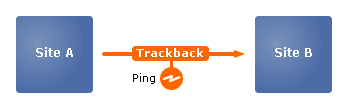
Trackback is a way to notify a website or blog when you publish an entry that references it.
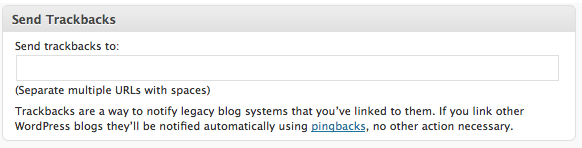
WordPress.com: “Trackbacks are a way to notify legacy blog systems that you’ve linked to them. If you link other WordPress blogs they’ll be notified automatically using pingbacks, no other action necessary.”
As well as having links to other blogs in your post, you might also want to add TrackBacks to other posts. If the other blog supports TrackBack, a TrackBack URI will be displayed somewhere on the blog post. Often, this URI is not visible unless just that one posting and its comments are displayed. This is because TrackBacks are meant to add a comment or comment-like entry to that other blog posting.
How To Locate The Trackback Link
Mostly you can find tackback after the blog post content and before the comments.
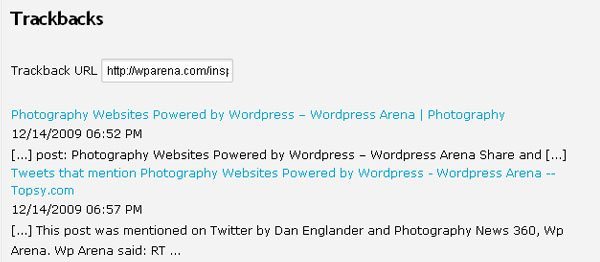
As you can see I have allowed the trackback and these links appearing after the comment list as follow:
How To send a Trackback
First of all copy the URI of reference post where you want to send trackback and Before publishing your blog post, you’ll need to tell WordPress to send your trackback notices. Back on your blog, scroll down from the editor to the Trackbacks module and paste that trackback URLs into the box next to “Send Trackbacks To.”
Successful trackbacks and pingbacks usually appear within moments of publishing your blog entry, but remember that trackbacks and pingbacks can be moderated or disabled by the blog owners.
You are welcome to use this blog entry to test your trackback/pingback functionality, however, please do not spam.
Reference and Other Useful Resource:
apfeltalk. Linkback
WordPress Trackback Tutorial
Comments 0

chaturbe
Thiis article presents clear idea in support off the nnew peopl
of blogging, that genuinely how to do blogging.

gulvafslibning og maling
There’s certainly a great deal to learn about this issue.
I love all the points you’ve made.

jakie cb radio wybrać
I am genuinely glad to glance at this web site posts
which includes plenty of helpful data, thanks for providing these information.

dominocard99.wordpress.com
Excellent post. I used to be checking constantly this weblog and I’m inspired!
Extremely helpful information specifically the ultimate section :) I maintain such info a lot.
I used to be looking for this certain info for a long time.
Thanks and good luck.
Wordpress Theme Divi
Hi,
Great post.
Nicely mentioned about wordpress themes.
I have also made a review on one of the best WordPress themewordpress themes.
Let me know if I can include your this article in any of my website’s article for my
audience to know your great efforts too.
Thank you!