


While the primary goal of a CDN is to improve website access speed, there are also several surprising secondary benefits.
Speed kills. Speed matters. For any blog, website, or application, content delivery speed is one of the things that can make it or break it for users. Studies show that around 50 percent of users want a web page to load within two seconds and start to abandon websites on the three-second mark. This does not fare well for publishers and can be especially harmful to those running an e-commerce business.
Thus, publishers will go to any extreme in order to reduce web page loading speed, including deploying their CMS and front-end over a robust infrastructure. Hosting on a reliable server or cloud server is the first step. Optimizing content for a more robust delivery is the second. Deploying a content delivery network is an ideal next step.
This comprehensive guide to speeding up your site includes a host of tweaks, solutions, and add-ons, which can help in shaving off a few crucial seconds or milliseconds of loading time.
However, beyond speeding up content delivery, some of these tweaks can also have secondary benefits, which can be very good for a WordPress-powered website. In particular, deploying a good CDN can be beneficial in terms of enhancing security
 In its CDN Guide, Incapsula offers insights into SSL Optimization, particularly on how publishers can leverage a content delivery network to improve the quality of their SSL certificates. In gist, the guide shares how deploying a CDN on top of a network infrastructure that already employs SSL can further improve the SSL grade of that network.
For instance, if your WordPress-powered website has a domain secured by a Grade B SSL certificate or even a free one from LetsEncrypt, you can deploy a CDN. Since users’ computers connect directly to the CDN, which delivers the content pulled from your server or cached within its own network, their browser will connect through the CDN’s own SSL certificate.
Your browser “sees” the Grade A+ certificate (owned by Incapsula, for example) instead of the lower-grade certificate that sits behind the CDN connection.
In its CDN Guide, Incapsula offers insights into SSL Optimization, particularly on how publishers can leverage a content delivery network to improve the quality of their SSL certificates. In gist, the guide shares how deploying a CDN on top of a network infrastructure that already employs SSL can further improve the SSL grade of that network.
For instance, if your WordPress-powered website has a domain secured by a Grade B SSL certificate or even a free one from LetsEncrypt, you can deploy a CDN. Since users’ computers connect directly to the CDN, which delivers the content pulled from your server or cached within its own network, their browser will connect through the CDN’s own SSL certificate.
Your browser “sees” the Grade A+ certificate (owned by Incapsula, for example) instead of the lower-grade certificate that sits behind the CDN connection.
The trust factor — SSL optimization through CDN
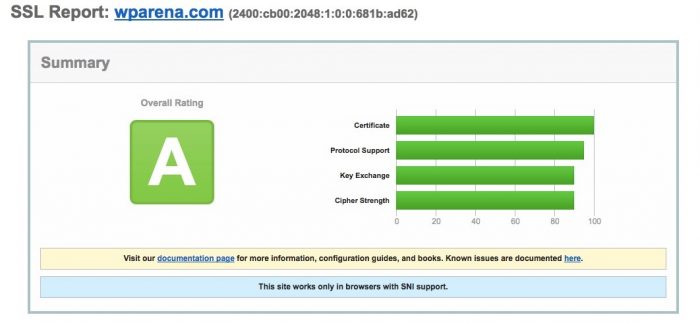
The standard for encrypting and securing online communications, SSL/TLS (which stands for Secure Sockets Layer / Transport Layer Security) or simply “SSL” ensures that all network traffic from two points is safe from eavesdropping and malicious injection of unwanted data. SSL underpins secure HTTP, which ensures all web traffic is safe and secure. It also helps improve the trust factor, since a user is assured that the website is who it says it is (identity), and that all network traffic cannot be stolen by malicious hackers (encryption). However, it may not be widely known that SSL comes in different grades and variants. Publishers and developers can opt to save money by deploying a free or self-generated SSL certificate. Some SSL certificates are also available from hosting providers for very affordable prices — as low as $5 per year for some web hosts. An inexpensive certificate may be viable for small publishers and small businesses on a budget, but the grade of an SSL certificate does matter, especially to discerning users and when a service requires a higher level of security. This is the reason that online banking services, email services, e-commerce sites, and social networks, among others, use enterprise-grade security with extended validation. SSL Labs provides a grading system, whereby users can determine the grade of any domain or website. For instance, WPArena has a grade an SSL certificate, which is among the top-tier ratings for SSL.
In its CDN Guide, Incapsula offers insights into SSL Optimization, particularly on how publishers can leverage a content delivery network to improve the quality of their SSL certificates. In gist, the guide shares how deploying a CDN on top of a network infrastructure that already employs SSL can further improve the SSL grade of that network.
For instance, if your WordPress-powered website has a domain secured by a Grade B SSL certificate or even a free one from LetsEncrypt, you can deploy a CDN. Since users’ computers connect directly to the CDN, which delivers the content pulled from your server or cached within its own network, their browser will connect through the CDN’s own SSL certificate.
Your browser “sees” the Grade A+ certificate (owned by Incapsula, for example) instead of the lower-grade certificate that sits behind the CDN connection.
Responses (0 )