



In the rapidly changing digital oriented landscape, your CMS is more than a collective box to write and store text and images. In 2026, If you are struggling to see your traffic numbers grow with a steady pace, the issue may not be with your content, it may be with your structure.
If you are a business owner or a freelancer looking to dominate the search engine result pages (SERPs). you will need a platform that fulfills all the googles parameters. In this guide, we’re going to be uncovering why you need to migrate or startup on a faster and best CMS for SEO in order to outpace your competitors and gain long-term momentum.
Table of Contents
The 2026 SEO Reality
Search engines now use more than just keywords to rank sites. Now, Google also emphasises a lot on website speed and user experience. That is why the Core Web Vitals has been prioritized. This single signal inside of PSI is Interaction to Next Paint (INP). Technically speaking, INP looks at how fast your page reacts when someone clicks on a button or link (or taps on a touch-only interface). Slow sites may cause users to bounce and rankings drop.
A “bloated” CMS that is full of heavy or outdated code can bog your site down. A CMS that is bloated with features and hefty scripts will also slow down load time and response rate.
Picking fast built and best SEO CMS is not just about designing your website. It’s the power of establishing good technical base. The more lightweight and optimized your CMS is, the faster search engines can crawl and index your pages. It also optimizes speed, responsiveness and overall performance.
When you make your technical SEO solid, there are higher chances for ranking at the top. And this is why speed and performance should be the first criteria for choosing a CMS.
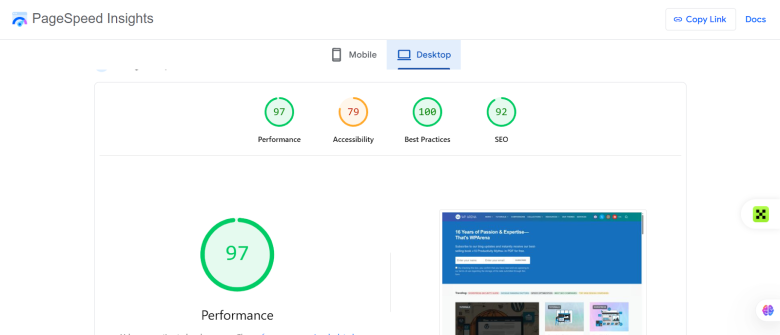
The image is showing real time results of https://wparena.com/
The ultimate features of SEO friendly CMS
It’s important to learn some things about best CMS for SEO. when it comes to SEO Not all CMS are designed with search in mind. An updated CMS would have some features with SEO consideration which is important for your website to rank.
Automated Schema Markup
First, it needs to have automatic Schema markup. Structured data helps search engines understand your content. then display rich results such as FAQs, ratings and product information. CMS usually have this functionality and also you can install through lightweight plugins.
Clean URL Structure
Second, your CMS needs to generate a clean URL structure. Avoid sites that generate complicated URLs with lots of random numbers or symbols in them. You ought to have the capacity to alter URLs and add your target keywords instinctively.
Mobile-First Indexing Readiness
Third, mobile-first indexing is essential. The mobile version of a website is what Google uses to determine how most websites will be graded and ranked. Responsive design and fast mobile sites should be offered by your CMS.
Advanced Meta Tag Management
meta tags management is also an advanced feature. You have to be able to customise the meta titles and meta descriptions for each of your pages. This is beneficial for click through rates and overall SEO performance.
WordPress vs. Ghost vs. Webflow
WordPress
For the ultimate website control, WordPress proves to be the best CMS in terms. Its flexibility and robust support can control any type of website. With the current block editor it is even easier to create and manage webpages. WordPress has a powerful plugin ecosystem that supports your websites in terms of SEO. by using rank math and other SEO plugins, you can control all over your webpages. You can add meta data, redirects without coding and schema markups to XML sitemaps.
This means that the on-page optimization becomes very detailed, also very customizable. WordPress is great for bloggers, digital agencies who engage in the content-heavy website. It also enables technical SEO CMS features, such as custom URLs, internal linking control and speed optimization with caching plugins. It might take the right setup for page speed to lay at the beginning. however when optimized it can rank very well in search results.
Ghost
Ghost is a modern publishing platform, focusing on high speed and low clutter. If you value the website speed then ghost would be the right choice for you. It is best for new websites unadulterated pick-up-and-go performance. It is built on Node. js, enabling it to load pages more quickly than many classic systems. It typically scores well on page speed optimization tests due to its light weight nature.
Ghost also scores well in terms of SEO. ghost automatically applies canonical tags using XML sitemaps. It’s ideal for those who do not require any additional plugins and will find this straightforward and clean. Ghost is ideal for professional publishers, bloggers and pure-content e-commerce platforms. But when we talk about WordPress SEO vs Ghost, it has less customization or even less plugin ecosystem.
Webflow
Webflow is a power tool that gives you custom development with no-code ease. Designers love it because they can have visual control over their code, while developers still get clean and semantic output. For a technical SEO CMS system, clean code is an important factor as search engines like organized sites. Webflow automatically makes blazing-fast pages, so you don’t need to do page speed optimization.
No more plugins required, Users can quickly add Meta titles and description, Alt Text and Internal Linking. This makes SEO tracking easy and visual. Webflow is ideal for brands, startups, and SaaS landing pages that are design orientated as well as performance driven. Not as big as the ecosystem of WordPress but give some strong built-in SEO tools. For businesses who care about the design and technical underpinning, Webflow is a worthy choice among the best SEO CMS platforms.
Why Site Performance Is the Ultimate Tie-Breaker
Content Alone Is No Longer Enough
Nowadays, to rank the site the content alone is not enough. There are a lot of websites that publish well written and informative posts that are SEO optimized. In this competitive landscape,
When two sites offer content of similar quality. Google applies other parameters which decides who should be on top. This is where site performance is the tie that binds.
What are Core Web Vitals (LCP and CLS)
LCP and CLS are the core web vitals which shows how fast and smooth your website appears to users. These are the main pillars in search rankings.
LCP is a measure of how fast the main content of your page loads. The loading time seems sluggish? People might leave before even read anything. CLS monitors your page layout stability. When buttons or text dance around on load, users become pissed off. A slow or unreliable website literally tells Google it’s not great.
How Your CMS Impacts Performance
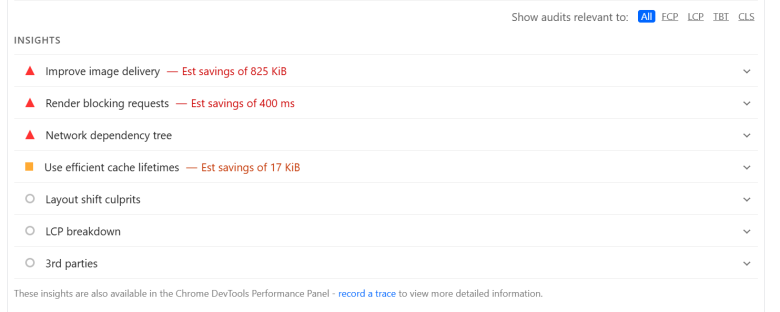
A CMS is a large factor that contributes to the performance. A framework which does not offer state of the art features such as image conversion to WebP, lazy loading and minification of JavaScript will lose in page speed tests. These technical considerations can affect how you rank. Hence, an abundant of website owners questions “Which CMS is best for SEO?” The response usually comes down to performance.
Here the issues you need to resolve like
Choosing the Best CMS for SEO
The right CMS for SEO will automate the technical part of these improvements. It also comes with faster image formats, lighter code, excellent caching and clear internal linking structures. Instead of distracting yourself with technical settings, you can get straight down to the serious business of producing content that actually helps people.
On content alone, performance comes out ahead. To stay ahead of competition and to have a stronger presence in search, selecting a fast & optimized CMS is one of the greatest advantages.
Is It Time to Switch? The Migration Checklist
You have invested a lot in your CMS, and switching it out is not an easy decision. But, It can make your website faster, improve your SEO and user experience but only if you do it right. If you are intending to shift on high speed and best cms for seo, then the strategy for migration must be very clear. An unclear migration approach may result in traffic loss and ranking drops. That’s why it’s key to be prepared.
Audit Your Current Site
Make sure to perform a website audit using semrush or ahrehs before indicating anything. Find your best pages with Google Search Console and analytics tools. Analyze which pages bring the most traffic and backlinks, as well as the ones that acquire conversions. Those pages are invaluable, keep them safe during migration. Document all the Important URLs, Blog Posts and Landing Page with Media.
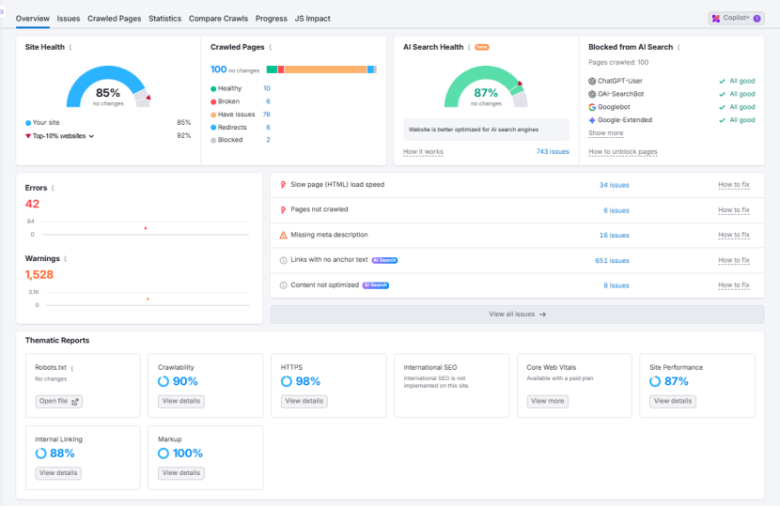
Using semrush https://wparena.com/ real time data.
Map Your Redirects
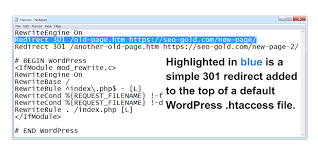
One of the most important elements to any CMS migration is redirects. All old URLs should direct properly to the new URLs with a 301 redirect. This informs search engines that your content has permanently shifted and preserves your SEO authority. In case of any wrong redirects , you’ll lose rankings and shatter internal links (which isn’t good for SEO). check this image:
Optimize Images and Assets
Optimize images and other media files before you launch your new site. Leverage your new CMS tools to optimize images, convert them to WebP and lazy load content. Little sizes of file are also more suitable for page speed and user experience.
Test Core Web Vitals
Finally, you can test your new website using tools such as PageSpeed Insights. In Core Web Vitals can be tested the LCP and the CLS. make sure your website is faster and more stable that before. Always test before going live.
Final Verdict
Different websites have different business models and goals. Hence the best CMS is not the same for everyone. But there is one thing which is obvious in 2026 is Speed and mobile responsiveness. Search engines prioritize websites that are fast, mobile-friendly and meet the latest SEO standards.
There are several reasons that a fast and light-weight CMS is a need. Because it gives entire control over how the site is optimized in terms of technical SEO, cleaner code and performance. Whether you go with the flexibility and plugin ecosystem of WordPress or the lightweight speed-oriented approach of Ghost, it’s essential to prioritize performance.
This technical guide is the ultimate walkthrough for you if you are going to switch to a faster CMS. By choosing the Best CMS fpr SEO? you’re setting your site up for developing over the long-term and ranking better in search results while gaining competitive edges within the online battleground.
FAQs
If I move to a new CMS, will I lose my traffic?
It depends on how strategically you migrate your site. If your redirect has not been properly set up. You may lose rankings. Before you switch, make sure to check Google’s official migration guide at https://developers.google.com/search/docs/crawling-indexing/site-move-with-url-changes
Also, look at your traffic via https://search.google.com/search-console after you’ve moved.
When do you see SEO results after changing CMS?
SEO improvements are not instant. Even if you are on a faster CMS, Google takes time to re-crawl and re-index your website. This can take a few weeks. You can monitor reports and performance as they are indexed through https://search.google.com/search-console/. Be patient and work constantly for optimization.
Is a faster CMS more important than great content?
They both DO matter, but when your content quality are about the same, speed can tip it in your favor. You can read more on how page experience is super important at the following link: https://developers.google.com/search/docs/appearance/page-experience. A fast CMS alone supports good content by getting out of the way as quickly and smoothly as possible.
Is it safe for me to switch my CMS without a developer?
In my opinion You could perhaps get away with handling your small website yourself and by using guides and web hosting support. For larger sites, with multiple pages, it’s safer to hire a professional. You can also use https://pagespeed.web.dev to test the speed of your site before/after migrating to ensure you’re seeing improvements.
Unbeatable SEO Tips To Boost WordPress Rankings - WPArena
[…] the WordPress website ranking is the best way to ensure that the site is optimized for SEO ranking. The strategy states that you […]