


If you want to add posts to your blog without opening the WP Admin and logging in, you can set up your WordPress installation to accept posts sent via email. This tutorial will guide you through the process of setting up a special secret email address that can receive emails and automatically turn them into posts.
Table of Contents
Mail To WordPress
Before we proceed, it's important to note that you should only use this email address to send posts to your WordPress blog.
To get started, follow these steps:
- Set up a special email address accessible via POP on your mail server. Make sure you have the necessary credentials (server, login name, and password) for this email address.
- Log in to your WordPress Admin dashboard and navigate to Settings and then Writing.
- Scroll down until you find the Post via e-mail section.
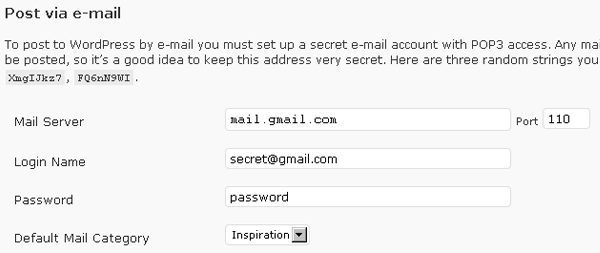
- Enter the server, login name, and password for the special email address you set up. Be sure to click on the Save Changes button to save your settings.
Once you have completed these steps, you are now ready to send posts via email to your WordPress blog. Any email sent to the special email address will be automatically converted into a post.
For more detailed instructions, you can refer to the official documentation on WordPress.org.
Another option you have is Mail-to-Blogger, a feature offered by Google Blogger.
Mail To Blogger
To enable Mail-to-Blogger, follow these steps:
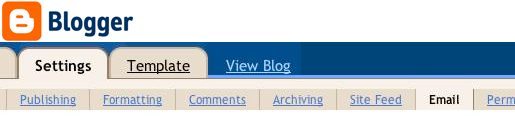
- Go to your Blogger dashboard and select Settings and then Email.
- Create a Mail-to-Blogger address, which you will use to send posts via email to your blog.
With these simple setup steps, you can easily send posts to your blog without the need to log in to the WordPress Admin or Blogger dashboard.
Remember to optimize your posts for search engines and engage your readers with interesting content. Happy blogging!
The Mail-to-Blogger feature turns any email account into a blog-posting application. In Settings | Email you can create a Mail-to-Blogger address which you will use to send posts via email to your blog.
FAQs: Posts via Email
How do I send a post via email in WordPress?
To send a post via email in WordPress, you can use the built-in feature called Post by Email.
Here are the steps to set it up and send a post via email:
1. Log in to your WordPress dashboard.
2. Go to Settings > Writing.
3. Scroll down to the "Post via email" section.
4. Enter a secret email address in the "Mail Server" field. This will be used to send posts via email.
5. Customize the "Default Mail Category" if needed.
6. Save the changes.
To send a post via email:
1. Open your preferred email client or service.
2. Compose a new email.
3. Enter the secret email address you set up earlier in the "To" field.
4. In the subject line, enter the title of your post.
5. Write the content of your post in the body of the email.
6. If you want to set a specific category for the post, include it in square brackets in the subject line, like [Category Name].
7. Attach any images or files you want to include in the post.
8. Send the email.
WordPress will receive the email, create a new post with the email content, and assign it to the specified category (if provided).
What is the post by email plugin for WordPress?
The "Post by Email" plugin for WordPress allows you to publish and manage blog posts directly from your email. You can create new posts, add categories and tags, set the post status, and even attach images or other media files to your email.
Can you send emails through WordPress?
Yes, you can send emails through WordPress using plugins like WP Mail SMTP or Easy WP SMTP. These plugins help you configure your WordPress website to send emails through an SMTP server. Additionally, some hosting providers offer built-in email functionality that allows you to send emails directly from your WordPress website.
How do I follow a WordPress blog via email?
To follow a WordPress blog via email, you can use the built-in WordPress Jetpack plugin or a third-party plugin like 'Follow Blog Widget'. Alternatively, you can use a service like Feedburner to offer email subscriptions for your blog.






Responses (1 )