
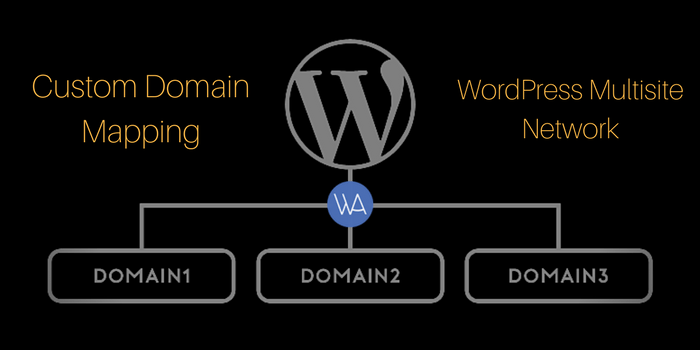
Once the WordPress Multisite setup is completed, you can use a custom domain for your blog, such as WPCouponCode.com, instead of the default address you get when you sign up, like example.wparena.com. This is called Domain Mapping; it’s a paid feature of WordPress.com.
Further, if you are self-hosting your WordPress site, then all you have to enable your WordPress into Multisite and need few plugins to manage your network sites.
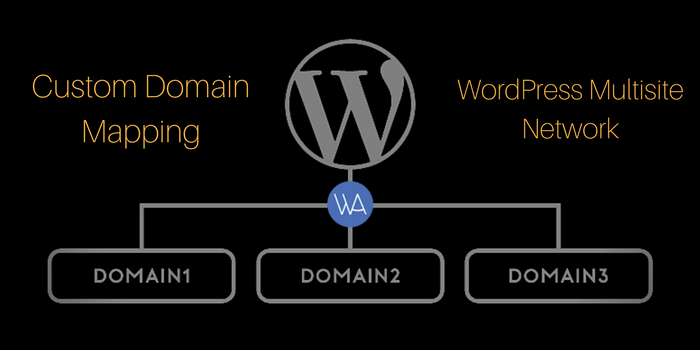
First of all, you have to enable the Multisite feature in WordPress. Afterward, you have the choice to do custom domain mapping with a plugin or without a plugin. We will cover both methods in this tutorial.
- WordPress Multisite Custom Domain Mapping With a Plugin
- WordPress Multisite Custom Domain Mapping without a plugin
Let’s take a look at custom domain mapping using plugins first.
Custom Domain Mapping with a Plugin
There is a well-renowned plugin called “WordPress MU Domain Mapping” that can help you to map a custom domain easily. Let’s take a deep look into this plugin settings.
1. WordPress MU Domain Mapping Plugin
WordPress MU Domain Mapping Plugin allows users of a WordPress Multisite Network to map their blog/site to a custom domain. Let’s install it on a Multisite Network.
- Install the plugin in the usual way into the regular WordPress plugins folder.
- After installation, “Network Activate” the plugin.
- Move sunrise.php into wp-content/. If there is a sunrise.php there already, you’ll just have to merge them as best as you can.
- Edit wp-config.php and uncomment or add the SUNRISE definition line. If it does not exist please ensure it’s on the line above the last “require_once” command.
define( 'SUNRISE', 'on' ); - As a “Super Admin”, visit Super Admin -> Domain Mapping to create the domain mapping database table and set the server IP address or a domain to point CNAME records at.
- Make sure the default Apache virtual host points at your WordPress multisite network, so it will handle unknown domains correctly. On some hosts, you may be required to get a dedicated IP address. A quick check: in a web browser, type in the IP address of your install. If you are using CPanel, use the Park a Domain menu to set the mapped domain to your main installation.
- Do not define COOKIE_DOMAIN in your wp-config.php as it conflicts with logins on your mapped domains.
Configuration
On Super Admin->Domain Mapping menu, you can configure the following settings:
- “Remote Login” can be disabled. Useful if you’re hosting totally separate websites.
- “Permanent redirect” uses a 301 redirect rather than 302 to send visitors to your domain mapped site.
- “User domain mapping page” allows you to disable Settings->Domain Mapping that the user uses.
- “Redirect administration pages to network’s original domain (remote login disabled if this redirect is disabled)” – with this checked, if a user visits their dashboard on a mapped domain it will redirect to the dashboard on the non-mapped domain. If you don’t want this, remote login will be disabled for security reasons.
- “Disable primary domain check. Sites will not redirect to one domain name. May cause duplicate content issues.” – ignore the primary domain setting on your sites. The same content will be available on multiple domains and may cause problems with Google because of duplicate content issues.
Furthermore, Super Admin -> Domains allows you to edit the domains mapped to any sites on your network.
For Cpanel users
If your domain uses the nameservers on your hosting account you should follow these instructions. If the name servers are pointed elsewhere, change the A record or CNAME as documented above. Add a wildcard subdomain/virtual host record to your site’s DNS record in Web Host Manager (WHM). If you do not have access to WHM, you must email your hosting company and ask them to make this one change for you. Should be no problem:
- Go to “Edit DNS Zone” and select the domain of your WordPress Multisite installation and click “Edit”.
- Below “Add New Entries Below This Line”, enter in the first box (Domain) an asterisk: “*”.
- The second box, TTL, should be “14400”.
- The third box should be “IN”.
- Select “A” Record Type from the drop down “A”.
- And in the last box, paste in the IP address of your website/network.
From Cpanel, click on the “Parked Domains” under the “Domains” section:
- Under “Create a New Parked Domain” enter the domain name you want to add to your network.
- Click the “Add Domain” button.
- It should add the domain to the list of parked domains and under “Redirect to” it will say “not redirected”. That is OKAY.
Now you’re ready to do your custom domain mapping. It’s quite easy and requires a little bit of code insertion.
DOWNLOAD WORDPRESS DOMAIN MAPPING Plugin
Custom Domain Mapping Without a Plugin
You’ve seen how to do custom domain mapping with a plugin above. It is also possible to map a custom domain in WordPress Multisite without any plugin. Let’s take a look below.
If you are using the latest version of WordPress, all you need to follow these steps as below.
- Upload your wp-config.php file to convert your single user WordPress to a Multisite Network and add the following line of code above the line ”/* That’s all, stop editing! Happy blogging. */”. (You can find detail about How to add a Multisite feature in WordPress.)
define(‘WP_ALLOW_MULTISITE’, true);
Now login to your admin and you can see “Network” under tool option.
- Click on the “Network” link in the Tools menu loads the network setup/installation page. It should look like this.
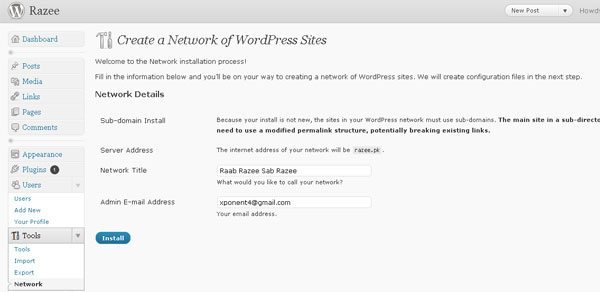 After adding required information in “Create a Network”, install and update your wp-config.php file and.htaccess. Before updating never forget to backup your both file.
Now you will see a New feature in admin panel as “Super Admin” in Dashboard. - Login to your cPanel and create the wildcard subdomain for your main domain.
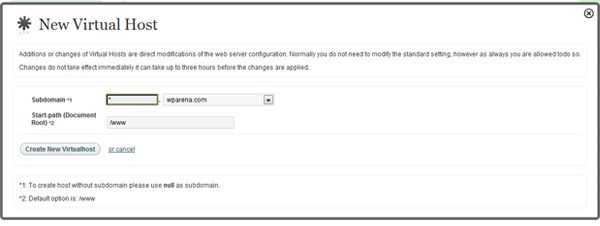 Don’t put any name under Subdomain instead of name put * (asterisk) and select your domain name and Document Root must be your WordPress path.
 - Go to the Super Admin panel and select on All Sites, Add New Site, write the Subdomain, Site Title and email address and click on “Add Site“.

- After adding your new site, now Edit from the subdomain. Change the value of Domain, Siteurl, Home, and Fileupload Url to suit to your new domain.

- The most important part is to Edit your wp-config.php file again and change the value as follow:
define( ‘DOMAIN_CURRENT_SITE’, ‘domain name.com’ );
Into
define( ‘DOMAIN_CURRENT_SITE’, “. $_SERVER[‘HTTP_HOST’].” );
If you can successfully set up a WordPress multisite network, to begin with, you can probably do this as well. By implementing Domain mapping on your self-hosted WordPress Multisite, you can offer hosting service for all kind of websites. Your network users can select their own domain and can run a profitable business online.
Hope, this tutorial helps you in setting up your custom domain on WordPress multisite. If you encounter any issues, just let me know in the comments section below and I will try my best to help you.

 Editorial Staff
![Blue & Buff Charity; - or - The Patriarch of the Greek Clergy applying for Relief. / Js Gy [James Gillray] des. et fect. (print; handcoloured etching)](https://wparena.com/wp-content/uploads/2010/10/large_1984_0567.jpg "How to Expand/Collapse WordPress Posts with jQuery 7")
 Noor Mustafa Raza


12 comments
First of all, thank you for the detailed tuturial. I have a little doubt, these techniques if I want the new domain to be in a folder and not a main domain?
This is I have 2 site in wordpress multisite, “www.mywordpreesite.pt/demo1/” and “www.mywordpreesite.pt/demo2/”,
And I have a website (not wordpress) “www.omeusitePrincipal.pt”, I wanted to remap the demos for, “www.omeusitePrincipal.pt/demo1” and “www.omeusitePrincipal.pt/demo2”, so it is possible to use a folder of the main domain? and will not change anything from the site I already have in the main domain?
I’m very noob yet so I’m still researching to get as much information as possible to understand the process.
Sorry for the poor English.
Thank you
Hi HUGUES,
It’s completely possible. Simple .htaccess rules and some tricks will do it. I can help out if I know the full scenario and working example.
Thanks,
Jazib
Thank you! However, I’ve still been struggling with a couple of parts allowing customers to use their own domain name:
Right now I’m on a Shared server. I’ve discussed with my hosting company that it may be required to be either on a VPS or Dedicated server or at least have a dedicated IP for this to work. I’ve been told that it is not required and the shared IP will still work for adding an A record or CNAME to an external domain.
Is this true? What would you suggest?
Also, do you know of any way to automate the Parked Domain process? Right now everything is automatic and can be done by the client besides adding the Parked Domain. Ideally, I’d like the whole process to be automatic, including adding the parked domain when a client updates their domain from the admin dashboard.
Do you know of any cPanel modules or integrations that would allow me to automate this process?
Thanks :)
Thanks Dave for taking out the time and comment. You don’t need a VPS or dedicated server until your network really grows that big. For your second question, I haven’t got the point exactly. What do you mean by parked domain? Can you please tell me in a real working example. Because, as per my understanding to your question, you want to allow your clients to park their domains to your network and this is only possible, once they changed their domain DNS to your DNS.
Thanks
Sorry for the confusion.
What I would really like would be to set it up like Shopify or squarespace so my customers who have a registered domain elsewhere, can point their domain using an A record and CNAME to my server in order to display site1.domain.com as customersdomain.com.
You can see Shopify’s setup here: https://help.shopify.com/manual/domains/connecting-existing-domains/setting-up-your-domain#set-up-your-existing-domain-to-connect-to-shopify
Do you know how this is possible and whats required?
I am hoping that doing it this way, would not only automate the process for myself but also allow customers to continue using their email and other servers they may already have setup.
Other services* they may already have setup
Sure Dave, this is what WordPress Multisite completely supports. You can use MU Domain Mapping plugin for this purpose. Here is the link
https://wordpress.org/plugins/wordpress-mu-domain-mapping/
If you need more support, try using the contact form and I will assist you.
The plugin above is no longer supported. Do you know of another solution?
I might be wrong but the suggestion of adding “. $_SERVER[‘HTTP_HOST’]” to the wp-config.php file seems like a massive security risk https://expressionengine.com/blog/http-host-and-server-name-security-issues
‘
Can you explain the reasoning behind wanting to have such a risk on a site?
The plugin above is no longer supported. Do you know of another solution?
Hey there, You’ve done an excellent job. I’ll certainly digg it and
recommend to my tweets followers personally. I’m confident they’ll be benefited
from this website.
Please put dates on your articles or update them. Reading this turned out to be an unfortunate waste of my time. Nobody uses domain mapping plugins anymore.